





Samsung Note 10 / Note 10 Plus S Pen Replacement | Budget Stylus, Black (SM-N970/N975)
Samsung Note 10 / Note 10 Plus S Pen Replacement | Budget Stylus, Black (SM-N970/N975)
 In Stock
Regular price
NZ$15.99
Regular price
Sale price
NZ$15.99
Unit price
per
inc GST
Samsung Note 10 / Note 10 Plus S Pen Replacement | Budget Stylus, Black (SM-N970/N975)
Samsung Note 10 / Note 10 Plus S Pen Replacement | Budget Stylus, Black (SM-N970/N975)
In Stock
Regular price
NZ$15.99
Regular price
Sale price
NZ$15.99
Unit price
per
inc GST
- Samsung Galaxy Note 10 and Note 10 Plus S Pen replacement: budget stylus pen in black that clicks into the phone's built-in S Pen slot
- No battery and no charging needed: ready to write the moment it comes out of the slot
- Fine tip for neat handwriting and drawing
- Compatible with Samsung Galaxy Note 10, Samsung Galaxy Note 10 Plus and Samsung Galaxy Note 10 Plus 5G models; SM-N970F, SM-N970F/DS, SM-N970N, SM-N970U, SM-N970U1, SM-N970W, SM-N970X, SM-N9700, SM-N971N, SM-N975F, SM-N975F/DS, SM-N975U, SM-N975U1, SM-N975W, SM-N975N, SM-N975X, SM-N9750, SCV45, SM-N976B, SM-N976B/DS, SM-N976F, SM-N976U, SM-N976V, SM-N976N, SM-N9760, SM-N976Q
Frequently Bought Together


Frequently Bought Together
Product Details
Lost your Note 10 / Note 10 Plus S Pen, or is the pen broken or the nib worn? This budget replacement S Pen is made for the Samsung Galaxy Note 10 and Note 10 Plus (SM-N970/N975) and clicks into the phone's built-in S Pen slot, ready to write, draw and use the screen.
Also available for the Note 10 / Note 10 Plus: OEM S Pen (Bluetooth Air actions and remote camera shutter).
Got a different Note? We also stock the Note 20 / Note 20 Ultra S Pen. Screen cracked too? The S Pen works with our Galaxy Note 10 OL3 screen replacement and Galaxy Note 10 Plus OL3 screen replacement.
- REPLACES A LOST OR BROKEN PEN - Made to the shape of the Note 10 / Note 10 Plus S Pen, so it slides into the built-in slot, clicks into place and goes wherever your phone goes.
- NO CHARGING NEEDED - There's no battery inside, so it's ready to write the moment you take it out.
- FINE TIP - A fine tip for neat handwriting and detailed drawing. Slim and light to hold.
- REPLACEABLE NIB - The tip pulls out with tweezers and can be changed when it wears, so the pen keeps writing smoothly.
- SENT FROM NZ STOCK - Shipped from our New Zealand stock, so there's no waiting weeks for a part to arrive from overseas.
Part Includes:
- Replacement S Pen for the Galaxy Note 10 and Note 10 Plus, black
- 12 Month Warranty
Please Note
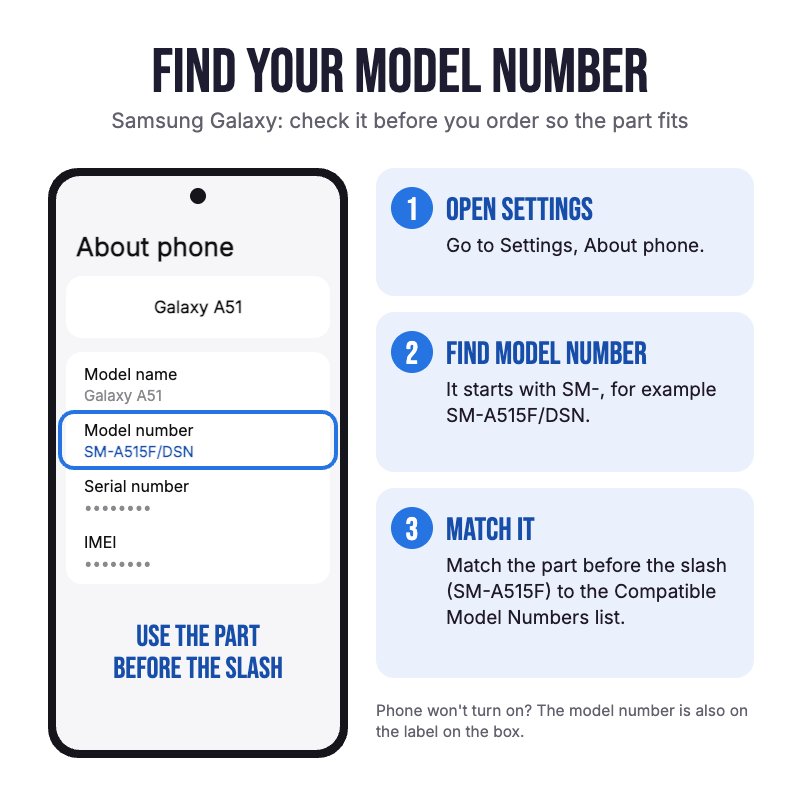
Not confirmed to fit the Note 10 Lite, which takes a different S Pen. Check in Settings, About phone for your model.
Please Note
Aftermarket S Pen, not an official Samsung part. It has no Bluetooth, so Air actions like the remote camera shutter, gestures and media controls won't work. Writing and drawing on the screen work as normal.
Specifications
- Type: Aftermarket replacement S Pen
- Compatible Models: Galaxy Note 10 and Note 10 Plus (SM-N970/N975)
- Colour: Black
- Pen Technology: EMR (Wacom) pen for the phone's built-in S Pen digitiser
- Tip: Replaceable
- Bluetooth and Air Actions: No
- Charging: Not needed (no battery)
- Finish: Anodised colour
- System: Android
- Spare Nibs: Not included
- Warranty: 12 months
Compatible Model Numbers
 Samsung Galaxy Note 10
Model Number (SM Number)
- SM-N970F
- SM-N970F/DS
- SM-N970N
- SM-N970U
- SM-N970U1
- SM-N970W
- SM-N970X
- SM-N9700
- SM-N971N
 Samsung Galaxy Note 10 Plus
Model Number (SM Number)
- SM-N975F
- SM-N975F/DS
- SM-N975U
- SM-N975U1
- SM-N975W
- SM-N975N
- SM-N975X
- SM-N9750
- SCV45
Samsung Galaxy Note 10 Plus 5GModel Number (SM Number)
- SM-N976B
- SM-N976B/DS
- SM-N976F
- SM-N976U
- SM-N976V
- SM-N976N
- SM-N9760
- SM-N976Q
Installation Help

Using your new S Pen
Here are some helpful tips for getting started with your new S Pen. If you are unsure of something or have any questions, please feel free to contact us either by phone (0508 IGADGET) or by email
- Slide the S Pen into the slot nib first and push until it clicks in. To take it out, push the end in and it pops out.
- S Pen not working at all? Take off any magnetic case or cover, check your screen protector, then restart the phone. Magnets, metal and some third-party screen protectors can stop an S Pen working.
- To change a worn nib, grip it with tweezers and pull it straight out, then push a new nib in with the pointed writing end facing out. Never reuse an old nib or force one in the wrong way round.
What’s In The Box
- 1x Samsung Galaxy Note 10 and Note 10 Plus S Pen Replacement (Black)
Related Products


