





iPhone 6 Charging Port Bracket | Lightning Dock Connector Bracket
iPhone 6 Charging Port Bracket | Lightning Dock Connector Bracket
 In Stock
Regular price
NZ$2.99
Regular price
Sale price
NZ$2.99
Unit price
per
inc GST


iPhone 6 Charging Port Bracket | Lightning Dock Connector Bracket
iPhone 6 Charging Port Bracket | Lightning Dock Connector Bracket
In Stock
Regular price
NZ$2.99
Regular price
Sale price
NZ$2.99
Unit price
per
inc GST
DIY DIFFICULTY
ModerateAbout 1 to 2 hours
Screen unclips from the front and comes off. The loudspeaker and vibrator come out to reach the bracket.
- iPhone 6 charging port bracket, the metal Lightning dock connector bracket
- Fixes a charging port that's loose or moves when you plug in the cable, where the old bracket is bent or missing
- Compatible with iPhone 6 models; A1549, A1586 & A1589
Frequently Bought Together

Frequently Bought Together


Product Details
Is your iPhone 6 charging port loose, or does it move when you plug in the cable? The Lightning port and headphone jack are held to the rear case by this small metal bracket. If the bracket is bent or missing, often after an earlier repair, the port can shift and charging can become unreliable.
This is the iPhone 6 Lightning dock connector bracket for the A1549, A1586 and A1589: the bracket that secures the Lightning charger port and headphone jack to the chassis. It is a separate part from the charging port itself. If the port is damaged or not charging, you need our iPhone 6 charging port flex cable too. The bracket is fitted during that repair.
Part Includes:
- Metal Lightning connector bracket
Please Note
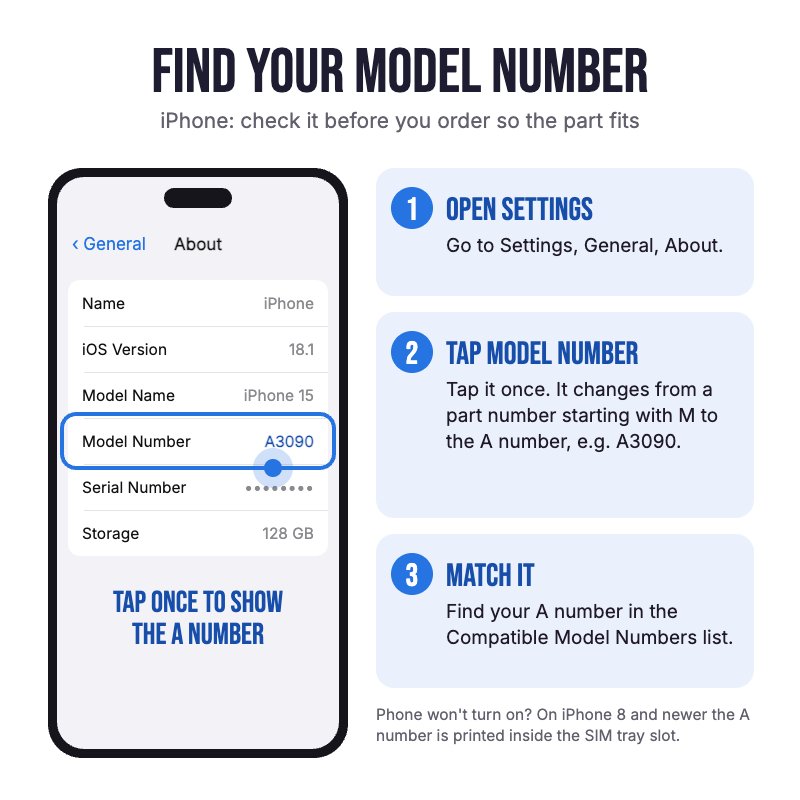
Does NOT fit iPhone 6 Plus, 6s or 6s Plus. They use different brackets. Check in Settings, General, About for your model.
Please Note
Bracket only. The iPhone 6 charging port is sold separately, and this bracket goes back in over it during that repair.
Please Note
This item will usually be new but sometimes we only have as-new used stock.
Specifications
- Type: Lightning Connector Bracket (charging port retaining bracket)
- Material: Metal
- Holds: Lightning connector and headphone jack assembly
- Compatible Models: iPhone 6 (A1549, A1586, A1589)
- Screws: Not included. Reuse the ones from your old bracket
- Pairing: Not needed. The bracket is a plain metal part, so there's nothing to pair.
How do I find my Model number?
 iPhone 6
Compatible Model Numbers
iPhone 6Model Number (A Number)
- A1549
- A1586
- A1589
 iPhone 6 Model NumbersHow do I find my Model number?
Model Identifier
- iPhone7,2
EMC Number
- EMC 2816
Device Number (M Number)
- MG4P2
- MG4X2
- MG4U2
- MG4Q2
- MG502
- MG4V2
- MG4N2
- MG4W2
- MG4R2
- MG552
- MG5C2
- MG582
- MG562
- MG5D2
- MG592
- MG542
- MG5A2
- MG572
- MG6A2
- MG6H2
- MG6E2
- MG6C2
- MG6J2
- MG6F2
- MG692
- MG6G2
- MG6D2
- MG482
- MG4H2
- MG4C2
- MG492
- MG4J2
- MG4E2
- MG472
- MG4F2
- MG4A2
More info Less info
Installation Help

The bracket is fitted during the charging port replacement. Check out the video above or the step by step guide below for assistance with this repair
iFixit iPhone 6 Lightning Connector Replacement Guide

Here are some tools you may need to help you complete the repair.
- P2 Metal Pentalobe 0.8mm Screwdriver Tool
- #000 1.5mm Metal Phillips Screwdriver Tool (PH000)
- Large Blue Suction Cup Opening Tool
- Mechanic AK-15 King ESD Anti-Static Stainless Steel Red Curved Tweezers
- iGadget Plastic Triangle Opening Picks (set of 5)
- 5x iGadget Plastic Flexible Opening Cards
- Nylon Antistatic Spudger Pry Tool
- Or get the P2 and #000 screwdrivers, suction cup, tweezers, opening pick and spudger together in our 6 Piece iPhone Repair Toolkit
- iSclack Evo (Gen 3) Suction Cup Opening Tool for phones and tablets by Dottorpod
- iHold Evo Screen Holding Opening Tool for iPads and iPhones with USB-C Adapter by Dottorpod

Here are some helpful tips to assist you in completing a safe repair on your device. If you are unsure of something or have any questions, please feel free to contact us either by phone (0508 IGADGET) or by email
- Drain the battery below 25% before you start on this repair
- Always power down your device prior to working on it
- Always track your screws to avoid putting back in the wrong place and damaging your device. There are two 3.6mm P2 pentalobe screws beside the Lightning port, then Phillips screws of many lengths inside. The front panel cable bracket screws (1.2mm, 1.7mm and 3.1mm) must go back in their own holes or they can damage the logic board. You can draw a picture of your phone and tape the screws to the right places or use a screw mat
- Lift the screen with a suction cup placed above the home button and free the bottom edge with an opening tool. Swing the home button end up, hinged at the top edge, and support the screen at about 90 degrees
- Make sure you always unplug the battery before attempting any component removal. On the iPhone 6 the battery stays in the phone: remove the battery connector bracket (two Phillips screws) and lift the connector straight up, without prying against the logic board
- Remove the front panel cable bracket, disconnect the four screen cables and lift the screen off. The logic board stays in the phone for this repair
- Disconnect the Lightning connector cable and the antenna cable, then remove the loudspeaker (four Phillips screws) and the vibrator (two Phillips screws) to reach the bracket
- The Lightning connector bracket is held by two 3.1mm Phillips screws over the Lightning port. When replacing the port, transfer the headphone jack gasket, microphone brace and antenna cable clip from the old part if the new one does not have them, then fit the bracket so it sits flat over the port and refit both screws
- Before closing the phone, plug in a cable to check the port sits firm and charges, and test the microphone and headphone jack
- The iPhone 6 has no water-resistance seal, so no screen adhesive is needed. When closing, hook the clips along the top edge of the screen in first, then press the rest of the screen down
What’s In The Box
- 1x iPhone 6 Lightning Connector Bracket


