





Samsung A05 Screen Replacement | OEM LCD with Middle Frame (SM-A055F)
Samsung A05 Screen Replacement | OEM LCD with Middle Frame (SM-A055F)
4
SAM-A05-13-BLK
 In Stock
Regular price
NZ$29.99
Regular price
Sale price
NZ$29.99
Unit price
per
inc GST
Samsung A05 Screen Replacement | OEM LCD with Middle Frame (SM-A055F)
Samsung A05 Screen Replacement | OEM LCD with Middle Frame (SM-A055F)
4
SAM-A05-13-BLK
In Stock
Regular price
NZ$29.99
Regular price
Sale price
NZ$29.99
Unit price
per
inc GST
DIY DIFFICULTY
ModerateAbout 1 to 2 hours
Plastic back comes off first. The board, sub-board and glued battery move to the new frame.
- Samsung Galaxy A05 screen replacement: premium OEM LCD and digitiser with the middle frame pre-installed
- Fixes a cracked screen, black display, lines or touch not responding
- Compatible with Samsung Galaxy A05 models; SM-A055F, SM-A055F/DS, SM-A055M, SM-A055M/DS
Frequently Bought Together


Frequently Bought Together
Product Details

Cracked your Samsung A05 screen, or is the display black, showing lines, or no longer responding to touch? This is a premium OEM LCD and digitiser assembly for the Galaxy A05 (SM-A055F).
Got the A05s (SM-A057F)? This is the screen for it.
- FRAME PRE-INSTALLED, LESS RISK - The middle frame comes fitted, so there's no heating and prying a glued screen off your old frame, the step where most DIY screen repairs go wrong.
- MATCHES THE ORIGINAL - The A05 came with an LCD, and this OEM LCD has the same 6.7" size and 720 x 1600 resolution, so it looks and works like the screen you had.
- TOUGH, SMUDGE RESISTANT GLASS - 9H rated glass with an oleophobic coating, so it stands up to everyday scratches and wipes clean of fingerprints.
- PRECISE FIT - The cutouts, brackets and screw points line up with the original, so the screen sits flush and your phone closes up properly.
- SENT FROM NZ STOCK - Shipped from our New Zealand stock, so there's no waiting weeks for a part to arrive from overseas.
Part Includes:
- Samsung Galaxy A05 OEM LCD screen and touch digitiser
- Middle frame (pre-installed)
- 12 Month Warranty
Please Note
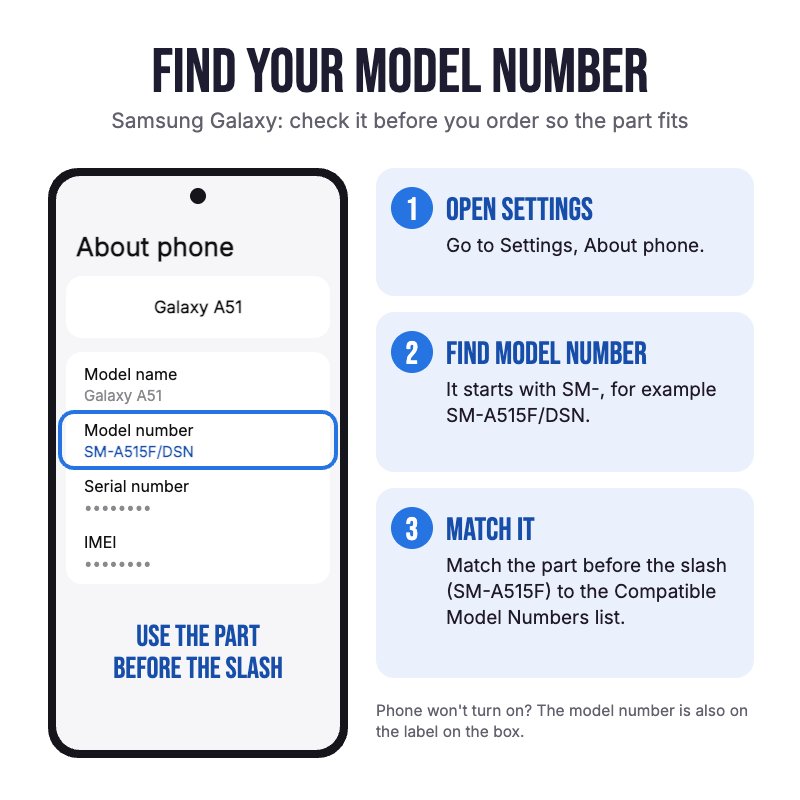
Does NOT fit the Galaxy A05s, which looks similar but has a sharper 1080 x 2400 screen. Check in Settings, About phone for your model.
Please Note
Your board, sub-board and battery move across to the new frame. The battery is not included.
Please Note
Assembled by a third party manufacturer, so it is not an official Samsung part.
Specifications
- Screen Type: OEM LCD
- Display Size: 6.7"
- Resolution: 720 x 1600 pixels
- Colours: Black
- Brightness: 625 cd/m2
- Glass Rating: 9H
- Middle Frame: Pre-installed
- Battery: Not included
- Warranty: 12 Months
Compatible Model Numbers
 Samsung Galaxy A05
Model Number (SM Number)
- SM-A055F
- SM-A055F/DS
- SM-A055M
- SM-A055M/DS
Installation Help

Check out the video above for assistance with this repair

Here are some tools you may need to help you complete the repair.
- #00 Metal Phillips 2.0mm Screwdriver Tool (PH00)
- uFix iOpener Microwaveable Heated Bag Opening Tool
- iGadget 5 piece opening picks
- 5x iGadget Plastic Flexible Opening Cards
- iPlastix Flexible Opening Tool by Dottorpod
- Nylon Antistatic Spudger Pry Tool
- Mechanic AK-15 King ESD Anti-Static Stainless Steel Red Curved Tweezers
- Box of Isopropyl Adhesive Cleaning Alcohol Pad Wipes x100
- 2mm Tesa Tape 61395 Roll Double Sided Adhesive Tape (100m)

Here are some helpful tips to assist you in completing a safe repair on your device. If you are unsure of something or have any questions, please feel free to contact us either by phone (0508 IGADGET) or by email
- Drain the battery below 25% before you start on this repair
- Power the phone off and take out the SIM tray before you open it.
- The plastic back cover is held by clips and a light adhesive. Warm the edges gently with the iOpener in short bursts, as too much heat can damage the battery, then work a pick around the edge no more than 3 to 5mm in, or you can cut the antenna, side key or camera cables.
- Always track your screws (Phillips #00) so they go back in the right place. Draw a picture of your phone and tape the screws to it, or use a screw mat
- Always unplug the battery before you remove any other parts. Keep metal tools away from the battery, and never bend, crush or puncture it.
- Move the motherboard, sub-board, cameras and flex cables from your old frame into the new one. The battery is not included and is glued in: loosen its adhesive with isopropyl alcohol and lift it slowly with a plastic card, never prying against the cell, or fit a new battery.
- Test the display, touch, cameras, speaker and calls before you close the phone up, and leave the protective film and stickers on until the new screen is working properly.
- Press the back cover down all the way round until the clips click in. If it does not sit flat, run a strip of 2mm Tesa tape where the old adhesive was.
What’s In The Box
- 1x Samsung Galaxy A05 OEM LCD Screen Replacement with Middle Frame
Related Products


