





iPhone 17 Pro Screen Replacement | Premium Soft OLED 120Hz ProMotion
iPhone 17 Pro Screen Replacement | Premium Soft OLED 120Hz ProMotion
 In Stock
Regular price
NZ$181.99
Regular price
Sale price
NZ$181.99
Unit price
per
inc GST
iPhone 17 Pro Screen Replacement | Premium Soft OLED 120Hz ProMotion
iPhone 17 Pro Screen Replacement | Premium Soft OLED 120Hz ProMotion
In Stock
Regular price
NZ$181.99
Regular price
Sale price
NZ$181.99
Unit price
per
inc GST
DIY DIFFICULTY
ModerateAbout 1 to 2 hours
Held in by two pentalobe screws and adhesive. The front sensors move to the new screen.
- REPART Premium Flexible Soft OLED with high colour intensity and lower power consumption than LCD
- Fixes a cracked or shattered screen, black or flickering display, lines on the screen and touch not responding
- Compatible with iPhone 17 Pro models; A3256, A3522, A3523 & A3524
Frequently Bought Together





Frequently Bought Together
Product Details

Cracked glass, a black or flickering display, green or white lines, or a touch screen that has stopped responding on your iPhone 17 Pro all mean the screen needs replacing. This iPhone 17 Pro screen replacement is a complete Soft OLED screen assembly - display, touch digitiser and front glass in one part - so it fixes both the picture and the touch in a single swap. Looking for an iPhone 17 Pro LCD? The iPhone 17 Pro actually uses an OLED display, and this replacement is OLED to match.
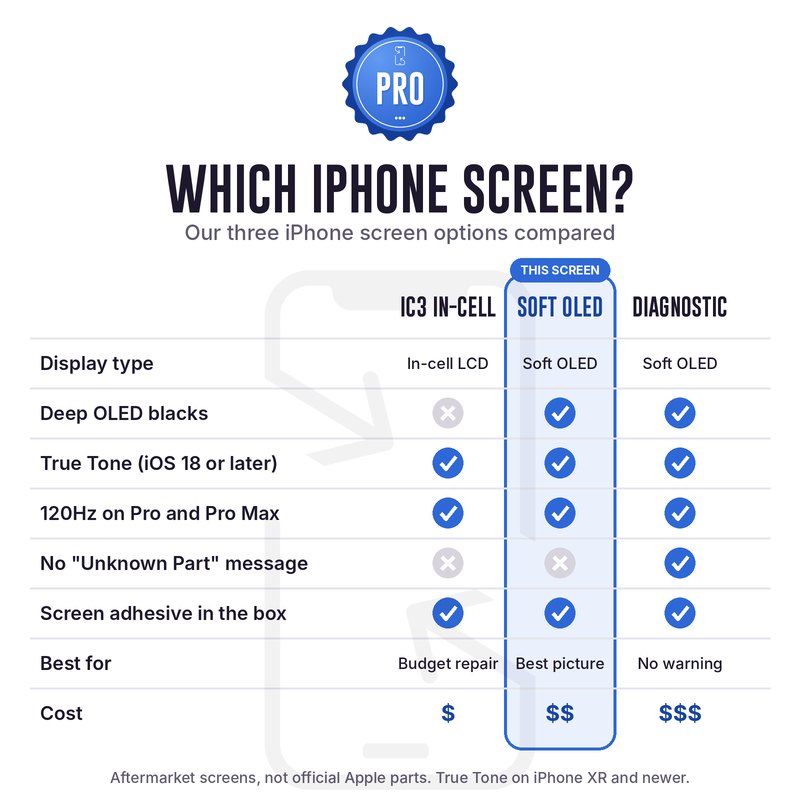
Also available for the iPhone 17 Pro: Diagnostic OLED (no Unknown Part message)
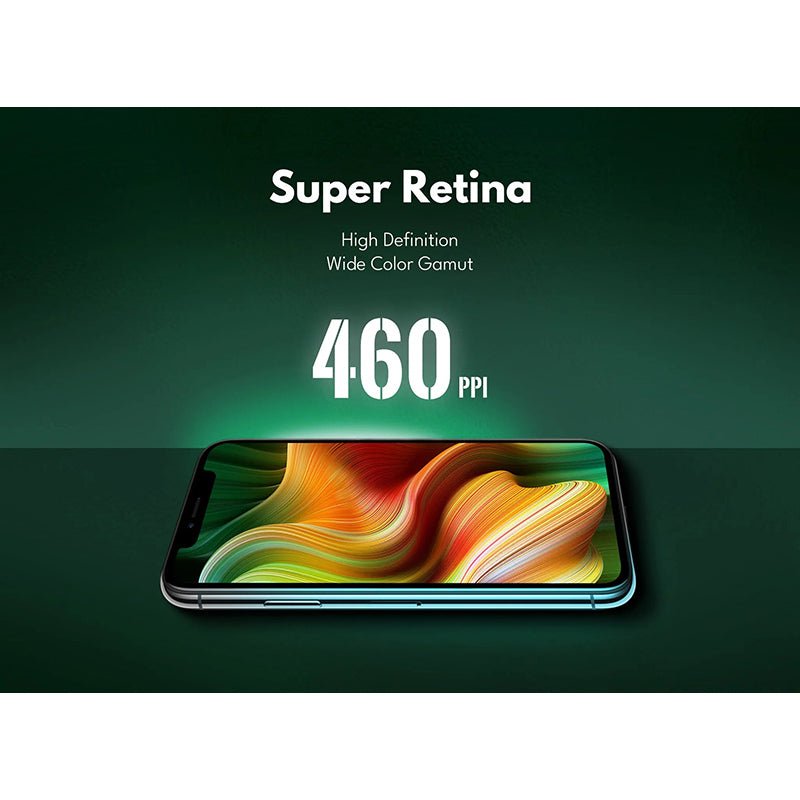
This REPART Soft OLED is built for the iPhone 17 Pro: a 6.3-inch, 2622 x 1206 panel at 460 ppi, with 788-806 cd/m2 brightness, a 100-120% sRGB colour gamut and a 120Hz ProMotion refresh rate. As a soft (flexible) OLED, it folds under at the bottom edge the same way Apple's screen does, so it fits the frame with the same slim bottom border.
- TRUE OLED - Real blacks and rich, bright colour from the same display type your iPhone came with. OLED also uses less battery than an LCD.
- SHARP SOFT OLED - 2622 x 1206 at 460 ppi, the same resolution as the original screen.
- 120HZ PROMOTION - Adapts up to 120Hz like the original and drops down when the screen is still, saving battery.
- ALWAYS-ON DISPLAY - The Always-On display works with this screen, so the time, widgets and notifications stay visible on the dimmed Lock Screen.
- TRUE TONE - True Tone and auto-brightness work with iOS 18 or later, no transfer machine needed.
- PRECISE FIT - Brackets come pre-installed and the cutouts match the original screen, so every hole lines up and the frame sits flush.
- QUALITY GLASS - Hard-wearing glass with an oleophobic (anti-fingerprint) coating that stands up to daily use.
Part Includes:
- iPhone 17 Pro Flexible Soft OLED Screen Assembly
- iPhone 17 Pro Screen Gasket Adhesive
- 12 Month Warranty
Please Note
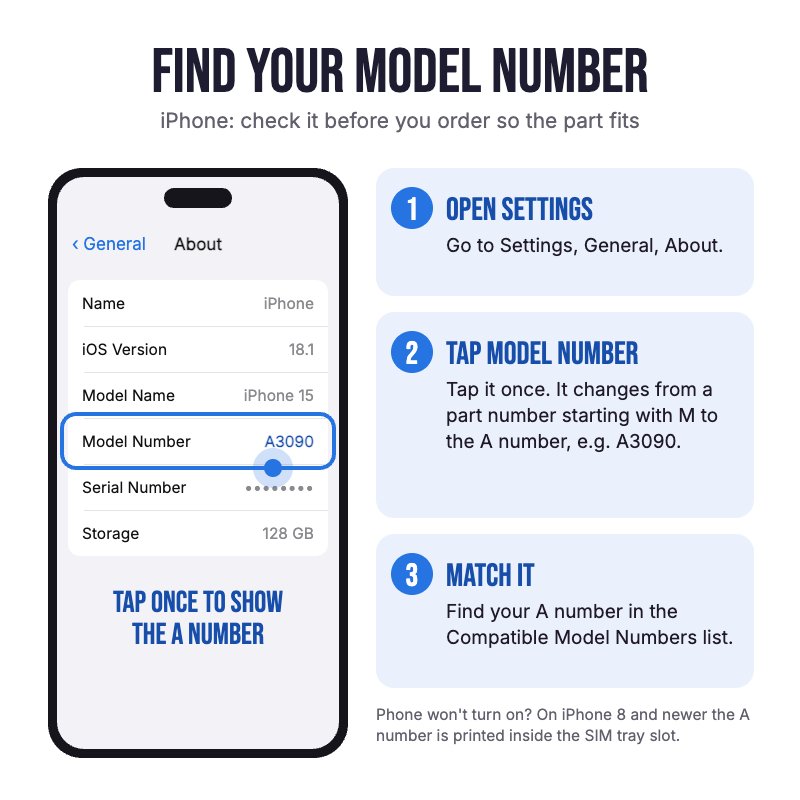
Does NOT fit iPhone 17, 16 Pro, 18 Pro or 17 Pro Max. Check in Settings, General, About for your model.
Please Note
True Tone and auto-brightness work on iOS 18 and later, with no transfer machine needed. ProMotion 120Hz adaptive.
Please Note
Third-party screen, not an official Apple product. iOS will list it as an Unknown Part. This is normal.
Specifications
- Screen Type: AMOLED (Flexible Soft OLED)
- Screen Brand: REPART
- Display Size: 6.3"
- Refresh Rate: 120Hz ProMotion (adaptive)
- Polariser Viewing Angle: 360 degrees
- Resolution: 2622 x 1206 pixels
- Pixel Density: 460 ppi
- True Tone Capable: Yes, with auto-brightness (iOS 18 or later)
- Always-On Display: Supported
- IC Transferable: Yes
- Colour Temp: 6000-7000K
- Colour Gamut Value: 100-120% (sRGB)
- Brightness: 788-806 cd/m2
- Glass Rating: 9H
- Front Sensor Flex: Not included - transfer from your old screen
- Earpiece Speaker: Not part of the screen - stays in your phone
- Pairing: Not paired. Shows as an Unknown Part, but the screen works normally.
- Warranty: 12 Months
How do I find my Model number?
 iPhone 17 Pro
Compatible Model Numbers
iPhone 17 ProModel Number (A Number)
- A3256
- A3522
- A3523
- A3524
How do I find my Model number?
 iPhone 17 Pro Model Numbers
Model Identifier
- iPhone18,1
EMC Number
- EMC 8949
- EMC 8957
- EMC 8958
- EMC 8959
Device Number (M Number)
- MG7K4
- MG7N4
- MG7R4
- MG7L4
- MG7P4
- MG7T4
- MG7M4
- MG7Q4
- MG7U4
- MG854
- MG894
- MG8D4
- MG864
- MG8A4
- MG8E4
- MG874
- MG8C4
- MG8F4
- MG8G4
- MG8K4
- MG8P4
- MG8H4
- MG8M4
- MG8Q4
- MG8J4
- MG8N4
- MG8R4
- MG8T4
- MG8W4
- MG904
- MG8U4
- MG8X4
- MG914
- MG8V4
- MG8Y4
- MG924
More info Less info
Installation Help

Check out the video above or the step by step guide below for assistance with this repair
iFixit iPhone 17 Pro Screen Replacement Guide

Here are some tools you may need to help you complete the repair.
Please note: A discounted simple toolset with the tools you need is available in a pop-up when you add this product to cart
- #000 1.5mm Metal Phillips Screwdriver Tool (PH000)
- P2 Metal Pentalobe 0.8mm Screwdriver Tool
- Y000 Metal Triwing Tri-Point 0.6mm Screwdriver Tool
- Large Blue Suction Cup Opening Tool
- Mechanic AK-15 King ESD Anti-Static Stainless Steel Red Curved Tweezers
- iGadget Plastic Triangle Opening Picks (set of 5)
- 5x iGadget Plastic Flexible Opening Cards
- Nylon Antistatic Spudger Pry Tool
- Or get the P2, Y000 and #000 screwdrivers, suction cup, tweezers, opening picks, opening cards and spudger together in our 8 Piece iPhone Repair Toolkit
- iSclack Evo (Gen 3) Suction Cup Opening Tool for phones and tablets by Dottorpod
- uFix iOpener Microwaveable Heated Bag Opening Tool
- iHold Evo Screen Holding Opening Tool for iPads and iPhones with USB-C Adapter by Dottorpod
- 1mm Tesa Tape 61395 Roll Double Sided Adhesive Tape (50m)
- iGadget Plastic Alcohol 200mL Bottle with Pump Top
- iGadget Universal Magnetic Work Project Mat with Marker (30cm x 25cm)

Here are some helpful tips to assist you in completing a safe repair on your device. If you are unsure of something or have any questions, please feel free to contact us either by phone (0508 IGADGET) or by email
- Drain the battery below 25% before you start on this repair
- Always power down your device prior to working on it
- Track your screws on a screw mat or tape them to a drawing of your phone. This repair uses two 7.5mm pentalobe screws at the bottom, a small cross-head screw on each of the battery and screen connector covers, and two 1.0mm Y000 screws on the front sensor bracket
- Remove the two 7.5mm pentalobe screws either side of the USB-C port, then heat the bottom edge to soften the adhesive
- Slide the pick under the plastic bezel, not between the bezel and the glass, and no deeper than 3mm. The screen opens from the right-hand side like a book - the screen and sensor cables are on the left, so stop before the volume-up button on the left edge
- Always unplug the battery before you remove any other parts. Keep metal tools away from the battery, and never bend, crush or puncture it.
- Remove the battery connector cover and unplug the battery first, then the screen and ambient light sensor connectors. When reassembling, connect the screen connectors first and the battery last, pressing each down gently until it clicks - don't force it
- Transfer the front sensors (ambient light sensor and microphone) from your old screen - the earpiece and Face ID camera stay in the phone, so leave them alone. Remove the bracket (two 1.0mm Y000 screws), warm the area, lift the fragile sensors by the tab underneath with a spudger or opening card and re-stick the cable with Tesa tape. A damaged sensor stops auto-brightness working
- Test touch, display, ProMotion, auto-brightness and Face ID before sealing the phone, and don't peel off the protective film or any stickers until it's all working
- Clean off all the old adhesive with isopropyl alcohol and fit the new screen adhesive supplied in the box to keep dust and moisture out. Lower the screen top edge first, then press firmly round the edges
- This screen supports IC transfer - a micro-soldering specialist can move the display IC from your old screen onto this one.
- Once the repair is finished, turn True Tone on in Settings > Display & Brightness and check auto-brightness is working (iOS 18 or later)
What’s In The Box
- 1x iPhone 17 Pro Flexible OLED Screen Replacement
- 1x iPhone 17 Pro Screen Gasket Adhesive
Related Products


