Frequently Bought Together
Product Details

Cracked your Samsung S7 screen, or is the display black, showing lines, or no longer responding to touch? This Galaxy S7 screen replacement is a premium OEM OLED and digitiser for the S7 (SM-G930F, SM-G930U): an OEM Samsung OLED panel with new glass fitted, supplied as the screen only, without a middle frame. Looking for an S7 LCD? The S7 actually uses an OLED display, and this replacement is OLED to match.
- OEM OLED PANEL - An OEM Samsung OLED panel with new front glass fitted, in the original 5.1" size and 1440 x 2560 resolution, so colours, contrast and deep blacks match the screen you had.
- TOUGH, SMUDGE RESISTANT GLASS - 9H rated glass with an oleophobic coating, so it stands up to everyday scratches and wipes clean of fingerprints.
- PRECISE FIT - The dimensions and cutouts match the original, so the panel sits flush in your frame around the home button and your phone closes up properly.
- SENT FROM NZ STOCK - Shipped from our New Zealand stock, so there's no waiting weeks for a part to arrive from overseas.
Part Includes:
- Samsung Galaxy S7 OEM OLED screen and digitiser with new glass (screen only)
- 12 Month Warranty
Please Note
Does NOT fit the S7 Edge (SM-G935) or S7 Active (SM-G891A). Check in Settings, About phone for your model.
Please Note
Screen only, with no frame: the new panel is glued into your own frame, and your board, battery and home button stay in place.
Please Note
OEM OLED panel with replacement glass fitted, not a new Samsung part.
Specifications
- Screen Type: OEM OLED (glass replaced)
- Display Size: 5.1"
- Resolution: 1440 x 2560 pixels
- Colours: Black
- Brightness: Up to 855 nits (in bright light)
- Glass Rating: 9H
- Middle Frame: Not included (screen only)
- Warranty: 12 Months
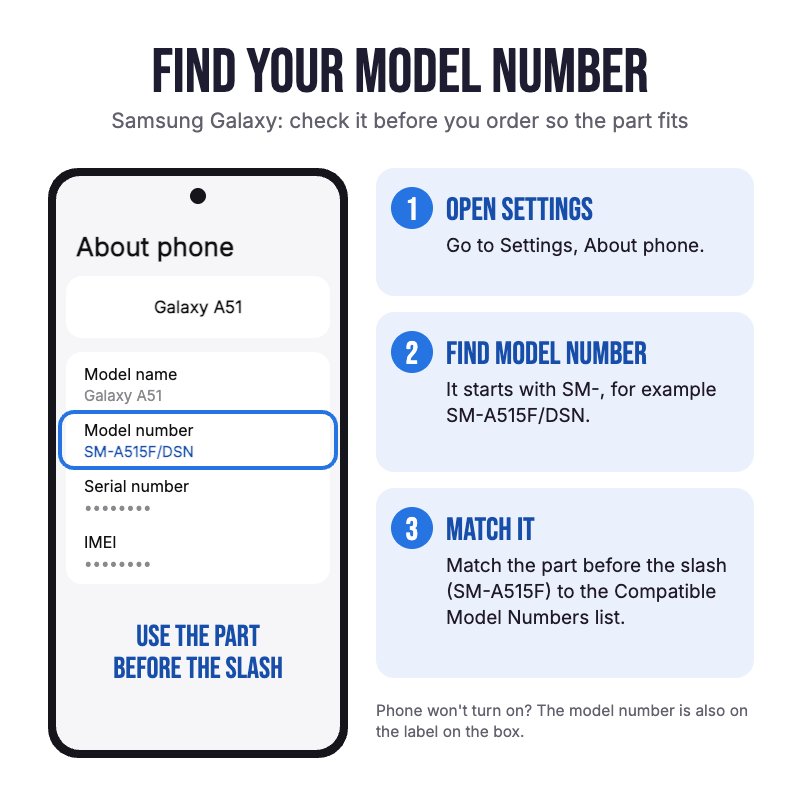
How do I find my Model number?
Samsung Galaxy S7
Compatible Model Numbers
Samsung Galaxy S7Model Number (SM Number)
- SM-G930F
- SM-G930FD
- SM-G930A
- SM-G930T
- SM-G930P
- SM-G930V
- SM-G930R4
- SM-G930U
- SM-G930W8
- SM-G930S
- SM-G930K
- SM-G930L
- SM-G9300
Installation Help
Check out the video above or the step by step guide below for assistance with this repair
iFixit Samsung Galaxy S7 Screen Replacement Guide
Here are some tools you may need to help you complete the repair.
Please note: A discounted simple toolset with the tools you need is available in a pop-up when you add this product to cart
- #00 Metal Phillips 2.0mm Screwdriver Tool (PH00)
- uFix iOpener Microwaveable Heated Bag Opening Tool
- Large Blue Suction Cup Opening Tool
- iGadget 5 piece opening picks
- iPlastix Flexible Opening Tool by Dottorpod
- Nylon Antistatic Spudger Pry Tool
- Box of Isopropyl Adhesive Cleaning Alcohol Pad Wipes x100
- B7000 Multipurpose Liquid Repair Glue - 15ml
- 2mm Tesa Tape 61395 Roll Double Sided Adhesive Tape (100m)
Here are some helpful tips to assist you in completing a safe repair on your device. If you are unsure of something or have any questions, please feel free to contact us either by phone (0508 IGADGET) or by email
- Drain the battery below 25% before you start on this repair
- Power the phone off and take out the SIM tray before you open it.
- The back glass is glued on. Warm the edges gently with the iOpener in short bursts, as too much heat can damage the battery, then lift a corner with the suction cup and work a pick around the edge no more than 3 to 5mm in, or you can cut the wireless charging coil, antenna or camera cables. Go gently at the curved edges, where the glass can crack.
- Always track your screws (Phillips #00) so they go back in the right place. Draw a picture of your phone and tape the screws to it, or use a screw mat
- Always unplug the battery before you remove any other parts. Keep metal tools away from the battery, and never bend, crush or puncture it.
- Take out the eight screws holding the NFC antenna and wireless charging coil assembly, lift it out, then unplug the display cable with the spudger. The battery, board and home button stay in the frame for this repair.
- Warm the screen in short bursts, then lift the old screen off the front with the suction cup and plastic picks or the iPlastix, keeping them shallow, and feed the display cable out through the slot in the frame. Use plastic tools only, never metal, against the OLED panel.
- Clean every trace of old adhesive and glass off the frame with isopropyl alcohol, so the new screen sits flat.
- Connect and test the new screen before gluing it in: check the display, touch and the home button, and leave the protective film and stickers on until the new screen is working properly.
- Glue the new screen in with a thin line of B7000 around the edge of the frame, keeping it out of the cable slot, and hold the screen pressed flat while it sets.
- Opening the phone breaks the factory seal. Fit new adhesive (a strip of 2mm Tesa tape where the old adhesive was) when you close up the back, or the phone will lose its water resistance rating.
What’s In The Box
- 1x Samsung Galaxy S7 OEM OLED Screen Replacement (screen only, no frame)

In Stock