Samsung Note 10 / Note 10 Plus S Pen Replacement | OEM Stylus, Black (SM-N970/N975)

Samsung Note 10 / Note 10 Plus S Pen Replacement | OEM Stylus, Black (SM-N970/N975)

SAM-N10-STYLUS-BLK
Regular price NZ$15.99
Regular price Sale price NZ$15.99
Sale Sold out
Email me when back in stock
inc GST
Skip to product information

Samsung Note 10 / Note 10 Plus S Pen Replacement | OEM Stylus, Black (SM-N970/N975)

Samsung Note 10 / Note 10 Plus S Pen Replacement | OEM Stylus, Black (SM-N970/N975)

SAM-N10-STYLUS-BLK
Regular price NZ$15.99
Regular price Sale price NZ$15.99
Sale Sold out
inc GST
Email me when back in stock
  • Samsung Galaxy Note 10 and Note 10 Plus S Pen replacement: OEM stylus pen in black that clicks into the phone's built-in S Pen slot
  • Bluetooth S Pen with Air actions and remote camera shutter, charges in the slot
  • Fine tip with pressure-sensitive writing
  • Compatible with Samsung Galaxy Note 10, Samsung Galaxy Note 10 Plus and Samsung Galaxy Note 10 Plus 5G models; SM-N970F, SM-N970F/DS, SM-N970N, SM-N970U, SM-N970U1, SM-N970W, SM-N970X, SM-N9700, SM-N971N, SM-N975F, SM-N975F/DS, SM-N975U, SM-N975U1, SM-N975W, SM-N975N, SM-N975X, SM-N9750, SCV45, SM-N976B, SM-N976B/DS, SM-N976F, SM-N976U, SM-N976V, SM-N976N, SM-N9760, SM-N976Q
Regular price NZ$15.99
Regular price Sale price NZ$15.99

Dispatches next business day straight from our NZ warehouse

Frequently Bought Together

iPhone 6s Battery Replacement | 1715mAh | Premium Zero-Cycle

iPhone 6s Battery Replacement | 1715mAh | Premium Zero-Cycle

IPH6S-15

NZ$15.99
Choose Default:
MacBook Air 13" A1466 / A1369 Battery Replacement (A1496) 2010-2017

MacBook Air 13" A1466 / A1369 Battery Replacement (A1496) 2010-2017

MBAIR-A1466-15-A1496

NZ$69.99
Choose Default:
P5 Metal Pentalobe 1.2mm Screwdriver Tool

P5 Metal Pentalobe 1.2mm Screwdriver Tool

IG-DRIV-P5

NZ$7.99
Choose Default:
iPhone 7 Battery Replacement | 1960mAh | Premium Zero-Cycle

iPhone 7 Battery Replacement | 1960mAh | Premium Zero-Cycle

IPH7-15

NZ$16.99
Choose Default:
8 Piece iPhone Repair Toolkit - Suitable for 7-16 Series

8 Piece iPhone Repair Toolkit - Suitable for 7-16 Series

IG-IPH7-TOOL-8P

NZ$19.99
Choose Default:
View full details

Frequently Bought Together

iPhone 6s Battery Replacement | 1715mAh | Premium Zero-Cycle

iPhone 6s Battery Replacement | 1715mAh | Premium Zero-Cycle

IPH6S-15

NZ$15.99
Choose Default:
MacBook Air 13" A1466 / A1369 Battery Replacement (A1496) 2010-2017

MacBook Air 13" A1466 / A1369 Battery Replacement (A1496) 2010-2017

MBAIR-A1466-15-A1496

NZ$69.99
Choose Default:
P5 Metal Pentalobe 1.2mm Screwdriver Tool

P5 Metal Pentalobe 1.2mm Screwdriver Tool

IG-DRIV-P5

NZ$7.99
Choose Default:
iPhone 7 Battery Replacement | 1960mAh | Premium Zero-Cycle

iPhone 7 Battery Replacement | 1960mAh | Premium Zero-Cycle

IPH7-15

NZ$16.99
Choose Default:
8 Piece iPhone Repair Toolkit - Suitable for 7-16 Series

8 Piece iPhone Repair Toolkit - Suitable for 7-16 Series

IG-IPH7-TOOL-8P

NZ$19.99
Choose Default:

Product Details

Lost your Note 10 / Note 10 Plus S Pen, or is your pen not working or not connecting? This OEM replacement S Pen is made for the Samsung Galaxy Note 10 and Note 10 Plus (SM-N970/N975), clicks into the phone's built-in S Pen slot and works the same way as the pen that came with the phone.

Also available for the Note 10 / Note 10 Plus: Budget S Pen (no charging needed).

Got a different Note? We also stock the Note 20 / Note 20 Ultra S Pen. Screen cracked too? The S Pen works with our Galaxy Note 10 OL3 screen replacement and Galaxy Note 10 Plus OL3 screen replacement.


  • REPLACES A LOST OR BROKEN PEN - Made to the shape of the Note 10 / Note 10 Plus S Pen, so it slides into the built-in slot, clicks into place and goes wherever your phone goes.
  • BLUETOOTH AIR ACTIONS - Connects to your phone over Bluetooth, so the side button and mid-air gestures work as a remote: take photos, play music and switch slides from across the room. Air actions support may vary by app.
  • CHARGES IN THE SLOT - The pen's small battery only runs Air actions, and it charges by itself whenever the pen is in its slot.
  • HOVER AND AIR COMMAND - Hold the pen just above the screen to see the pointer, use hover tools like Translate and Magnify, and press the side button to open Air command and your S Pen shortcuts.
  • FINE TIP, PRESSURE SENSITIVE - Press lightly for thin lines or harder for thick strokes, with a fine tip for neat handwriting and detailed drawing. Slim and light to hold.
  • REPLACEABLE NIB - The tip pulls out with tweezers and can be changed when it wears, so the pen keeps writing smoothly.
  • SENT FROM NZ STOCK - Shipped from our New Zealand stock, so there's no waiting weeks for a part to arrive from overseas.


Part Includes:

  • OEM replacement S Pen for the Galaxy Note 10 and Note 10 Plus, black
  • 12 Month Warranty


Please Note

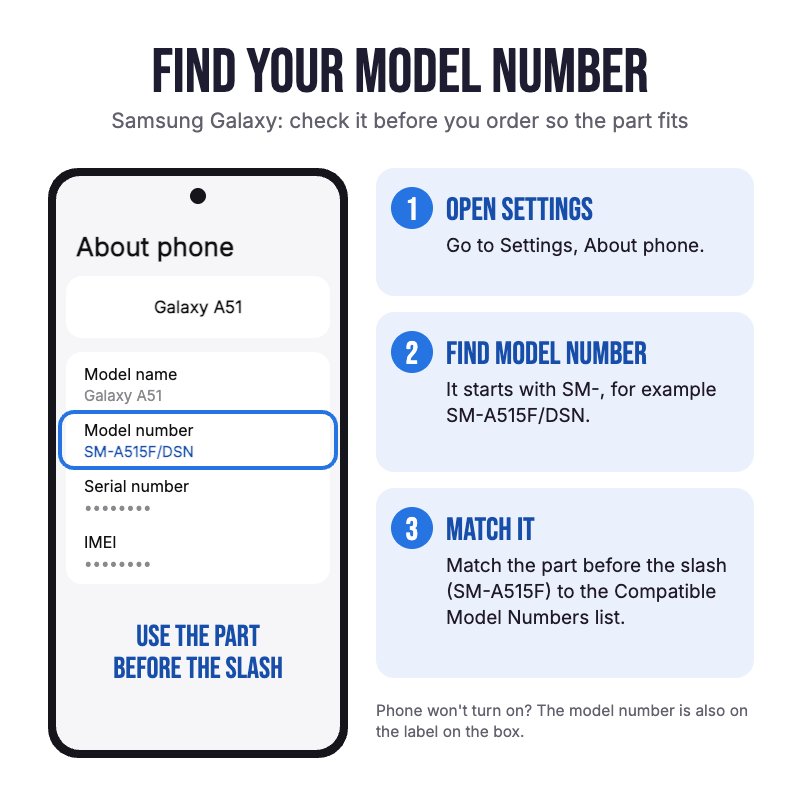
Not confirmed to fit the Note 10 Lite, which takes a different S Pen. Check in Settings, About phone for your model.

Please Note

Slot it in and the phone connects it by itself: wait for the S Pen connected message and it's ready for Air actions.

Please Note

Air actions only work while the pen is charged. If they stop, leave the pen in its slot for a few minutes. Writing and hover don't need a charge.

Specifications

  • Type: OEM replacement S Pen
  • Compatible Models: Galaxy Note 10 and Note 10 Plus (SM-N970/N975)
  • Colour: Black
  • Pen Technology: EMR (Wacom) pen for the phone's built-in S Pen digitiser, with hover
  • Tip: Replaceable
  • Pressure Sensitive: Yes
  • Air Command: Yes (hover and press the side button)
  • Bluetooth and Air Actions: Yes, including remote camera shutter
  • Charging: Charges in the phone's S Pen slot (for Air actions only)
  • Finish: Anodised colour
  • System: Android
  • Spare Nibs: Not included
  • Warranty: 12 months

Compatible Model Numbers

Samsung Galaxy Note 10 Samsung Galaxy Note 10
Model Number (SM Number)
  • SM-N970F
  • SM-N970F/DS
  • SM-N970N
  • SM-N970U
  • SM-N970U1
  • SM-N970W
  • SM-N970X
  • SM-N9700
  • SM-N971N
Samsung Galaxy Note 10 Plus Samsung Galaxy Note 10 Plus
Model Number (SM Number)
  • SM-N975F
  • SM-N975F/DS
  • SM-N975U
  • SM-N975U1
  • SM-N975W
  • SM-N975N
  • SM-N975X
  • SM-N9750
  • SCV45
Samsung Galaxy Note 10 Plus 5G Samsung Galaxy Note 10 Plus 5G
Model Number (SM Number)
  • SM-N976B
  • SM-N976B/DS
  • SM-N976F
  • SM-N976U
  • SM-N976V
  • SM-N976N
  • SM-N9760
  • SM-N976Q

Installation Help

helpful tips

Using your new S Pen

Here are some helpful tips for getting started with your new S Pen. If you are unsure of something or have any questions, please feel free to contact us either by phone (0508 IGADGET) or by email

  • Slide the S Pen into the slot nib first and push until it clicks in. To take it out, push the end in and it pops out.
  • When you first slot the pen in, the phone connects it over Bluetooth and charges it. Wait for the S Pen connected message before you try Air actions.
  • Hold the pen just above the screen and press the side button to open Air command. If the floating icon doesn't show, turn on Show floating icon in Settings, Advanced features, S Pen.
  • S Pen not connecting? Put it back in the slot for a few minutes to charge, then open Settings, Advanced features, S Pen, Air actions, tap the three dots and choose Reset S Pen. Restart the phone if it still won't connect.
  • S Pen not working at all? Take off any magnetic case or cover, check your screen protector, then restart the phone. Magnets, metal and some third-party screen protectors can stop an S Pen working.
  • To change a worn nib, grip it with tweezers and pull it straight out, then push a new nib in with the pointed writing end facing out. Never reuse an old nib or force one in the wrong way round.

What’s In The Box

  • 1x Samsung Galaxy Note 10 and Note 10 Plus S Pen Replacement (Black)
Customer Reviews
0.0 Be the first to review this item
0% 
0% 
0% 
0% 
0%