





Samsung A01 Core Battery Replacement | 3000mAh | EB-BA013ABY
Samsung A01 Core Battery Replacement | 3000mAh | EB-BA013ABY
 In Stock
Regular price
NZ$16.99
Regular price
Sale price
NZ$16.99
Unit price
per
inc GST


Samsung A01 Core Battery Replacement | 3000mAh | EB-BA013ABY
Samsung A01 Core Battery Replacement | 3000mAh | EB-BA013ABY
In Stock
Regular price
NZ$16.99
Regular price
Sale price
NZ$16.99
Unit price
per
inc GST
DIY DIFFICULTY
Very easyAbout 5 minutes
Clip-on plastic back comes off by hand. The battery lifts out of its bay, with no screws or glue.
- Premium 3000mAh zero-cycle battery, removable pack with no glue
- Replaces a battery that drains fast, won't hold a charge, shuts down early or has swollen
- Compatible with Samsung Galaxy A01 Core models (SM-A013F, SM-A013G and SM-A013M)
Frequently Bought Together


Frequently Bought Together


Product Details
Is your Samsung Galaxy A01 Core draining fast, shutting down early or swelling? A worn battery is usually the cause. This is a new 3000mAh replacement, Samsung battery model EB-BA013ABY. The A01 Core battery is user-removable, so you can swap it yourself in a few minutes.
- ZERO CYCLE CELL - A brand new cell, never used in a phone, so you start with its full life.
- FULL 3000mAh CAPACITY - Rated 2920mAh and 3000mAh typical, the same as the battery Samsung fitted to the Galaxy A01 Core.
- QUALITY TESTED - Strict QC testing, with a failure rate under 1%.
- SENT FROM NZ STOCK - Shipped from our New Zealand stock, so there's no waiting weeks for a part to arrive from overseas.
Part Includes:
- Samsung Galaxy A01 Core Replacement Battery
- 12 Month Warranty
Please Note
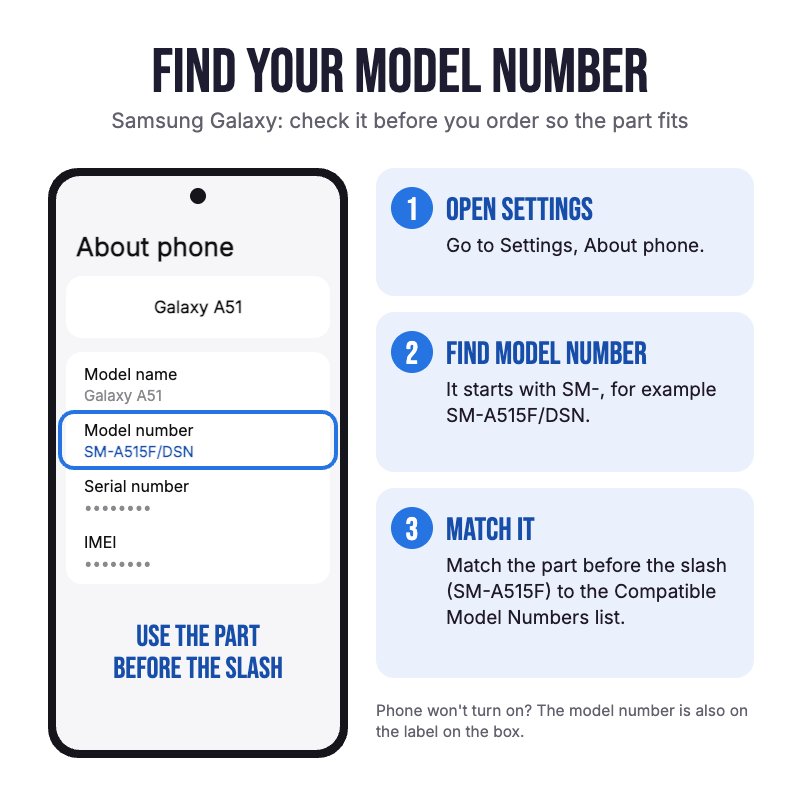
Does NOT fit the Galaxy A03 Core or A03, which take larger 5000mAh batteries (SLC-50 and HQ-50S). Check in Settings, About phone for your model. For the Galaxy A03, see our A03s / A03 / A02s battery page.
Please Note
The battery is user-removable and the back cover clips on, so you don't need any adhesive.
Please Note
Aftermarket battery, not an official Samsung part. It works just like the original.
Specifications
- Battery Model: EB-BA013ABY
- Voltage: 3.85V
- Rated Capacity: 2920mAh, 11.25Wh
- Typical Capacity: 3000mAh, 11.55Wh
- Battery Type: Lithium-ion polymer
- Condition: Brand new cell
- Warranty: 12 Months
Compatible Model Numbers
 Samsung Galaxy A01 Core
Model Number (SM Number)
- SM-A013F
- SM-A013F/DS
- SM-A013G
- SM-A013G/DS
- SM-A013M
Installation Help

The A01 Core battery is user-removable, so there is no teardown to follow. Take the back cover off, lift the old battery out and press the new one in, using the tips below.
Remember
After completing your repair, calibrate your newly installed battery by charging it to 100% and then charging for a further two hours. Use your phone until it shuts off due to low battery, and finally, charge it uninterrupted to 100% again

Here are some tools you may need to help you complete the repair.
Please note: A discounted simple toolset with the tools you need is available in a pop-up when you add this product to cart

Here are some helpful tips to assist you in completing a safe repair on your device. If you are unsure of something or have any questions, please feel free to contact us either by phone (0508 IGADGET) or by email
- Drain the battery below 25% and power the phone off before you start. A charged lithium-ion battery can catch fire if it's punctured or damaged
- Lift the plastic back cover off, starting at a corner with your fingernail or a plastic opening pick, and work round slowly so the clips don't snap. Don't use metal tools
- Lift the old battery out of its bay with your fingertip or a plastic card. It isn't glued in. If it is swollen, don't press on it and see the caution below
- Line up the gold contacts on the new battery with the contacts in the phone and press it flat into the bay
- Press the back cover on all the way round until it clicks into place, then power the phone on and check it charges
Caution
If the new battery or the battery in your device is swollen or damaged during repair, take the proper precautions
Note
You cannot dispose of old batteries in your general waste. Find recycling e-waste centres online or take to your local refuse station.
What's In The Box
- 1x Samsung Galaxy A01 Core Replacement Battery


