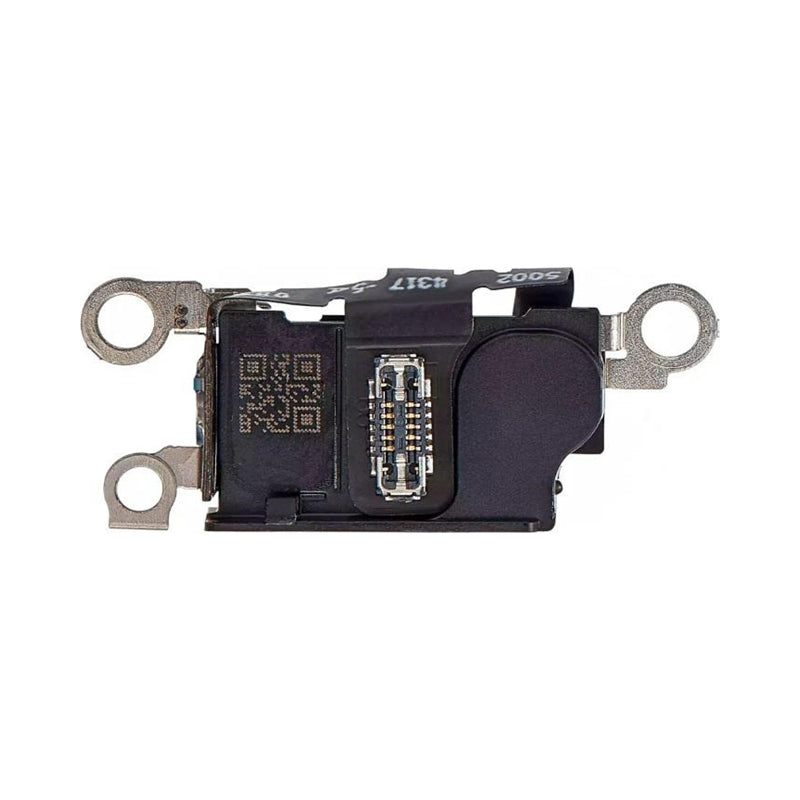
iPhone 16 Pro Max Microphone Replacement | Bottom Mic & Charging Port Sensor

iPhone 16 Pro Max Microphone Replacement | Bottom Mic & Charging Port Sensor

IPH16PM-CHRGSENSOR In Stock
Regular price NZ$16.99
Regular price Sale price NZ$16.99
Sale Sold out
inc GST

4 xNZ$0.00

Skip to product information

iPhone 16 Pro Max Microphone Replacement | Bottom Mic & Charging Port Sensor

iPhone 16 Pro Max Microphone Replacement | Bottom Mic & Charging Port Sensor

IPH16PM-CHRGSENSOR In Stock
Regular price NZ$16.99
Regular price Sale price NZ$16.99
Sale Sold out
inc GST
Or Weekly Interest Free Payments of

4 x NZ$4.24

  • iPhone 16 Pro Max bottom microphone replacement, the mic and air pressure (barometer) sensor flex sold as the charging port sensor or charging microphone flex
  • Fixes callers not hearing you, muffled or silent voice memos and videos, and wrong altitude readings
  • Bottom microphone and barometric pressure sensor in one part, separate from the USB-C charging port
  • Compatible with iPhone 16 Pro Max models; A3084, A3295, A3296 & A3297
Regular price NZ$16.99
Regular price Sale price NZ$16.99

Dispatches next business day straight from our NZ warehouse

Frequently Bought Together

6 Piece iPhone Repair Toolkit

6 Piece iPhone Repair Toolkit

IG-IPH6-TOOL-6P

NZ$14.99
Choose Default:
iHold Evo Screen Holding Opening Tool for iPads and iPhones with USB-C Adapter by Dottorpod

iHold Evo Screen Holding Opening Tool for iPads and iPhones with USB-C Adapter by Dottorpod

DP-IHOLDEVO

NZ$26.99
Choose Default:
iPhone 6s Battery Replacement | Premium Quality

iPhone 6s Battery Replacement | Premium Quality

IPH6S-15

NZ$15.99
Choose Default:
MacBook Air 13" A1466 / A1369 Battery Replacement (A1496) 2010-2017

MacBook Air 13" A1466 / A1369 Battery Replacement (A1496) 2010-2017

MBAIR-A1466-15-A1496

NZ$69.99
Choose Default:
P5 Metal Pentalobe 1.2mm Screwdriver Tool

P5 Metal Pentalobe 1.2mm Screwdriver Tool

IG-DRIV-P5

NZ$7.99
Choose Default:
View full details

Frequently Bought Together

iPhone 6s Battery Replacement | Premium Quality

iPhone 6s Battery Replacement | Premium Quality

IPH6S-15

NZ$15.99
Choose Default:
MacBook Air 13" A1466 / A1369 Battery Replacement (A1496) 2010-2017

MacBook Air 13" A1466 / A1369 Battery Replacement (A1496) 2010-2017

MBAIR-A1466-15-A1496

NZ$69.99
Choose Default:
P5 Metal Pentalobe 1.2mm Screwdriver Tool

P5 Metal Pentalobe 1.2mm Screwdriver Tool

IG-DRIV-P5

NZ$7.99
Choose Default:
iPhone 7 Battery Replacement | Premium Quality

iPhone 7 Battery Replacement | Premium Quality

IPH7-15

NZ$16.99
Choose Default:
11 Piece Universal Phone, Laptop and Tablet Repair Tool Kit - Pentalobe P2/P5, Y000, T5, #000

11 Piece Universal Phone, Laptop and Tablet Repair Tool Kit - Pentalobe P2/P5, Y000, T5, #000

IG-TOOL-SET-11P

NZ$10.00
Choose Default:

Product Details

Fix an iPhone 16 Pro Max microphone that callers can't hear, that records no or muffled sound on voice memos and videos, or that gives wrong altitude readings in Compass. This flex is the iPhone 16 Pro Max main bottom microphone, the primary of its three, with the barometric pressure sensor on the same cable.

Also sold as the charging port sensor (or charging port sensor module), charging microphone flex cable with pressure sensor, bottom microphone with air pressure sensor, barometer sensor mic flex, lower microphone or microphone flex cable.


Part Includes:

  • Bottom Microphone with Barometric Pressure Sensor (Charging Port Sensor)
  • 12 Month Warranty


Please Note

Does NOT fit iPhone 16 Pro, 16 Plus or 15 Pro Max. They use different microphone parts. Check in Settings, General, About for your model.

Please Note

This is not the charging port or charging port module. It sits beside the USB-C port, which is where the "charging port sensor" name comes from, but it does not carry charge. If your iPhone 16 Pro Max won't charge, you need our iPhone 16 Pro Max Charging Port instead.

Please Note

This part will either be brand new or a Used Genuine Apple replacement. Opening the iPhone 16 Pro Max breaks its factory water-resistance seal. Fit new back glass adhesive when you close it up.

Specifications

  • Part Number: Apple 923-11084 (Main microphone)
  • Type: Bottom Microphone with Pressure Sensor (Charging Port Sensor)
  • Microphone: Yes (bottom microphone)
  • Pressure Sensor: Yes (barometric)
  • Compatible Models: iPhone 16 Pro Max (A3084, A3295, A3296, A3297)
  • Pairing: Not needed. The microphone isn't a paired part, so no Unknown Part message.
  • Warranty: 12 Months
How do I find my Model number?

Compatible Model Numbers

iPhone 16 Pro Max iPhone 16 Pro Max
Model Number (A Number)
  • A3084
  • A3295
  • A3296
  • A3297

Part number icon iPhone 16 Pro Max Model NumbersHow do I find my Model number?

Model Identifier
  • iPhone17,2
EMC Number
  • EMC 8684
  • EMC 8685
  • EMC 8686
  • EMC 8687
Device Number (M Number)
  • MYW53
  • MYW93
  • MYWE3
  • MYW63
  • MYWA3
  • MYWF3
  • MYW43
  • MYW83
  • MYWD3
  • MYW33
  • MYW73
  • MYWC3
  • MYWJ3
  • MYWN3
  • MYWT3
  • MYWK3
  • MYWP3
  • MYWU3
  • MYWH3
  • MYWM3
  • MYWR3
  • MYWG3
  • MYWL3
  • MYWQ3
  • MYWX3
  • MYX23
  • MYX63
  • MYWY3
  • MYX33
  • MYX73
  • MYWW3
  • MYX13
  • MYX53
  • MYWV3
  • MYX03
  • MYX43
  • MYTP3
  • MYTW3
  • MYW13
  • MYTQ3
  • MYTX3
  • MYW23
  • MYTN3
  • MYTT3
  • MYW03
  • MYTM3
  • MYTR3
  • MYTY3
* Please note, to make searching the device number (M Number) easier, we have only listed the part numbers (First 5 characters), we have removed the region numbers as there is no difference in parts. For example, if "M Number" is "MC922LL/A". we remove the "region" portion and everything after (the "LL/A" at the end) leaving us with "MC922".
More info Less info

Installation Help

installation guide

Check out the video above or the step by step guide below for assistance with this repair

iFixit iPhone 16 Pro Max Bottom Microphone Replacement Guide


repair tips

Here are some helpful tips to assist you in completing a safe repair on your device. If you are unsure of something or have any questions, please feel free to contact us either by phone (0508 IGADGET) or by email

  • Drain the battery below 25% before you start on this repair
  • Always power down your device prior to working on it
  • Track your screws, they are different lengths: two P2 pentalobe screws beside the USB-C port, Y000 and Phillips screws on the covers and cables, and three on the microphone itself (3.4mm and 3mm standoff screws and a 1.4mm Y000). Refit each one in the hole it came from. Draw a picture of your phone and tape the screws to the right places or use a screw mat
  • On the iPhone 16 Pro Max this repair is done from the back glass, not the screen, and the logic board and loudspeaker stay in. Remove the two pentalobe screws, warm the edges of the back glass and lift it with a suction cup. Keep picks no more than 3mm deep and don't slide a pick in next to the volume up button, where a delicate cable runs
  • Make sure you always unplug the battery before attempting any component removal. The battery connector sits under a small cover: disconnect it first, then the back glass cable under the second cover, and reconnect the battery last
  • To reach the microphone, unplug the lower cable from the logic board, warm it and peel it off the Taptic Engine, then remove the Taptic Engine. Don't pry against or press on the battery
  • Pry the microphone up gently with the flat end of a spudger, then seat the new microphone in place before refitting the screws
  • Before closing the phone, make a test call and record a voice memo and a video to check the microphone works
  • Opening your iPhone 16 Pro Max breaks its factory water-resistance seal. Clean off the old adhesive with isopropyl alcohol and fit new back glass adhesive when you close it up

What’s In The Box

  • 1x iPhone 16 Pro Max Replacement Bottom Microphone with Pressure Sensor
Customer Reviews
0.0 Be the first to review this item
0% 
0% 
0% 
0% 
0% 
Write a Review Ask a Question