


Sold Out


Sold Out

Sold Out


You have unsaved items in your cart.
If you wish to save them for a future transaction, please save your cart items by clicking here.


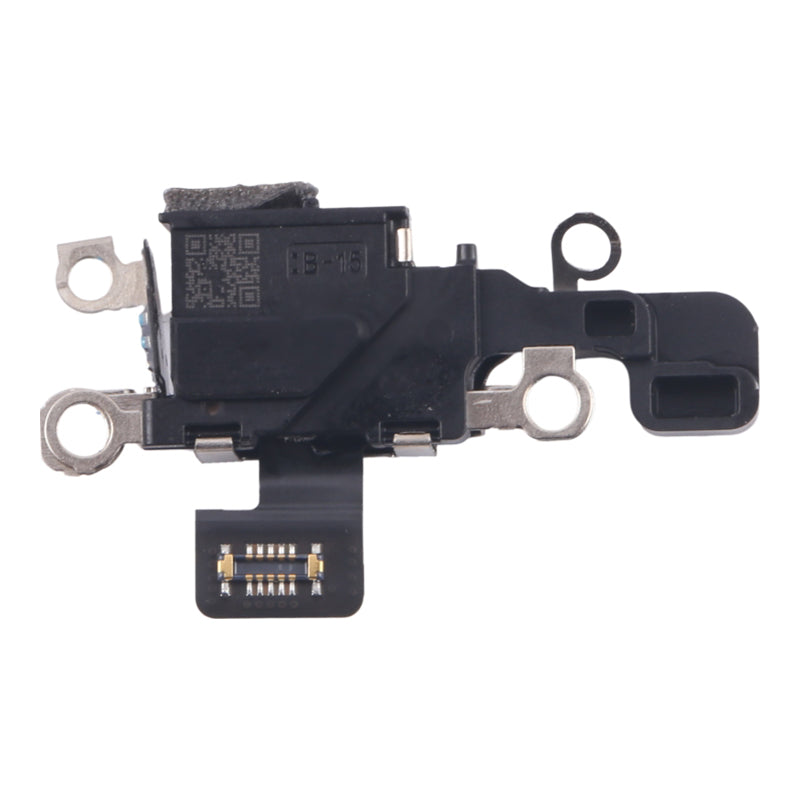
Fix an iPhone 16 microphone that callers can't hear, that records no or muffled sound on voice memos and videos, or that gives wrong altitude readings in Compass. This flex is the iPhone 16 main bottom microphone, the primary of its three, with the barometric pressure sensor on the same cable.
Also sold as the charging port sensor (or charging port sensor module), charging microphone flex cable with pressure sensor, bottom microphone with air pressure sensor, barometer sensor mic flex, lower microphone or microphone flex cable.
Part Includes:
Does NOT fit iPhone 16 Plus, 16 Pro, 16e or 15. Each has its own microphone part. Check in Settings, General, About for your model.
This is not the charging port or charging port module. It sits beside the USB-C port, which is where the "charging port sensor" name comes from, but it does not carry charge. If your iPhone 16 won't charge, you need our iPhone 16 Charging Port Replacement instead.
This part will either be brand new or a Used Genuine Apple replacement. Opening the iPhone 16 breaks its factory water-resistance seal. Fit new back glass adhesive when you close it up.
 iPhone 16
 iPhone 16 Model NumbersHow do I find my Model number?
Check out the video above or the step by step guide below for assistance with this repair
iFixit iPhone 16 Microphone Replacement Guide

Here are some tools you may need to help you complete the repair.

Here are some helpful tips to assist you in completing a safe repair on your device. If you are unsure of something or have any questions, please feel free to contact us either by phone (0508 IGADGET) or by email

Go to Settings > General > About. To the right of "Model Number", you can see the Device Number (M number). To see the the Model Number (A number) tap on the device number.

Find the serial number, EMC number and model number printed on the underside of your Mac near the regulatory markings. It's also on the original packaging next to a barcode label. EMC is the most accurate number to compare with our list as it takes into account the year of your device.
The original packaging might also show an Apple part number such as MNYF2xx/A ("xx/A" is a variable that differs by country or region and is not included on our list so can be disregarded)."

Go to Apple icon > About this Mac > System Report. It will automatically be selected on the hardware tab (left side). To the right, the model name and model identifier will be written on the first two lines."


To find out what model watch you have, turn your watch on
