iPhone 13 Pro Diagnostic Battery with Pulled Chip | No iOS Warnings | 3095mAh

iPhone 13 Pro Diagnostic Battery with Pulled Chip | No iOS Warnings | 3095mAh

IPH13P-15-DIA In Stock
Regular price NZ$41.99
Regular price Sale price NZ$41.99
Sale Sold out
inc GST
Ships today

4 xNZ$0.00

4xNZ$10.49

Skip to product information

iPhone 13 Pro Diagnostic Battery with Pulled Chip | No iOS Warnings | 3095mAh

iPhone 13 Pro Diagnostic Battery with Pulled Chip | No iOS Warnings | 3095mAh

IPH13P-15-DIA In Stock
Regular price NZ$41.99
Regular price Sale price NZ$41.99
Sale Sold out
inc GST
Or Weekly Interest Free Payments of

4 x NZ$10.49

4 x NZ$10.49

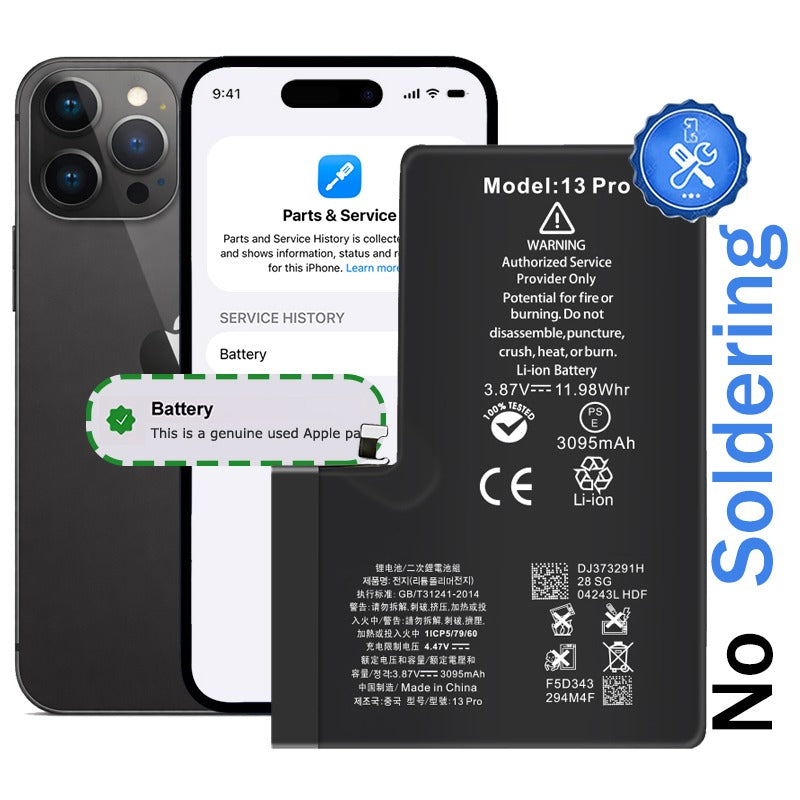
  • Pre-installed authentication chip eliminates 'Unknown Part' warnings and restores full battery health reporting in iOS settings
  • Brand new 3095mAh cells with 0 cycle count display 100% battery health in system settings
  • Plug-and-play installation requires no microsoldering or chip transfer from original batteries, saving time and technical complexity
  • Works seamlessly with Apple Repair Assistant mode and passes all iOS diagnostic tests authentically
  • Compatible with iPhone 13 Pro models; A2483, A2636, A2638, A2639 & A2640
Regular price NZ$41.99
Regular price Sale price NZ$41.99

Dispatches today straight from our NZ warehouse

Frequently Bought Together

iHold Evo Screen Holding Opening Tool for iPads and iPhones with USB-C Adatper by Dottorpod

iHold Evo Screen Holding Opening Tool for iPads and iPhones with USB-C Adatper by Dottorpod

DP-IHOLDEVO

NZ$23.99
Choose Default:
8 Piece iPhone Repair Toolkit - Suitable for 7-16 Series

8 Piece iPhone Repair Toolkit - Suitable for 7-16 Series

IG-IPH7-TOOL-8P

NZ$19.99
Choose Default:
JC B1 Battery Repair Tester machine

JC B1 Battery Repair Tester machine

JC-MACH-JCB1

NZ$99.99
Choose Default:
6 Piece iPhone Repair Toolkit

6 Piece iPhone Repair Toolkit

IG-IPH6-TOOL-6P

NZ$14.99
Choose Default:
iPhone 6s Battery Replacement | Premium Quality

iPhone 6s Battery Replacement | Premium Quality

IPH6S-15

NZ$15.99
Choose Default:
View full details

Frequently Bought Together

iPhone 6s Battery Replacement | Premium Quality

iPhone 6s Battery Replacement | Premium Quality

IPH6S-15

NZ$15.99
Choose Default:
Macbook Air 13" A1466 Battery Replacement for 2010-2017 (Model A1496)

Macbook Air 13" A1466 Battery Replacement for 2010-2017 (Model A1496)

MBAIR-A1466-15-A1496

NZ$69.99
Choose Default:
iPhone 7 Battery Replacement | Premium Quality

iPhone 7 Battery Replacement | Premium Quality

IPH7-15

NZ$14.99
Choose Default:
P5 Metal Pentalobe 1.2mm Screwdriver Tool

P5 Metal Pentalobe 1.2mm Screwdriver Tool

IG-DRIV-P5

NZ$7.99
Choose Default:
B7000 Multipurpose Liquid Repair Glue - 15ml

B7000 Multipurpose Liquid Repair Glue - 15ml

GLU-B7000-15

NZ$5.99
Choose Default:

Product Details

Tired of dealing with battery authentication warnings after iPhone 13 Pro repairs? This diagnostic battery with pulled chip solves Apple's lockout issue by communicating directly with iOS. Your customers get clean battery health readings without the frustrating 'Service' messages that plague standard aftermarket replacements.


  • Zero microsoldering required: Plug-and-play design eliminates the need for complex chip transfer from original batteries
  • Full battery health visibility: Displays accurate capacity percentage in iPhone settings, just like OEM batteries
  • iOS 18 compatible: Works with Apple Repair Assistant and future software updates
  • Zero cycle count: Brand new 3095mAh Li-ion cells for maximum customer satisfaction
  • Safety certified: Built-in protections against overcharge, overheating, and short circuits
  • Professional-grade quality: Simplifies repair workflow and eliminates risky soldering steps


Restore your iPhone 13 Pro to full factory functionality with authentic battery authentication that keeps iOS happy.

Please Note

This is not a genuine Apple battery replacement

Specifications

  • Voltage: 8.98V
  • Watt Hours: 16.75Whr
  • Capacity: 3095mAh
  • Chipset: Texas Instruments
  • Battery Type: Li-Polymer
  • Warranty: 12 Months
How do I find my Model number?

Compatible Model Numbers

iPhone 13 Pro iPhone 13 Pro
Model Number (A Number)
  • A2483
  • A2636
  • A2638
  • A2639
  • A2640
How do I find my Model number?

Part number icon iPhone 13 Pro Model Numbers

Model Identifier
  • iPhone14,2
EMC Number
  • EMC 4000
  • EMC 4002
  • EMC 4033
  • EMC 4034
Device Number (M Number)
  • MLTT3
  • MLU03
  • MLU73
  • MLUD3
  • MLTQ3
  • MLTX3
  • MLU33
  • MLUA3
  • MLTR3
  • MLTY3
  • MLU43
  • MLUC3
  • MLTP3
  • MLTW3
  • MLU13
  • MLU93
  • MLUK3
  • MLUU3
  • MLV03
  • MLV73
  • MLUF3
  • MLUP3
  • MLUW3
  • MLV33
  • MLUH3
  • MLUQ3
  • MLUY3
  • MLV43
  • MLUE3
  • MLUN3
  • MLUV3
  • MLV13
  • MLVD3
  • MLVP3
  • MLVU3
  • MLW03
  • MLVA3
  • MLVF3
  • MLVN3
  • MLVW3
  • MLVC3
  • MLVK3
  • MLVQ3
  • MLVY3
  • MLV93
  • MLVE3
  • MLVH3
  • MLVV3
  • MLT83
  • MLTE3
  • MLTJ3
  • MLTN3
  • MLT63
  • MLTC3
  • MLTL3
  • MLT73
  • MLTH3
  • MLTH3
  • MLTM3
  • MLT53
  • MLT93
  • MLTF3
  • MLTK3
  • MLW43
  • MLW83
  • MLWD3
  • MLWH3
  • MLW23
  • MLW63
  • MLWA3
  • MLWF3
  • MLW33
  • MLW73
  • MLWC3
  • MLWG3
  • MLW13
  • MLW53
  • MLW93
  • MLWE3
* Please note, to make searching the device number (M Number) easier, we have only listed the part numbers (First 5 characters), we have removed the region numbers as there is no difference in parts. For example, if "M Number" is "MC922LL/A". we remove the "region" portion and everything after (the "LL/A" at the end) leaving us with "MC922".
More info Less info

Installation Help

zero cycle

Watch the video above or checkout the step-by-step guide below for assistance in completing this repair

iFixit iPhone 13 Pro Battery Replacement Guide

Remember

After completing your repair, calibrate your newly installed battery by charging it to 100% and then charging for a further two hours. Use your iPhone until it shuts off due to low battery, and finally, charge it uninterrupted to 100% again


safety certification

Here is some tools you may need to help you complete the repair.

Please note: A discounted simple toolset with the tools you need is available in a pop-up when you add this product to cart


chipset

Here are some helpful tips to assist you in completing a safe repair on your device. If you are unsure of something or have any quesions, please feel free to contact us either by phone (0508 IGADGET) or by email

  • Always track your screws to avoid putting back in the wrong place and damaging your device. You can draw a picture of your phone and tape the screws to the right places or use a magnetic screw mat
  • Always power down your device prior to working on it
  • Make sure you always unplug the battery before attemping any component removal
  • Before removing your battery, discharge the battery to below 25%. A charged lithium-ion battery can catch fire or explode if punctured or damaged
  • Removing the old battery adhesive can be frustrating, we recommend grabbing the tabs with tweezers and rolling the adhesive up the tweezers until it is gone. It may also be helpful to remove modular components that might be in the way at the bottom for better access. Also check out this video for more adhesive removal tips.
  • If your newly installed battery is draining fast or shutting off randomly, try the following steps to resolve it
    • Open up the device and unplug the battery
    • Check the phone and battery connector for rogue bits of foam or debris and remove
    • Plug the battery connector back into the phone making sure it is seated correctly (should hear an audible click)
    • Inspect the flex cable to make sure there is no strain on it when the battery is plugged in. If there is any strain you may need to remove the battery and reposition (higher, lower, closer, further away from connector) so that the cable sits without stretch. If the cable is pushing against the bottom of the phone chassis, the cable may need to be reshaped to sit comfortably.
    • Put phone back together and turn on
    • Once you reach the home screen, perform a force restart by pressing and releasing the volume up button, then pressing and releasing the volume down button and then pressing and holding the side/power button until the apple logo appears.
Caution

If the new battery or the battery in your device is swollen or damaged during repair, take the proper precautions

Note

You cannot dispose of old batteries in your general waste. Find recycling e-waste centres online or take to your local refuse station.

What’s In The Box

  • 1x iPhone 13 Pro Diagnostic Replacement Battery
  • 1x Replacement Battery Adhesive