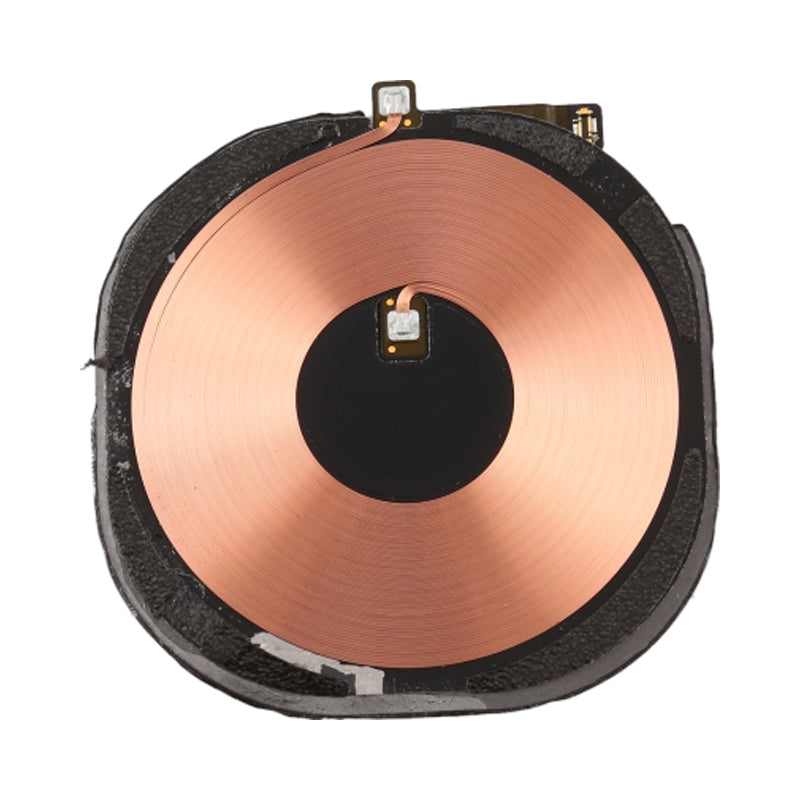
iPhone 11 Wireless Charging Antenna

iPhone 11 Wireless Charging Antenna

IPH11-89 In Stock
Regular price NZ$11.99
Regular price Sale price NZ$11.99
Sale Sold out
inc GST

4 xNZ$0.00

Skip to product information

iPhone 11 Wireless Charging Antenna

iPhone 11 Wireless Charging Antenna

IPH11-89 In Stock
Regular price NZ$11.99
Regular price Sale price NZ$11.99
Sale Sold out
inc GST
Or Weekly Interest Free Payments of

4 x NZ$2.99

  • Replacement wireless charging antenna
  • Soldering is required
  • Compatible with iPhone 11 models; A2111, A2221 and A2223
Regular price NZ$11.99
Regular price Sale price NZ$11.99

Dispatches next business day straight from our NZ warehouse

Frequently Bought Together

8 Piece iPhone Repair Toolkit - Suitable for 7-16 Series

8 Piece iPhone Repair Toolkit - Suitable for 7-16 Series

IG-IPH7-TOOL-8P

NZ$19.99
Choose Default:
iHold Evo Screen Holding Opening Tool for iPads and iPhones with USB-C Adapter by Dottorpod

iHold Evo Screen Holding Opening Tool for iPads and iPhones with USB-C Adapter by Dottorpod

DP-IHOLDEVO

NZ$26.99
Choose Default:
iPhone 6s Battery Replacement | Premium Quality

iPhone 6s Battery Replacement | Premium Quality

IPH6S-15

NZ$15.99
Choose Default:
MacBook Air 13" A1466 / A1369 Battery Replacement (A1496) 2010-2017

MacBook Air 13" A1466 / A1369 Battery Replacement (A1496) 2010-2017

MBAIR-A1466-15-A1496

NZ$69.99
Choose Default:
P5 Metal Pentalobe 1.2mm Screwdriver Tool

P5 Metal Pentalobe 1.2mm Screwdriver Tool

IG-DRIV-P5

NZ$7.99
Choose Default:
View full details

Frequently Bought Together

iPhone 6s Battery Replacement | Premium Quality

iPhone 6s Battery Replacement | Premium Quality

IPH6S-15

NZ$15.99
Choose Default:
MacBook Air 13" A1466 / A1369 Battery Replacement (A1496) 2010-2017

MacBook Air 13" A1466 / A1369 Battery Replacement (A1496) 2010-2017

MBAIR-A1466-15-A1496

NZ$69.99
Choose Default:
P5 Metal Pentalobe 1.2mm Screwdriver Tool

P5 Metal Pentalobe 1.2mm Screwdriver Tool

IG-DRIV-P5

NZ$7.99
Choose Default:
iPhone 7 Battery Replacement | Premium Quality

iPhone 7 Battery Replacement | Premium Quality

IPH7-15

NZ$16.99
Choose Default:
11 Piece Universal Phone, Laptop and Tablet Repair Tool Kit - Pentalobe P2/P5, Y000, T5, #000

11 Piece Universal Phone, Laptop and Tablet Repair Tool Kit - Pentalobe P2/P5, Y000, T5, #000

IG-TOOL-SET-11P

NZ$10.00
Choose Default:

Product Details

If Wireless Charging of your iPhone 11 is not working properly, this wireless charging antenna may fix the problem.


Includes:

  • Wireless Charging Antenna Coil


Please Note

This part does not include the internal volume flex, external volume buttons or vibrate switch

Specifications

  • Part Type: Wireless Charging Antenna
  • Connection Type: solder pads
  • Warranty: 12 Months
How do I find my Model number?

Compatible Model Numbers

iPhone 11 iPhone 11
Model Number (A Number)
  • A2111
  • A2221
  • A2223
How do I find my Model number?

Part number icon iPhone 11 Model Numbers

Model Identifier
  • iPhone12,1
EMC Number
  • EMC 3309
  • EMC 3304
  • EMC 3309
Device Number (M Number)
  • MWHU2
  • MWJ12
  • MWJ72
  • MWHT2
  • MWJ02
  • MWJ62
  • MWHY2
  • MWJ52
  • MWJD2
  • MWHW2
  • MWJ32
  • MWJA2
  • MWHX2
  • MWJ42
  • MWJC2
  • MWHV2
  • MWJ22
  • MWJ92
  • MWLU2
  • MWM22
  • MWM82
  • MWLT2
  • MWM02
  • MWM72
  • MWLY2
  • MWM62
  • MWMD2
  • MWM42
  • MWLV2
  • MWN12
  • MWN82
  • MWNG2
  • MWN02
  • MWN72
  • MWNF2
  • MWN62
  • MWNE2
  • MWNL2
  • MWNC2
  • MWNJ2
  • MWN52
  • MWND2
  • MWNK2
  • MWN22
  • MWN92
  • MWNH2
* Please note, to make searching the device number (M Number) easier, we have only listed the part numbers (First 5 characters), we have removed the region numbers as there is no difference in parts. For example, if "M Number" is "MC922LL/A". we remove the "region" portion and everything after (the "LL/A" at the end) leaving us with "MC922".
More info Less info

Installation Help

zero cycle

Check out the video above for assistance in this repair


chipset

Here are some helpful tips to assist you in completing a safe repair on your device. If you are unsure of something or have any questions, please feel free to contact us either by phone (0508 IGADGET) or by email

  • Always track your screws to avoid putting back in the wrong place and damaging your device. You can draw a picture of your phone and tape the screws to the right places or use a screw mat
  • Always power down your device prior to working on it
  • Make sure you always unplug the battery before attempting any component removal

What’s In The Box

  • 1x iPhone 11 Wireless Charging Antenna
Customer Reviews
0.0 Be the first to review this item
0% 
0% 
0% 
0% 
0% 
Write a Review Ask a Question