





MacBook Pro 16" A2141 Battery Replacement (A2113) 2019-2020
MacBook Pro 16" A2141 Battery Replacement (A2113) 2019-2020
3
MBPRO-A2141-15-A2113
 In Stock
Regular price
NZ$129.99
Regular price
Sale price
NZ$129.99
Unit price
per
inc GST
MacBook Pro 16" A2141 Battery Replacement (A2113) 2019-2020
MacBook Pro 16" A2141 Battery Replacement (A2113) 2019-2020
3
MBPRO-A2141-15-A2113
In Stock
Regular price
NZ$129.99
Regular price
Sale price
NZ$129.99
Unit price
per
inc GST
DIY DIFFICULTY
DifficultAbout 2 to 4 hours
The bottom case, trackpad, logic board and speakers come out, then the glued cells are freed with adhesive remover.
- Replacement Lithium Ion (Li-Polymer) Battery for MacBook Pro 16" with ternary (nickel cobalt manganese) battery cell, safety chipset and high grade cabling
- Fixes a MacBook Pro that won't turn on, turns off suddenly, won't hold a charge or shows a "Service Battery" warning
- Suits MacBook Pro 16" A2141 (2019, and the 2020 Radeon Pro 5600M option); battery model A2113
Frequently Bought Together


Frequently Bought Together
Product Details
This MacBook Pro 16" (2019-2020) replacement battery is what you need to bring your dead MacBook Pro back to life!
Battery degradation is an inevitable part of your MacBook Pro's lifespan. If your laptop won't turn on, turns off suddenly, has a "service battery" warning, or simply won't hold a charge, this replacement battery may be what you need to fix it.
It suits the Intel 16-inch MacBook Pro A2141 from 2019 (MacBookPro16,1), including the Radeon Pro 5600M option added in 2020 (MacBookPro16,4). It replaces battery model A2113.
Don't be let down by poor quality cheap batteries. Our high quality aftermarket battery has safety chipsets and high grade cabling to give you years of trouble free charging.
The battery comes as one pack of six cells with its control board attached. The data cable is reused from your old battery. The cells are glued to the top case, and the trackpad and logic board both have to come out, so this is a difficult job. Watch the video and follow the step by step guide in Installation Help before you start.
Part Includes:
- Battery Cells
- Safety chipsets and PCB board
- High Grade cabling and connectors
- 12 Month Warranty
Please Note
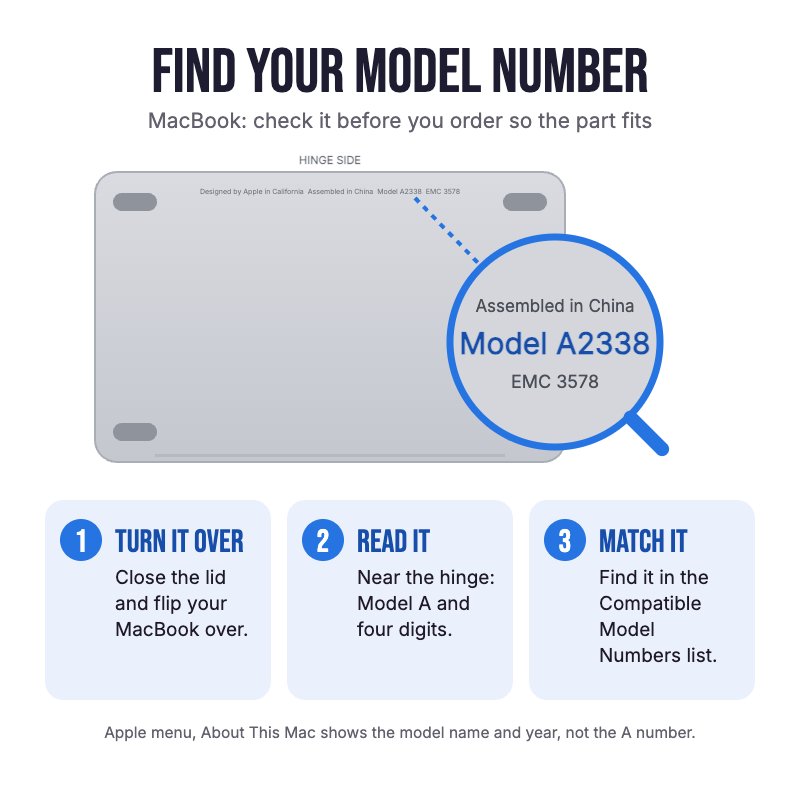
Does NOT fit the 15" 2018-2019 A1990 or the Apple silicon 16" models (A2485, A2780, A2991). Check the A-number on the bottom case for your model.
Please Note
Fits the Intel 16" A2141. About This Mac should show "MacBook Pro (16-inch, 2019)" with an Intel processor.
Please Note
High quality aftermarket battery, not an official Apple part.
Please Note
Isopropyl alcohol is not included in the box. You'll need some to loosen the old battery adhesive.
Specifications
- Compatible Part Numbers: A2113
- Compatible MacBook Models: A2141
- Voltage: 11.36V
- Watt Hours: 98.8Whr
- Capacity: 8697mAh
- Battery Type: Li-Polymer
- Cell Type: Ternary (nickel cobalt manganese)
- Battery Cells: 6
- Fixing: Glued to the top case, control board held by a T5 Torx screw
- Pairing: Not needed. Battery Health should read Normal after fitting.
- Warranty: 12 Months
How do I find my Model number?
 MacBook Pro 16" 2019
Compatible Model Numbers
MacBook Pro 16" 2019Model Number (A Number)
- A2141
EMC Number
- EMC 3347
 MacBook Pro 16" 2019 How do I find my Model number?
Model Identifier
- MacBookPro16,1
- MacBookPro16,4
Device Number (M Number)
- MVVJ2
- MVVK2
- MVVL2
- MVVM2
More info Less info
Installation Help

Check out the video above or the step by step guide below for assistance with this repair
iFixit MacBook Pro 16" 2019 Battery Replacement Guide
Remember
After completing your repair, calibrate your newly installed battery by charging it to 100% and then charging for a further two hours. Use your MacBook until it shuts off due to low battery, and finally, charge it uninterrupted to 100% again

Here are some tools you may need to help you complete the repair.
- Mechanic AK-15 King ESD Anti-Static Stainless Steel Red Curved Tweezers
- iGadget Plastic Triangle Opening Picks (set of 5)
- uFix iOpener Microwaveable Heated Bag Opening Tool
- iGadget Plastic Alcohol 200mL Bottle with Pump Top
- iGadget Universal Magnetic Work Project Mat with Marker (30cm x 25cm)

Here are some helpful tips to assist you in completing a safe repair on your device. If you are unsure of something or have any questions, please feel free to contact us either by phone (0508 IGADGET) or by email
- Drain the battery below 25% before you start on this repair. A charged lithium-ion battery can catch fire or explode if punctured or damaged
- These MacBook Pros can power on by themselves when the bottom case comes off or a charger is connected. Before you start, turn off AutoBoot in Terminal with sudo nvram AutoBoot=%00, then power down. Turn it back on afterwards with sudo nvram AutoBoot=%03
- The P5 pentalobe, T3, T5 and T8 Torx screwdrivers you need are included in the box
- Always track your screws to avoid putting back in the wrong place and damaging your device. You can draw a picture of your laptop and tape the screws to the right places or use a screw mat
- The bottom case is held by six P5 pentalobe screws (four 3.7 mm, two 7.3 mm, fitted at an angle) and hidden clips. Lift the front edge with a suction cup, release the side clips with a pick, then slide the case towards the front rather than lifting it up. On reassembly, hook the hinge-side clips first
- Disconnect the battery first: peel the control board sticker and data cable tape, flip up both ZIF flaps, slide the cable out, then remove the T5 screw on the power connector and lift it. A damaged cable or unlatched ZIF is the most common reason a new battery isn't recognised
- The trackpad has to come out (13 T5 screws). Its cable is glued to the battery, so warm it gently and peel it off slowly. Keep the nine small washers from the screw posts
- The logic board also has to come out (mixed T3, T5 and T8 screws). The keyboard ZIF flap is long and fragile, and the Touch ID and headphone connectors can catch under the board on reassembly
- Remove the T5 screw holding the battery control board
- The cells are glued to the top case. Cover the display with foil, tape over the trackpad opening and prop the hinge end up, then work in pairs (right, left, centre): a few drops of adhesive remover or isopropyl alcohol, wait about two minutes, and slide a plastic card under
- Never pry against a cell with metal tools, and never bend, squeeze or puncture the cells when removing the old battery or fitting the new one
- Clean off all the old adhesive, test-fit the new battery and press each cell down. Make sure the trackpad cable isn't trapped under the battery
- If your newly installed battery is draining fast or shutting off randomly, first try the battery calibration steps found here. If that doesn't resolve it, try an SMC reset
Caution
If the new battery or the battery in your device is swollen or damaged during repair, take the proper precautions
Note
You cannot dispose of old batteries in your general waste. Find recycling e-waste centres online or take to your local refuse station.
What’s In The Box
- 1x MacBook Pro 16" A2141 Replacement Battery
- 1x Instruction guide
- 1x Replacement connector cover tape
- 1x Simple replacement toolkit
- 1x Small plastic handle P5 pentalobe screwdriver
- 1x Small plastic handle T3 torx screwdriver
- 1x Small plastic handle T5 torx screwdriver
- 1x Small plastic handle T8 torx screwdriver
- 1x Plastic spudger
- 1x Plastic suction cup
- 2x Plastic pry cards
- 1x Plastic wide head spudger
- 1x Pair of nitrile gloves
- 1x Dust protection cloth
Related Products


