





Samsung Galaxy S6 Edge Plus Charging Port Replacement | Board with Headphone Jack and Mic | SM-G928F
Samsung Galaxy S6 Edge Plus Charging Port Replacement | Board with Headphone Jack and Mic | SM-G928F
 In Stock
Regular price
NZ$16.99
Regular price
Sale price
NZ$16.99
Unit price
per
inc GST


Samsung Galaxy S6 Edge Plus Charging Port Replacement | Board with Headphone Jack and Mic | SM-G928F
Samsung Galaxy S6 Edge Plus Charging Port Replacement | Board with Headphone Jack and Mic | SM-G928F
In Stock
Regular price
NZ$16.99
Regular price
Sale price
NZ$16.99
Unit price
per
inc GST
DIY DIFFICULTY
ModerateAbout 30 minutes to 1 hour
Glued back glass and the midframe come off first. The board plugs in under the main board, which hinges up.
- Replacement micro USB charging port board with 3.5mm headphone jack and microphone
- Fixes a loose or not working charging port, and a phone that will not charge, charges intermittently, won't connect to a computer or has no wired audio
- Compatible with Samsung Galaxy S6 Edge Plus model SM-G928F
Frequently Bought Together


Frequently Bought Together


Product Details
Is your Samsung Galaxy S6 Edge Plus charging port not working? If it feels loose, is charging on and off, is having trouble connecting to a computer, having audio issues or is not charging at all, a new charging port board (also called the charging board or sub board) is usually the repair you need.
Part Includes:
- Micro USB connector
- Headphone jack
- Microphone
- Return and Recent App buttons
- Flex Cable
- 12 Month Warranty
Please Note
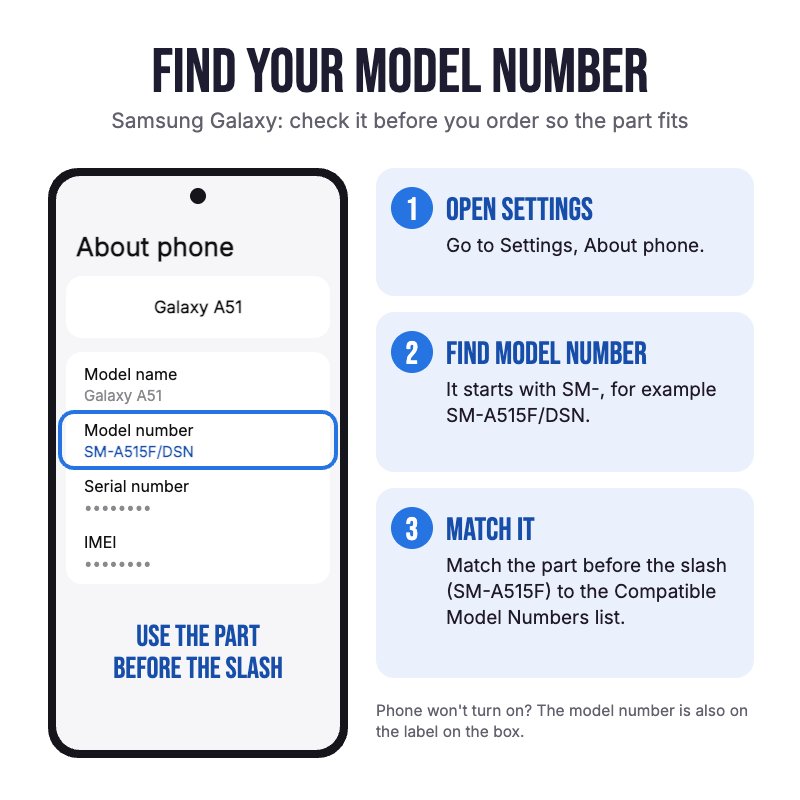
Does NOT fit the S6 or S6 Edge. Not confirmed for US or Canadian models (SM-G928A, T, P, V, W8). Check in Settings, About phone for your model.
Please Note
The micro USB port, headphone jack and microphone are all on this board, so it fixes charging, wired audio and call mic faults in one part.
Please Note
This part will either be brand new OEM or an A-Grade Used Genuine Samsung replacement.
Specifications
- Type: Charging Port Board
- Connector: Micro USB
- Headphone Jack: 3.5mm
- Microphone: Yes
- Board Version: International (SM-G928F)
- Warranty: 12 Months
Compatible Model Numbers
 Samsung Galaxy S6 Edge Plus
Model Number (SM Number)
- SM-G928F
Installation Help

Check out the video above for assistance with this repair

Here are some tools you may need to help you complete the repair.
- #00 Metal Phillips 2.0mm Screwdriver Tool (PH00)
- uFix iOpener Heat Bag
- Suction Cup
- iGadget 5 piece opening picks
- 5x iGadget Plastic Flexible Opening Cards
- Black Spudger
- Fine Tipped Curved Tweezers
- Isopropyl Adhesive Cleaning Alcohol Pad Wipes x100
- 2mm Tesa Tape 61395 Double Sided Adhesive Tape

Here are some helpful tips to assist you in completing a safe repair on your device. If you are unsure of something or have any questions, please feel free to contact us either by phone (0508 IGADGET) or by email
- Drain the battery below 25% before you start on this repair
- Always power down your device prior to working on it
- Always track your screws to avoid putting back in the wrong place and damaging your device. You can draw a picture of your phone and tape the screws to the right places or use a screw mat
- Take out the SIM tray first. The glass back cover is glued on: warm one edge at a time with the iOpener in short bursts (the screen and the battery are both damaged by heat), lift the cover with the suction cup and slide an opening pick around the edge.
- Only push an opening pick 4 to 5mm past the edge. Any deeper and you can cut the antenna cable, the power button cable or the rear cameras.
- Remove the 18 midframe screws and lift the midframe off. It carries the NFC and wireless charging coil, so do not tear its cable.
- Make sure you always unplug the battery before attempting any component removal
- Disconnect the display, front camera, sensor and two aerial cables, then hinge the main board up. The charging port board's flex plugs into the underside of the main board, so do not lift it too far.
- The back and recent apps button pads on the board are stuck to the back of the screen. Lift them slowly with a pick, as they tear easily.
- Reconnect both aerial (coaxial antenna) cables and press every connector down until it clicks when refitting, or the phone may lose signal after the repair.
- Test charging, the headphone jack and the back and recent apps buttons before you close the phone, then clean off the old adhesive with alcohol and fit new adhesive or 2mm Tesa tape so the back glass sits flat.
What’s In The Box
- 1x Samsung Galaxy S6 Edge Plus Charging Port Board with Headphone Jack


