





iPhone 6s Plus Front Glass Replacement | Glass Only with Frame and OCA (No LCD)
iPhone 6s Plus Front Glass Replacement | Glass Only with Frame and OCA (No LCD)
 In Stock
Regular price
NZ$7.99
Regular price
Sale price
NZ$7.99
Unit price
per
inc GST


iPhone 6s Plus Front Glass Replacement | Glass Only with Frame and OCA (No LCD)
iPhone 6s Plus Front Glass Replacement | Glass Only with Frame and OCA (No LCD)
In Stock
Regular price
NZ$7.99
Regular price
Sale price
NZ$7.99
Unit price
per
inc GST
DIY DIFFICULTY
Very difficult
The cracked glass is bonded to the working LCD and is cut off by machine. The new glass is then laminated on.
A technician with microsoldering equipment is recommended for this part.
- iPhone 6s Plus front glass replacement: glass only with the frame and OCA already fitted, for refurbishing a screen whose LCD still works
- Fixes cracked or scratched front glass when the display and touch underneath still work
- Compatible with iPhone 6s Plus models; A1634, A1687, A1690 & A1699
Frequently Bought Together


Frequently Bought Together


Product Details
Cracked the front glass on your iPhone 6s Plus, but the display and touch still work underneath? This is the front glass only, with the frame and OCA (optically clear adhesive) already attached, for refurbishing a screen where the glass is cracked but the LCD still works. It needs to be laminated to the LCD, so it suits technicians with refurbishing equipment rather than a home repair.
Also available for the iPhone 6s Plus: OCX LCD (complete screen, no laminating)
Why get yours?
- FRAME AND OCA PRE-FITTED - The frame is already bonded to the glass and the OCA is applied, so there's no gluing on a frame or cutting OCA sheets to size.
- KEEPS YOUR OWN LCD - Only the cracked glass is replaced, so the phone keeps its own LCD and touch, and you're not paying for a whole new screen.
- BLACK OR WHITE - Choose the colour that matches the front of your phone.
- SENT FROM NZ STOCK - Shipped from our New Zealand stock, so there's no waiting weeks for a part to arrive from overseas.
Part Includes:
- iPhone 6s Plus front glass with frame and OCA (pre-fitted)
Please Note
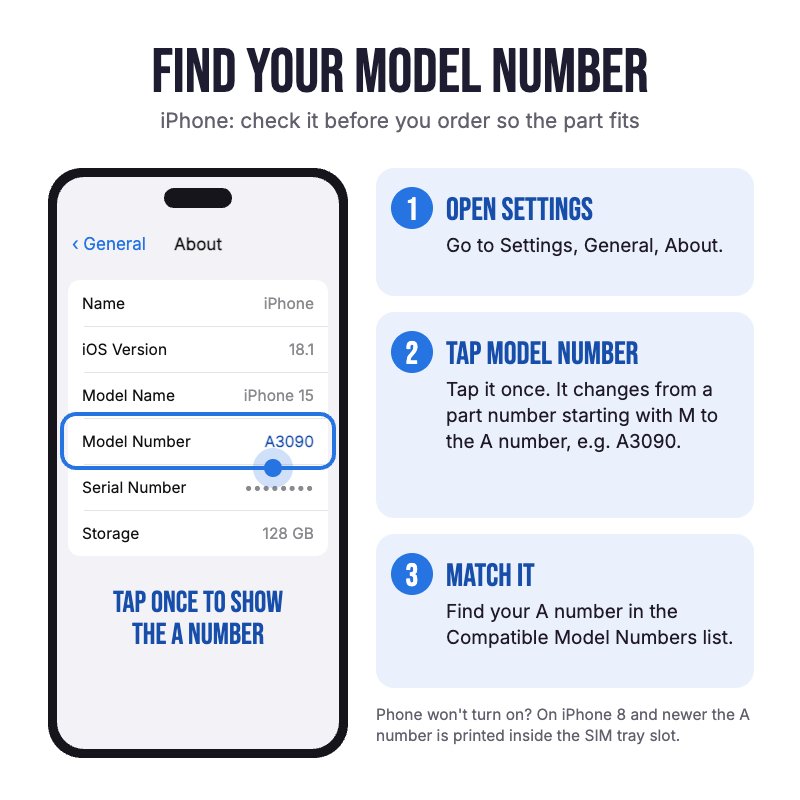
Does NOT fit the iPhone 6 or 6s. Not confirmed to fit the 6 Plus, 7 Plus or 8 Plus, which look the same. Check in Settings, General, About for your model.
Please Note
Glass only, no LCD. Your own LCD is reused, so it must still show a picture and respond to touch.
Please Note
Aftermarket glass, not an official Apple part. Fitting it needs LCD refurbishing equipment: a separator, cutting wire and an OCA laminator.
Specifications
- Part Type: Front glass with frame and OCA (glass only, no LCD)
- Display Size: 5.5"
- Frame: Pre-fitted to the glass
- OCA: Pre-applied
- Polariser: Not fitted
- Colours: Black or White
- Pairing: Not needed. This iPhone doesn't check its screen, so no Unknown Part message.
How do I find my Model number?
 iPhone 6s Plus
Compatible Model Numbers
iPhone 6s PlusModel Number (A Number)
- A1634
- A1687
- A1690
- A1699
How do I find my Model number?
 iPhone 6s Plus Model Numbers
Model Identifier
- iPhone8,2
EMC Number
- EMC 2944
Device Number (M Number)
- MKTM2
- MKTR2
- MKTW2
- MKTN2
- MKTT2
- MKTX2
- MKTL2
- MKTQ2
- MKTV2
- MKTP2
- MKTU2
- MKTY2
- MKW62
- MKWC2
- MKWG2
- MKW72
- MKWD2
- MKWH2
- MKW52
- MKW92
- MKWF2
- MKW82
- MKWE2
- MKWJ2
- MKVP2
- MKVW2
- MKW12
- MKVQ2
- MKVX2
- MKW22
- MKVN2
- MKVV2
- MKW02
- MKVU2
- MKVY2
- MKW32
- MKV52
- MKV92
- MKVG2
- MKV62
- MKVD2
- MKVH2
- MKV32
- MKV82
- MKVF2
- ML6C2
- ML6G2
- ML6L2
- ML6D2
- ML6H2
- ML6M2
- ML6A2
- ML6F2
- ML6K2
- ML6E2
- ML6J2
- ML6N2
- MN3R2
- MN3T2
- MN3Q2
- MN3U2
More info Less info
Installation Help

Follow the step by step guide below for assistance with this repair
iFixit iPhone 6s Plus Screen Replacement Guide (taking the screen out and refitting it)

Here are some tools you may need to help you complete the repair.
- P2 Metal Pentalobe 0.8mm Screwdriver Tool
- #000 1.5mm Metal Phillips Screwdriver Tool (PH000)
- Large Blue Suction Cup Opening Tool
- Mechanic AK-15 King ESD Anti-Static Stainless Steel Red Curved Tweezers
- iGadget 5 piece opening picks
- Nylon Antistatic Spudger Pry Tool
- Or get the P2 and #000 screwdrivers, suction cup, tweezers, opening pick and spudger together in our 8 Piece iPhone Repair Toolkit
- uFix iOpener Microwaveable Heated Bag Opening Tool
- iGadget Plastic Alcohol 200mL Bottle with Pump Top
- iGadget Universal Magnetic Work Project Mat with Marker (30cm x 25cm)
- Glass separator machine
- Cutting wire (molybdenum wire)
- OCA/glue remover
- LCD cleaner
- OCA laminator (vacuum laminating machine)
- Autoclave (bubble remover)

Here are some helpful tips to assist you in completing a safe repair on your device. If you are unsure of something or have any questions, please feel free to contact us either by phone (0508 IGADGET) or by email
- Drain the battery below 25% before you start on this repair
- Always power down your device prior to working on it
- Take out the two P2 pentalobe screws next to the Lightning port. The screen is held by adhesive, so warm the bottom edge with the iOpener, lift it with the suction cup and slide a pick no more than 3mm in, staying away from the right-hand edge where the display cables run.
- Track your screws (Phillips #000) on a magnetic mat and keep each set separate. Screws put back in the wrong hole can damage the logic board
- Always unplug the battery before you remove any other parts. Keep metal tools away from the battery, and never bend, crush or puncture it.
- Take the home button, front camera and sensor cable, earpiece speaker and LCD shield plate off the cracked screen with the spudger and tweezers. They go back onto the same screen once the new glass is on. Only your phone's own home button works with Touch ID.
- Heat the screen on a glass separator machine and pull cutting wire (molybdenum wire) between the cracked glass and the LCD to separate them. Then clear the old OCA with OCA/glue remover and wipe the LCD with LCD cleaner. If the polariser on the LCD is damaged, fit a new polariser first.
- Line the LCD up with the new glass in a laminating mould and bond them in an OCA laminator (vacuum laminating machine), then put the screen through an autoclave (bubble remover) so no air is left under the glass.
- Refit the parts and test the display, touch, home button, front camera and the proximity sensor (during a call) before you close the phone, and leave the protective film and stickers on until the screen is working properly.
- Clean off the old adhesive with isopropyl alcohol and fit a new screen gasket adhesive when you close the phone.
What’s In The Box
- 1x iPhone 6s Plus Front Glass with Frame and OCA


