





iPhone 16 Plus Battery Replacement | 4674mAh | Premium Zero-Cycle
iPhone 16 Plus Battery Replacement | 4674mAh | Premium Zero-Cycle
 In Stock
Regular price
NZ$42.99
Regular price
Sale price
NZ$42.99
Unit price
per
inc GST
 Ships today


iPhone 16 Plus Battery Replacement | 4674mAh | Premium Zero-Cycle
iPhone 16 Plus Battery Replacement | 4674mAh | Premium Zero-Cycle
In Stock
Regular price
NZ$42.99
Regular price
Sale price
NZ$42.99
Unit price
per
inc GST
DIY DIFFICULTY
ModerateAbout 45 minutes to 1 hour
Back glass opens first. The battery is held by electrically released adhesive that lets go when a power source is clipped on.
- Premium 4674mAh zero-cycle battery with a Texas Instruments fuel gauge chip, battery adhesive included
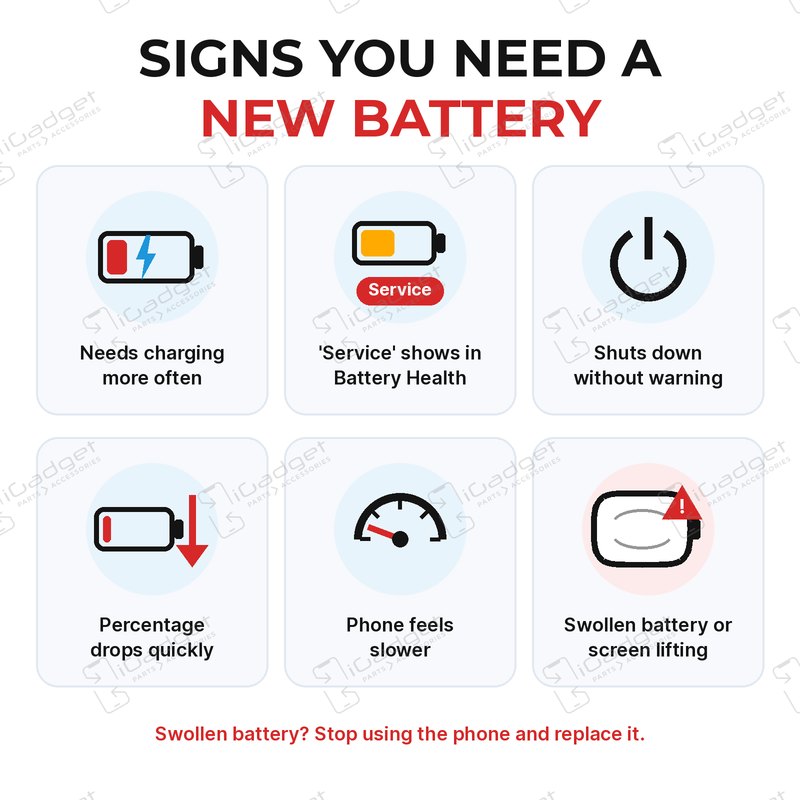
- Replaces a battery that drains fast, won't hold a charge, shuts down early or shows a Service message
- Compatible with iPhone 16 Plus models: A3082, A3289, A3290 and A3291
Frequently Bought Together


Frequently Bought Together


Product Details

Is your iPhone 16 Plus draining fast, shutting down early, not turning on or showing a Service message in Battery Health? A worn battery is usually the cause. This is a new 4674mAh replacement.
- TEXAS INSTRUMENTS FUEL GAUGE CHIP - The same brand of chip Apple uses, reporting temperature, voltage and charge to your iPhone.
- NO SURPRISE SHUTDOWNS - Accurate readings help your iPhone charge safely, stop at full and show a true percentage, so no sudden drops or early shutdowns like low-grade chips cause.
- ZERO CYCLE CELL - A brand new cell, never used in a phone, so you start with its full life.
- FULL 4674mAh CAPACITY - Rated at 4674mAh, the same as the battery Apple fitted to the iPhone 16 Plus.
- ELECTRICALLY RELEASING ADHESIVE INCLUDED - New pre-cut electrically releasing battery adhesive comes in the box. Next time the battery needs to come out, a low voltage on its silver tab releases it, so there's no prying, pulling or snapping strips.
- BATTERY HEALTH SHOWS - On iOS 18.1 or later, Settings shows the new battery's Battery Health and maximum capacity, so you can keep an eye on it.
- SENT FROM NZ STOCK - Shipped from our New Zealand stock, so there's no waiting weeks for a part to arrive from overseas.
Part Includes:
- iPhone 16 Plus Replacement Battery
- Battery Adhesive
- 12 Month Warranty
Please Note
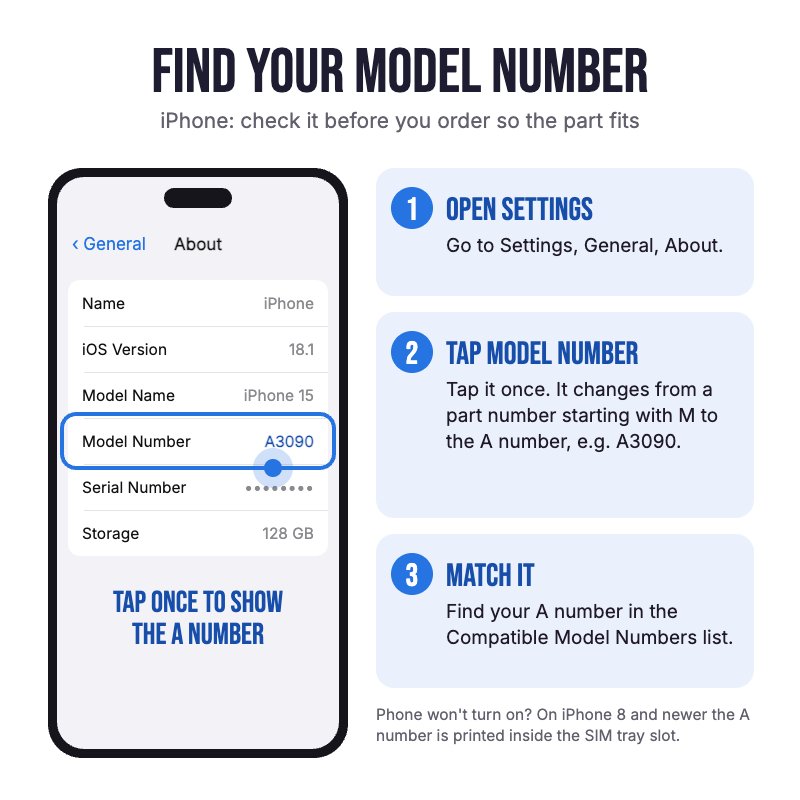
Does NOT fit the iPhone 16, 16 Pro Max or 15 Plus. Check in Settings, General, About for your model.
Please Note
New electrically releasing battery adhesive comes in the box, the same type Apple uses, so the battery can be released cleanly next time.
Please Note
Aftermarket battery, not an official Apple part. iOS shows "Unable to verify this iPhone has a genuine Apple battery" and lists it as an Unknown Part. The battery works normally.
Specifications
- Voltage: 3.88V
- Watt Hours: 18.12Whr
- Capacity: 4674mAh
- Chipset: Texas Instruments
- Battery Type: Lithium-ion polymer
- Condition: Brand new cell
- Pairing: iOS shows an Unknown Part message in Settings, and the battery works normally.
- Warranty: 12 Months
How do I find my Model number?
 iPhone 16 Plus
Compatible Model Numbers
iPhone 16 PlusModel Number (A Number)
- A3082
- A3289
- A3290
- A3291
 iPhone 16 Plus Model Numbers
Model Identifier
- iPhone17,4
EMC Number
- EMC 8692
- EMC 8693
- EMC 8694
- EMC 8695
Device Number (M Number)
- MXUW3
- MXV33
- MXV83
- MXV93
- MXUX3
- MXV43
- MXV13
- MXV73
- MXUU3
- MXV03
- MXV63
- MXUT3
- MXUY3
- MXV53
- MXVE3
- MXVK3
- MXVR3
- MXVT3
- MXVF3
- MXVL3
- MXVD3
- MXVJ3
- MXVC3
- MXVH3
- MXVP3
- MXVA3
- MXVG3
- MXVN3
- MXVX3
- MXY23
- MY2D3
- MY2J3
- MXVY3
- MXY13
- MY253
- MXVV3
- MXWV3
- MY1X3
- MXVU3
- MXUV3
- MXVQ3
- MXY53
- MXVW3
- MXWN3
- MY1P3
- MXUD3
- MXUJ3
- MXUQ3
- MXUE3
- MXUK3
- MXUR3
- MXUC3
- MXUH3
- MXUP3
- MXUA3
- MXUG3
- MXUN3
- MXU93
- MXUF3
- MXUL3
More info Less info
Installation Help

Check out the video above or the step by step guide below for assistance with this repair
iFixit iPhone 16 Plus Battery Replacement Guide
Remember
After completing your repair, calibrate your newly installed battery by charging it to 100% and then charging for a further two hours. Use your iPhone until it shuts off due to low battery, and finally, charge it uninterrupted to 100% again

Here are some tools you may need to help you complete the repair.
Please note: A discounted simple toolset with the tools you need is available in a pop-up when you add this product to cart
- P2 Metal Pentalobe 0.8mm Screwdriver Tool
- Y000 Metal Triwing Tri-Point 0.6mm Screwdriver Tool
- Large Blue Suction Cup Opening Tool
- Mechanic AK-15 King ESD Anti-Static Stainless Steel Red Curved Tweezers
- iGadget Plastic Triangle Opening Picks (set of 5)
- 5x iGadget Plastic Flexible Opening Cards
- Nylon Antistatic Spudger Pry Tool
- Or get the P2 and Y000 screwdrivers, suction cup, tweezers, opening pick, opening card and spudger together in our 8 Piece iPhone Repair Toolkit
- uFix iOpener Microwaveable Heated Bag Opening Tool
- iGadget Plastic Alcohol 200mL Bottle with Pump Top
- iPhone 16 Plus Rear Back Glass Door OEM Waterproof Adhesive
- iGadget Universal Magnetic Work Project Mat with Marker (30cm x 25cm)

Here are some helpful tips to assist you in completing a safe repair on your device. If you are unsure of something or have any questions, please feel free to contact us either by phone (0508 IGADGET) or by email
- Drain the battery below 25% and power the phone off before you start. A charged lithium-ion battery can catch fire if it's punctured or damaged
- Remove the pentalobe screws by the USB-C port. Warm each back glass edge in turn with the iOpener in short bursts to protect the battery. Lift the bottom edge with a suction cup and work an opening pick around no more than 3mm deep on every edge. Keep picks away from the volume up button, where the back glass cable runs, and never slide past the volume buttons
- The back glass swings open to the right and stays connected by its cable until the cover is off, so prop it up
- Track your screws on a magnetic mat or tape them to a drawing of your phone. They're different lengths, and a long screw in a short hole can damage the logic board
- Always unplug the battery before you remove any other parts. Keep metal tools away from the battery, and never bend, crush or puncture it.
- Remove the middle connector cover (Y000; slide it towards the left edge), then unplug the battery press connector and the wireless charging coil connector and lift the back glass off. The screen stays on
- There are no pull strips: the battery adhesive lets go under low voltage. Peel up the silver tab at the battery's bottom edge. Clip a red lead to the tab and a black lead to the grounding screw on the loudspeaker, lower right. Power it for about 90 seconds with a VoltClip on a powered USB-C cable (Apple uses 9V for 1 minute 30 seconds). Keep the clips from touching each other or any other metal. Lift the battery with a suction cup; if it won't move, power it another minute rather than prying
- Clean the frame bare with isopropyl alcohol (the old adhesive is clear, so wipe 5 to 10 times) and let it dry. Stick the battery adhesive to the battery first, fold the silver tab to the front so a clip can reach it next time, then lower the battery straight in against the logic board and loudspeaker, as it can't move once it touches. Press firmly for about 10 seconds
- Press the battery connector down until it clicks and check the phone powers on and charges. Clean off the old adhesive with isopropyl alcohol and fit a new back glass adhesive before you close it up
- If the new battery drains fast or shuts off, reseat the battery connector, check it for foam or debris and make sure the flex isn't strained, then do a force restart
Caution
If the new battery or the battery in your device is swollen or damaged during repair, take the proper precautions
Note
You cannot dispose of old batteries in your general waste. Find recycling e-waste centres online or take to your local refuse station.
What's In The Box
- 1x iPhone 16 Plus Replacement Battery
- 1x Replacement Battery Adhesive


