





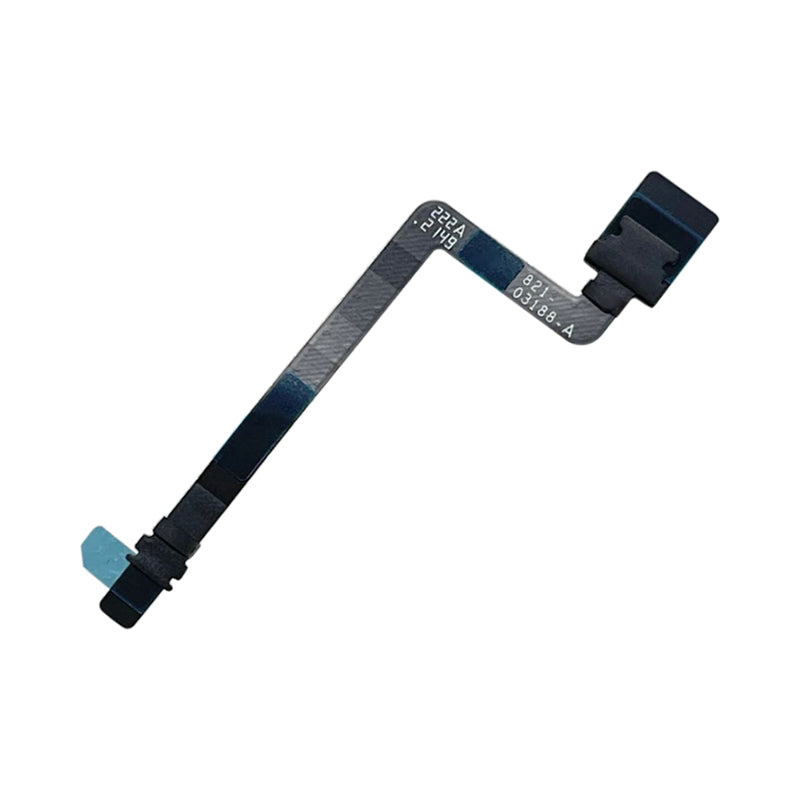
MacBook Pro 14" A2442/A2779/A2918/A2992 Battery Connect Flex Cable (2021-2023)
MacBook Pro 14" A2442/A2779/A2918/A2992 Battery Connect Flex Cable (2021-2023)
 In Stock
Regular price
NZ$19.99
Regular price
Sale price
NZ$19.99
Unit price
per
inc GST


MacBook Pro 14" A2442/A2779/A2918/A2992 Battery Connect Flex Cable (2021-2023)
MacBook Pro 14" A2442/A2779/A2918/A2992 Battery Connect Flex Cable (2021-2023)
In Stock
Regular price
NZ$19.99
Regular price
Sale price
NZ$19.99
Unit price
per
inc GST
- Replacement Lithium Ion Battery Connect Flex Cable
- Suits MacBook Pro 14" A2442/A2779/A2918/A2992 (2021-2023)
Frequently Bought Together
Frequently Bought Together


Product Details
This MacBook Pro 14" (2021-2023) replacement battery flex cable is what you need to bring your dead MacBook Pro to life!
Part Includes:
- Replacement Battery Connect Flex Cable
- 12 Month Warranty
Please Note
This part will either be brand new or a used Genuine Apple replacement
Specifications
- Battery Type: Li-Polymer
- Warranty: 12 Months
How do I find my Model number?
 MacBook Pro 14" 2023
 MacBook Pro 14" Late 2023
 MacBook Pro 14" Late 2023
 MacBook Pro 14" 2021
Compatible Model Numbers
MacBook Pro 14" 2023Model Number (A Number)
- A2779
EMC Number
- EMC
 MacBook Pro 14" 2023 How do I find my Model number?
Model Identifier
- MacBookPro14,5
- MacBookPro14,9
Device Number (M Number)
- MPHE3
- MPHH3
- MPHF3
- MPHJ3
- MPHG3
- MPHK3
More info Less info
MacBook Pro 14" Late 2023Model Number (A Number)
- A2918
EMC Number
- EMC 8304
MacBook Pro 14" 2020 How do I find my Model number?
Model Identifier
- Mac15,3
Device Number (M Number)
- MTL73
- MR7J3
- MTL83
- MR7K3
- MXE03
- MXE13
More info Less info
MacBook Pro 14" Late 2023Model Number (A Number)
- A2992
EMC Number
- EMC 8407
MacBook Pro 14" 2020 How do I find my Model number?
Model Identifier
- Mac15,6
- Mac15,10
- Mac15,8
Device Number (M Number)
- Mac15,8
- MRX33
- MRX63
- MRX43
- MRX73
- MRX53
- MRX83
More info Less info
MacBook Pro 14" 2021Model Number (A Number)
- A2442
EMC Number
- EMC 3650
MacBook Pro 13" 2020 How do I find my Model number?
Model Identifier
- MacBookPro18,3
- MacBookPro18,4
Device Number (M Number)
- MKGP3
- MKGQ3
- MKGR3
- MKGT3
More info Less info
Installation Help

Here are some tools you may need to help you complete the repair.
- T5 TorxScrewdriver
- T3 Torx Screwdriver
- T8 Torx Screwdriver
- P2 Pentalobe Screwdriver
- P5 Pentalobe Screwdriver
- iSesamo opening tool
- Fine Tipped Curved Tweezers
- Black Spudger

Here are some helpful tips to assist you in completing a safe repair on your device. If you are unsure of something or have any questions, please feel free to contact us either by phone (0508 IGADGET) or by email
- Drain the battery below 25% before you start on this repair. A charged lithium-ion battery can catch fire or explode if punctured or damaged
- Always track your screws to avoid putting back in the wrong place and damaging your device. You can draw a picture of your laptop and tape the screws to the right places or use a screw mat
- Always power down your device prior to working on it
- Make sure you always unplug the battery before attempting any component removal
- If your newly installed battery is draining fast or shutting off randomly, first try the battery calibration steps found here. Apple silicon Macs have no SMC reset - shut down, wait 30 seconds and restart
What’s In The Box
- 1x MacBook Pro 14" A2442/A2779/A2918/A2992 Battery Connect Flex Cable


