





MacBook Pro 15" A1286 Trackpad Flex Cable Replacement (2009-2012) | 821-0832
MacBook Pro 15" A1286 Trackpad Flex Cable Replacement (2009-2012) | 821-0832
 In Stock
Regular price
NZ$29.99
Regular price
Sale price
NZ$29.99
Unit price
per
inc GST


MacBook Pro 15" A1286 Trackpad Flex Cable Replacement (2009-2012) | 821-0832
MacBook Pro 15" A1286 Trackpad Flex Cable Replacement (2009-2012) | 821-0832
In Stock
Regular price
NZ$29.99
Regular price
Sale price
NZ$29.99
Unit price
per
inc GST
DIY DIFFICULTY
ModerateAbout 30 minutes to 1 hour
Lower case off and the screwed-in battery comes out. The trackpad unscrews to reach the far end of the cable.
- Replacement trackpad flex cable, printed 821-0832-A
- Fixes a trackpad that's not clicking, not responding or not working at all
- Compatible with MacBook Pro 15" A1286 (Mid 2009, Mid 2010, Early and Late 2011, Mid 2012)
Frequently Bought Together


Frequently Bought Together


Product Details
Is the trackpad on your 15" MacBook Pro not clicking, not responding or not working at all? The trackpad flex cable joins the trackpad to the logic board, and a worn or torn cable stops it working. A new trackpad cable is a cheap part to try before a whole trackpad.
This cable fits the 15-inch unibody MacBook Pro A1286 from Mid 2009 to Mid 2012. Need the trackpad too? We stock the A1278 / A1286 2009 to 2012 trackpad.
Part Includes:
- 1x Trackpad flex cable
- 12 Month Warranty
Please Note
Does NOT fit the Late 2008 A1286 or the 2012 to 2015 Retina A1398. Check the year in About This Mac.
Please Note
This is the cable only. The trackpad and its screws are not included.
Please Note
The lower case comes off and the battery comes out. The trackpad unscrews to reach the far end of the cable.
Specifications
- Part Type: Trackpad flex cable
- Printed Part Number: 821-0832-A (also 821-1255-A)
- Connects: Trackpad to logic board
- Condition: Brand new or A-grade used genuine Apple part
- Warranty: 12 Months
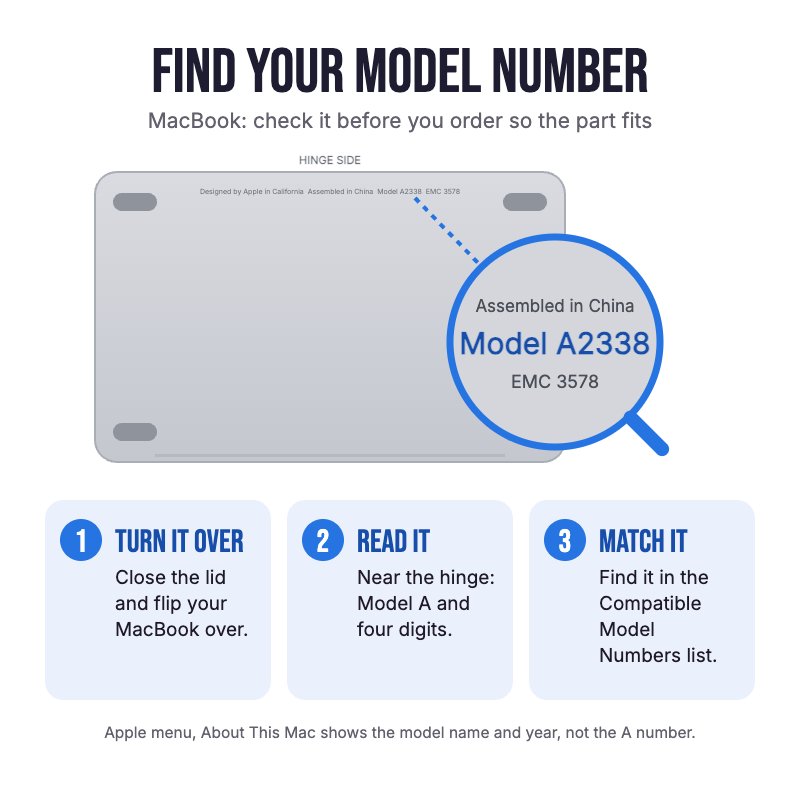
How do I find my Model number?
 MacBook Pro 15" Mid 2012
MacBook Pro 15" Late 2011
MacBook Pro 15" Early 2011
MacBook Pro 15" Mid 2010
MacBook Pro 15" Mid 2009
Compatible Model Numbers
MacBook Pro 15" Mid 2012Model Number (A Number)
- A1286
EMC Number
- EMC 2556
 MacBook Pro 15" Mid 2012 How do I find my Model number?
Model Identifier
- MacBookPro9,1
Device Number (M Number)
- MD103
- MD104
- MD546
More info Less info
MacBook Pro 15" Late 2011Model Number (A Number)
- A1286
EMC Number
- EMC 2563
MacBook Pro 15" Late 2011 How do I find my Model number?
Model Identifier
- MacBookPro8,2
Device Number (M Number)
- MD318
- MD322
More info Less info
MacBook Pro 15" Early 2011Model Number (A Number)
- A1286
EMC Number
- EMC 2353-1
MacBook Pro 15" Early 2011 How do I find my Model number?
Model Identifier
- MacBookPro8,2
Device Number (M Number)
- MC721
- MC723
- MD035
More info Less info
MacBook Pro 15" Mid 2010Model Number (A Number)
- A1286
EMC Number
- EMC 2353
MacBook Pro 15" Mid 2010 How do I find my Model number?
Model Identifier
- MacBookPro6,2
Device Number (M Number)
- MC371
- MC372
- MC373
- MC666
- MC847
More info Less info
MacBook Pro 15" Mid 2009Model Number (A Number)
- A1286
EMC Number
- EMC 2324
- EMC 2325
MacBook Pro 15" Mid 2009 How do I find my Model number?
Model Identifier
- MacBookPro5,3
- MacBookPro5,4
Device Number (M Number)
- MB985
- MB986
- MC118
More info Less info
Installation Help

Check out the video above or the step by step guide below for assistance with this repair
The video shows the cable job: lower case off, battery out, then the trackpad unscrews and the cable unplugs at both ends. The iFixit guide also takes out the fans and logic board, which the cable job doesn't need.
iFixit MacBook Pro 15" Unibody Mid 2012 Trackpad Replacement Guide

Here are some tools you may need to help you complete the repair.
- #00 Metal Phillips 2.0mm Screwdriver Tool (PH00)
- Or get the #00 Phillips in our 10 Piece MacBook Repair Toolkit
- Y0 Metal Triwing Tri-Point 2.0mm Screwdriver Tool
- Nylon Antistatic Spudger Pry Tool
- ESD Anti-Static Stainless Steel Curved Tweezers | ESD 15
- iGadget Universal Magnetic Work Project Mat with Marker (30cm x 25cm)

Here are some helpful tips to assist you in completing a safe repair on your device. If you are unsure of something or have any questions, please feel free to contact us either by phone (0508 IGADGET) or by email
- Always power down your device prior to working on it
- Always unplug the battery before you remove any other parts, and keep metal tools away from the battery. Never bend, crush or puncture it
- The lower case screws are #00 Phillips and come in two lengths. Track them on a magnetic work mat or tape them to a drawing of your laptop
- The battery is held by tri-point screws, not glue. Lift it out by its plastic pull tab
- Lift the cable connectors with a spudger, never the sockets
- Peel back the clear tape over the cable with tweezers and stick it back down over the new cable
- The trackpad screws are small #00 Phillips screws along the inner edge. Hold the trackpad while the last ones come out, then refit them gently so the click still feels even
What’s In The Box
- 1x MacBook Pro 15" A1286 Trackpad Flex Cable (2009-2012)


