





MacBook Air 15" MagSafe 3 Charging Port Replacement Board | M2 A2941, M3 A3114, M4 A3241 (2023-2025)
MacBook Air 15" MagSafe 3 Charging Port Replacement Board | M2 A2941, M3 A3114, M4 A3241 (2023-2025)
 In Stock
Regular price
NZ$24.99
Regular price
Sale price
NZ$24.99
Unit price
per
inc GST


MacBook Air 15" MagSafe 3 Charging Port Replacement Board | M2 A2941, M3 A3114, M4 A3241 (2023-2025)
MacBook Air 15" MagSafe 3 Charging Port Replacement Board | M2 A2941, M3 A3114, M4 A3241 (2023-2025)
In Stock
Regular price
NZ$24.99
Regular price
Sale price
NZ$24.99
Unit price
per
inc GST
DIY DIFFICULTY
ModerateAbout 45 minutes to 1 hour
Bottom case, a hinge cover and the left speaker come out. The port is held in by a small wedge.
- Replacement MagSafe 3 charging port board (DC-in board) with flex cable
- Fixes MagSafe 3 not charging, charging on and off, not holding the magnet or showing no light on the plug
- Compatible with MacBook Air 15" M2 A2941 (2023), M3 A3114 (2024) and M4 A3241 (2025)
Frequently Bought Together


Frequently Bought Together


Product Details
Is the MagSafe charger on your MacBook Air 15" not charging, charging on and off, or showing no light? The MagSafe 3 port sits on its own small DC-in board, so a new MagSafe 3 charging port board is usually the repair you need.
This board fits the 15-inch MacBook Air M2 A2941 from 2023, M3 A3114 from 2024 and M4 A3241 from 2025. USB-C port playing up instead? We stock the MacBook Air 15" M2 A2941 USB-C board and the M3 / M4 MacBook Air 15" USB-C board. Got a 13" Air? This is the MacBook Air 13" MagSafe 3 board.
Part Includes:
- 1x MagSafe 3 DC-in board with flex cable and connector
- 12 Month Warranty
Please Note
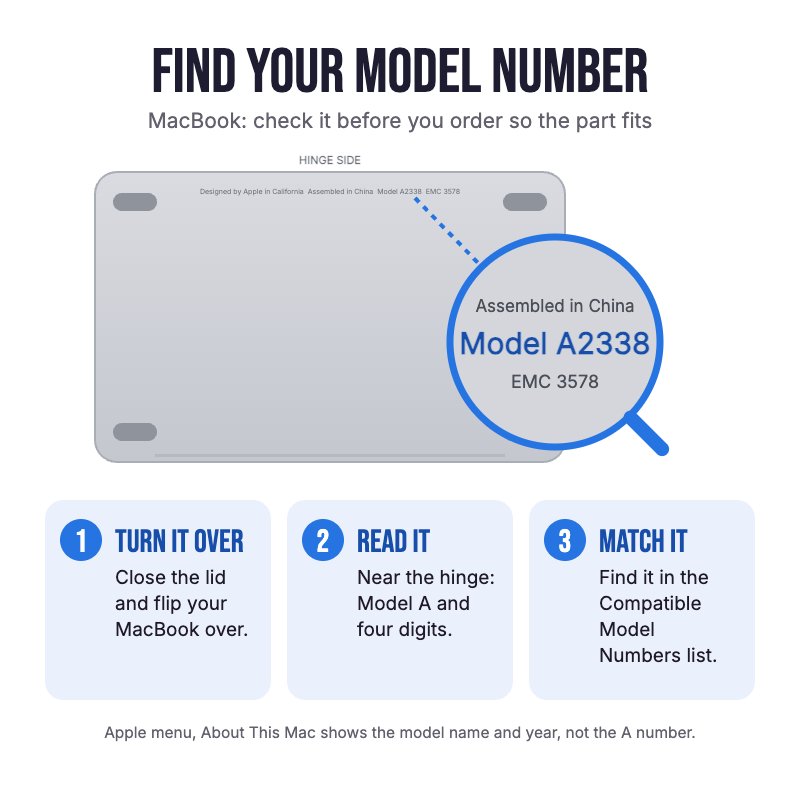
Does NOT fit the 13" MacBook Air (A2681, A3113, A3240) or any MacBook Pro. Not confirmed to fit the 2026 M5 15" Air. Check the A-number on the bottom case for your model.
Please Note
Takes the MagSafe 3 charger. The board works the same in any colour MacBook Air.
Please Note
The left speaker and a hinge cover come out to reach the board. Neither the logic board nor the battery comes out.
Specifications
- Part Type: MagSafe 3 DC-in charging port board with flex cable
- Printed Part Number: 821-04220
- Connector: MagSafe 3
- Condition: Brand new or A-grade genuine Apple part
- Warranty: 12 Months
How do I find my Model number?
 MacBook Air 15" Early 2025
 MacBook Air 15" Early 2024
 MacBook Air 15" Mid 2023
Compatible Model Numbers
MacBook Air 15" Early 2025Model Number (A Number)
- A3241
EMC Number
- EMC 8782
 MacBook Air 15" Early 2025 How do I find my Model number?
Model Identifier
- Mac16,13
Device Number (M Number)
- MC6J4
- MC6K4
- MC6L4
- MC7A4
- MC7C4
- MC7D4
- MDG34
- MDG84
- MDG94
- MW1G3
- MW1H3
- MW1J3
- MW1K3
- MW1L3
- MW1M3
More info Less info
MacBook Air 15" Early 2024Model Number (A Number)
- A3114
EMC Number
- EMC 8612
MacBook Air 15" Early 2024 How do I find my Model number?
Model Identifier
- Mac15,13
Device Number (M Number)
- MRYM3
- MRYN3
- MRYP3
- MRYQ3
- MRYR3
- MRYT3
- MRYU3
- MRYV3
- MXD13
- MXD23
- MXD33
- MXD43
- MC9D4
- MC9E4
- MC9F4
- MC9G4
- MC9H4
- MC9J4
- MC9K4
- MC9L4
More info Less info
MacBook Air 15" Mid 2023Model Number (A Number)
- A2941
EMC Number
- EMC 8301
MacBook Air 15" Mid 2023 How do I find my Model number?
Model Identifier
- Mac14,15
Device Number (M Number)
- MQKP3
- MQKQ3
- MQKR3
- MQKT3
- MQKU3
- MQKV3
- MQKW3
- MQKX3
More info Less info
Installation Help

Follow the step by step guides below for assistance with this repair
iFixit MacBook Air 15" 2024 MagSafe Port Replacement Guide
iFixit MacBook Air 15" 2023 MagSafe Port Replacement Guide

Here are some tools you may need to help you complete the repair.
- P5 Metal Pentalobe 1.2mm Screwdriver Tool
- T3 Metal Torx Screwdriver Tool
- T4 Metal Torx Screwdriver Tool
- T6 Metal Torx Screwdriver Tool
- Mechanic AK-15 King ESD Anti-Static Stainless Steel Red Curved Tweezers
- Nylon Antistatic Spudger Pry Tool
- iGadget Plastic Triangle Opening Picks (set of 5)
- iGadget Universal Magnetic Work Project Mat with Marker (30cm x 25cm)

Here are some helpful tips to assist you in completing a safe repair on your device. If you are unsure of something or have any questions, please feel free to contact us either by phone (0508 IGADGET) or by email
- Keep the lid closed until the battery is unplugged, as opening it can switch the MacBook on. Run
sudo nvram BootPreference=%00in Terminal first (macOS Sequoia or later) so the MacBook doesn't switch on when you open it or plug it in. Undo it afterwards withsudo nvram -d BootPreference - Always power down your device prior to working on it
- Drain the battery below 25% before you start on this repair
- The bottom case is held by four P5 screws and clips. Track your screws on a magnetic work mat or tape them to a drawing of your laptop, as several screws look alike but are different lengths
- Peel back the tape on the battery connector cover, remove its two screws and lift the connector with an opening pick
- Apple uses Torx Plus screws here (3IP on the covers and wedge, 4IP on the speaker). A T3 and T4 Torx will fit if you keep firm downward pressure. One speaker screw is a T6
- The left speaker has to come out. Lift its connector with a spudger and don't let its cable catch on the logic board as you lift it
- The MagSafe cable is lightly stuck to the frame. Peel it up slowly, and press it back down when you refit it
- The port sits in its recess under a small metal wedge held by two screws. The magnet in the port pulls screws sideways, so start them with tweezers
What’s In The Box
- 1x MacBook Air 15" MagSafe 3 Charging Port Board (2023-2025)


