





MacBook Air 15" M2 A2941 Charging Port Replacement | USB-C Board (2023)
MacBook Air 15" M2 A2941 Charging Port Replacement | USB-C Board (2023)
 In Stock
Regular price
NZ$20.99
Regular price
Sale price
NZ$20.99
Unit price
per
inc GST


MacBook Air 15" M2 A2941 Charging Port Replacement | USB-C Board (2023)
MacBook Air 15" M2 A2941 Charging Port Replacement | USB-C Board (2023)
In Stock
Regular price
NZ$20.99
Regular price
Sale price
NZ$20.99
Unit price
per
inc GST
DIY DIFFICULTY
ModerateAbout 45 minutes to 1 hour
Bottom case, a hinge cover and the left speaker come out. The port flex is stuck down with adhesive.
- Replacement USB-C charging port board (one USB-C port on its flex cable), silver
- Fixes a charging port that's loose, only charges at an angle, won't connect to devices or has stopped charging
- Compatible with MacBook Air 15" M2 A2941 (2023)
Frequently Bought Together


Frequently Bought Together


Product Details
Is a USB-C port on your MacBook Air 15" M2 loose, only charging at an angle, or not charging at all? Each of its two USB-C ports sits on its own small board, so a new USB-C charging port board is usually the repair you need.
This board fits the 15-inch MacBook Air M2 A2941 from 2023. Got a 2024 M3 or 2025 M4 15" Air? This is the M3 / M4 MacBook Air 15" USB-C board.
Part Includes:
- 1x USB-C port board with flex cable and connector
- 12 Month Warranty
Please Note
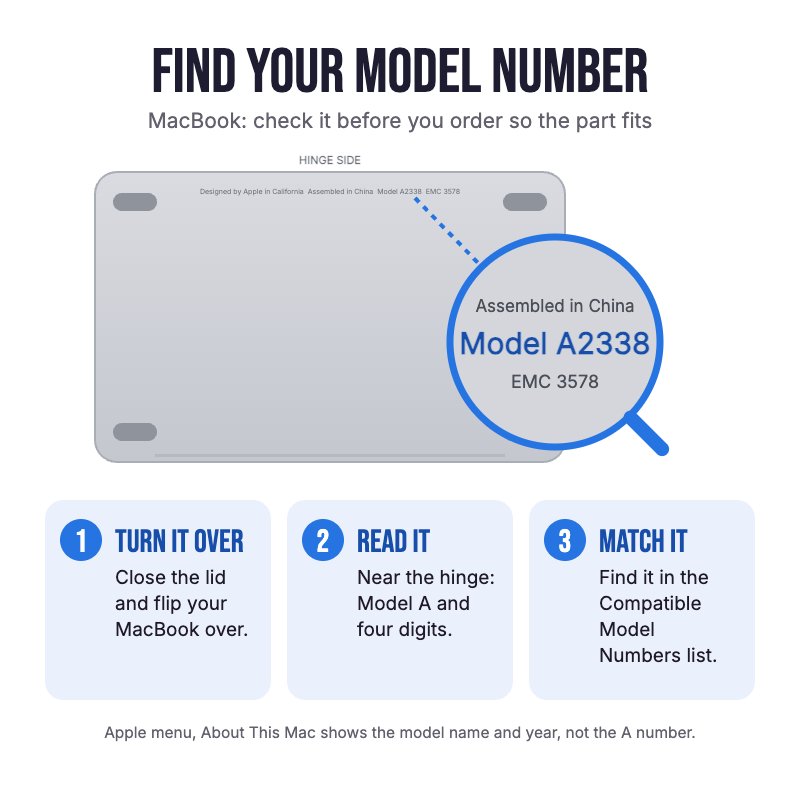
Does NOT fit the 13" MacBook Air, or the 15" M3 A3114 or M4 A3241. Check the A-number on the bottom case for your model.
Please Note
One board carries one USB-C port, so buy one for each port that has failed. Silver board, which suits any colour MacBook Air.
Please Note
The left speaker and a hinge cover come out to reach the board. The logic board stays in.
Specifications
- Part Type: USB-C port board with flex cable
- Printed Part Number: 821-04765
- Ports: 1x USB-C / Thunderbolt
- Colour: Silver
- Condition: Brand new or A-grade used genuine Apple part
- Warranty: 12 Months
How do I find my Model number?
 MacBook Air 15" Mid 2023
Compatible Model Numbers
MacBook Air 15" Mid 2023Model Number (A Number)
- A2941
EMC Number
- EMC 8301
 MacBook Air 15" Mid 2023 How do I find my Model number?
Model Identifier
- Mac14,15
Device Number (M Number)
- MQKP3
- MQKQ3
- MQKR3
- MQKT3
- MQKU3
- MQKV3
- MQKW3
- MQKX3
More info Less info
Installation Help

Follow the step by step guide below for assistance with this repair
iFixit MacBook Air 15" 2023 USB-C Ports Replacement Guide

Here are some tools you may need to help you complete the repair.
- P5 Metal Pentalobe 1.2mm Screwdriver Tool
- T3 Metal Torx Screwdriver Tool
- T4 Metal Torx Screwdriver Tool
- T5 Torx Screwdriver | MacBook Logic Board and Battery Repairs
- T6 Metal Torx Screwdriver Tool
- Or get the P5 and T5 together in our 10 Piece MacBook Repair Toolkit
- Mechanic AK-15 King ESD Anti-Static Stainless Steel Red Curved Tweezers
- iGadget Plastic Triangle Opening Picks (set of 5)
- iGadget Universal Magnetic Work Project Mat with Marker (30cm x 25cm)

Here are some helpful tips to assist you in completing a safe repair on your device. If you are unsure of something or have any questions, please feel free to contact us either by phone (0508 IGADGET) or by email
- Keep the lid closed until the battery is unplugged, as opening it can switch the MacBook on. Run
sudo nvram BootPreference=%00in Terminal first (macOS Sequoia or later) so the MacBook doesn't switch on when you open it or plug it in. Undo it afterwards withsudo nvram -d BootPreference - Always power down your device prior to working on it
- The bottom case is held by four P5 screws and clips. Track your screws on a magnetic work mat or tape them to a drawing of your laptop, as several screws look alike but are different lengths
- Peel back the tape on the battery connector cover, remove its two screws and lift the connector with an opening pick
- Apple uses Torx Plus screws here (3IP covers, 4IP speaker, 5IP board). A T3, T4 and T5 Torx will fit if you keep firm downward pressure. One speaker screw is a T6 (TR6 security on some units)
- The left speaker has to come out. Don't let its cable catch on the logic board as you lift it
- The port flex is stuck to the frame. Warm it gently with a hair dryer and peel it up slowly. On refit, press it down and hold for about 10 seconds
- The MagSafe magnet pulls on the board screws, so start them with angled tweezers. Start the board screws loosely, plug an unpowered USB-C cable into the port to line the board up, then tighten them. A port that sits out of line makes the plug feel stiff or loose
- Fit new cowling tape flush with the cowling edge
What’s In The Box
- 1x MacBook Air 15" M2 A2941 USB-C Port Board (2023)


