





MacBook Air 11" A1465 I/O Board | MagSafe 2 Charging Port, USB and Audio (2013-2015)
MacBook Air 11" A1465 I/O Board | MagSafe 2 Charging Port, USB and Audio (2013-2015)
1
MBAIR-A1465-19
 In Stock
Regular price
NZ$89.99
Regular price
Sale price
NZ$89.99
Unit price
per
inc GST
 Ships today


MacBook Air 11" A1465 I/O Board | MagSafe 2 Charging Port, USB and Audio (2013-2015)
MacBook Air 11" A1465 I/O Board | MagSafe 2 Charging Port, USB and Audio (2013-2015)
1
MBAIR-A1465-19
In Stock
Regular price
NZ$89.99
Regular price
Sale price
NZ$89.99
Unit price
per
inc GST
DIY DIFFICULTY
EasyAbout 40 minutes to 1.5 hours
Bottom case, I/O cable, fan and battery come out. The logic board stays in.
- Replacement I/O board with the MagSafe 2 charging port, a USB 3 port and the headphone jack
- Fixes a MagSafe port that won't charge, a dead USB port or no sound from the headphone jack
- Compatible with MacBook Air 11" A1465 (Mid 2013, Early 2014, Early 2015)
Frequently Bought Together


Frequently Bought Together


Product Details
Is your 11-inch MacBook Air not charging, or has its left USB port or headphone jack stopped working? The MagSafe 2 port, USB port and headphone jack all sit on one small I/O board (also called the IO board), so a new I/O board is usually the repair you need.
This board fits the 11-inch MacBook Air A1465 from Mid 2013, Early 2014 and Early 2015. The Mid 2012 A1465 uses a different board.
Part Includes:
- 1x I/O board with MagSafe 2 port, USB 3 port and headphone jack
- 12 Month Warranty
Please Note
Does NOT fit the Mid 2012 MacBook Air 11" A1465 or the 2010-2011 A1370. Check the year in About This Mac as well as the A-number.
Please Note
Carries the MagSafe 2 port, one USB 3 port and the headphone jack. The I/O cable to the logic board is a separate part, so reuse your old one.
Please Note
The battery comes out to reach the board, along with the fan.
Specifications
- Part Type: I/O board (MagSafe 2, USB, audio)
- Printed Part Number: 820-3453-A
- Service Part Number: 923-0430
- Ports: MagSafe 2, 1x USB 3, 3.5 mm headphone jack
- Condition: Brand new or A-grade genuine Apple part
- Warranty: 12 Months
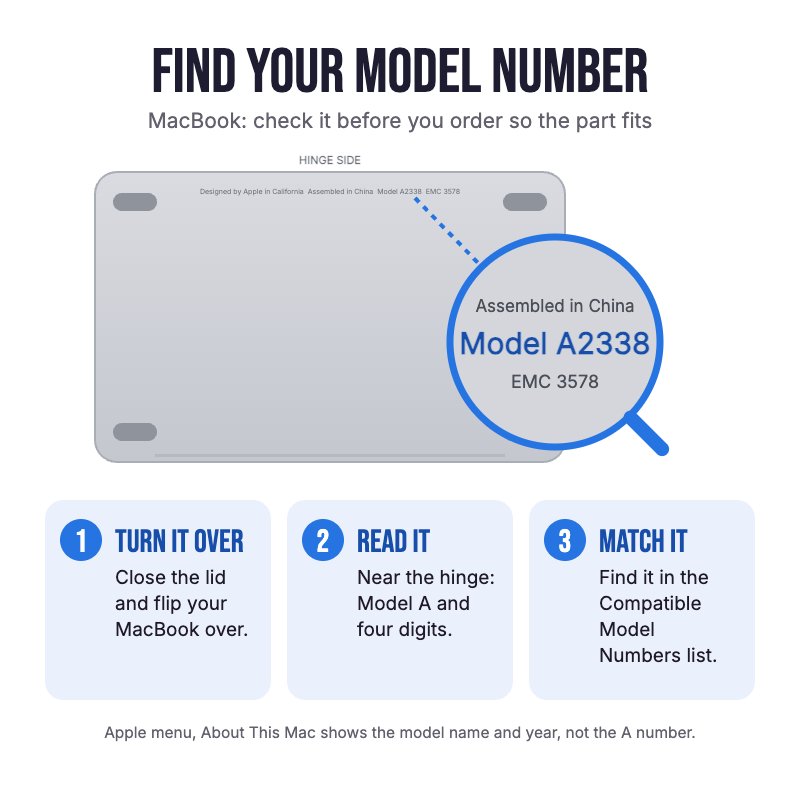
How do I find my Model number?
 MacBook Air 11" Early 2015
MacBook Air 11" Early 2014
MacBook Air 11" Mid 2013
Compatible Model Numbers
MacBook Air 11" Early 2015Model Number (A Number)
- A1465
EMC Number
- EMC 2924
 MacBook Air 11" Early 2015 How do I find my Model number?
Model Identifier
- MacBookAir7,1
Device Number (M Number)
- MJVM2
- MJVP2
More info Less info
MacBook Air 11" Early 2014Model Number (A Number)
- A1465
EMC Number
- EMC 2631
MacBook Air 11" Early 2014 How do I find my Model number?
Model Identifier
- MacBookAir6,1
Device Number (M Number)
- MD711
- MD712
- MF067
More info Less info
MacBook Air 11" Mid 2013Model Number (A Number)
- A1465
EMC Number
- EMC 2631
MacBook Air 11" Mid 2013 How do I find my Model number?
Model Identifier
- MacBookAir6,1
Device Number (M Number)
- MD711
- MD712
More info Less info
Installation Help

Follow the step by step guides below for assistance with this repair
iFixit MacBook Air 11" Early 2015 I/O Board Replacement Guide
iFixit MacBook Air 11" Early 2014 I/O Board Replacement Guide
iFixit MacBook Air 11" Mid 2013 I/O Board Replacement Guide

Here are some tools you may need to help you complete the repair.
- P5 Metal Pentalobe 1.2mm Screwdriver Tool
- T5 Torx Screwdriver | MacBook Logic Board and Battery Repairs
- Or get the P5 and T5 together in our 10 Piece MacBook Repair Toolkit
- Mechanic AK-15 King ESD Anti-Static Stainless Steel Red Curved Tweezers
- Nylon Antistatic Spudger Pry Tool
- iGadget Universal Magnetic Work Project Mat with Marker (30cm x 25cm)

Here are some helpful tips to assist you in completing a safe repair on your device. If you are unsure of something or have any questions, please feel free to contact us either by phone (0508 IGADGET) or by email
- Always power down your device prior to working on it
- The 10 P5 bottom case screws are two lengths. Track your screws on a magnetic work mat or tape them to a drawing of your laptop, as several screws look alike but are different lengths
- Unplug the battery, then take out the fan (three T5 screws) and the battery (five T5 screws). Don't press on the exposed cells
- The camera cable is stuck to the fan. Peel it off with tweezers, then walk its connector out side to side with a spudger
- Pull the I/O power cable parallel to the board towards the front edge
- Keep the small rubber gasket from the case corner and refit it
What’s In The Box
- 1x MacBook Air 11" A1465 I/O Board (2013-2015)


