





iPhone 7 Plus Charging Port Replacement | Lightning Dock Flex Cable | A1784
iPhone 7 Plus Charging Port Replacement | Lightning Dock Flex Cable | A1784
 In Stock
Regular price
NZ$12.99
Regular price
Sale price
NZ$12.99
Unit price
per
inc GST


iPhone 7 Plus Charging Port Replacement | Lightning Dock Flex Cable | A1784
iPhone 7 Plus Charging Port Replacement | Lightning Dock Flex Cable | A1784
In Stock
Regular price
NZ$12.99
Regular price
Sale price
NZ$12.99
Unit price
per
inc GST
DIY DIFFICULTY
DifficultAbout 1 to 2 hours
Glued screen opens from the front. The logic board comes out and the glued port flex lifts off past the battery.
- iPhone 7 Plus charging port replacement, the complete Lightning dock flex cable assembly
- Fixes a charging port that's not working, loose, charges on and off, only charges at an angle or won't connect to a computer
- Compatible with iPhone 7 Plus models; A1661, A1784, A1785 & A1786
Frequently Bought Together


Frequently Bought Together


Product Details
Is your iPhone 7 Plus charging port not working? If it feels loose, only charges at an angle, charges on and off, won't connect to a computer or isn't charging at all, a new charging port (also called the charger port or Lightning dock connector) is usually the repair you need.
This Lightning dock flex cable is the complete charging port assembly for the iPhone 7 Plus (A1661, A1784, A1785 and A1786). It also carries the dual lower microphones and the cellular antenna, so it can fix audio problems such as callers not hearing you or muffled voice memos.
100% guaranteed to never show "This accessory may not be supported by iPhone" on official Apple products with our charger ports.
Part Includes:
- Lightning connector
- Dual microphones
- Cellular antenna
- Flex cable with logic board connector
- 12 Month Warranty
Please Note
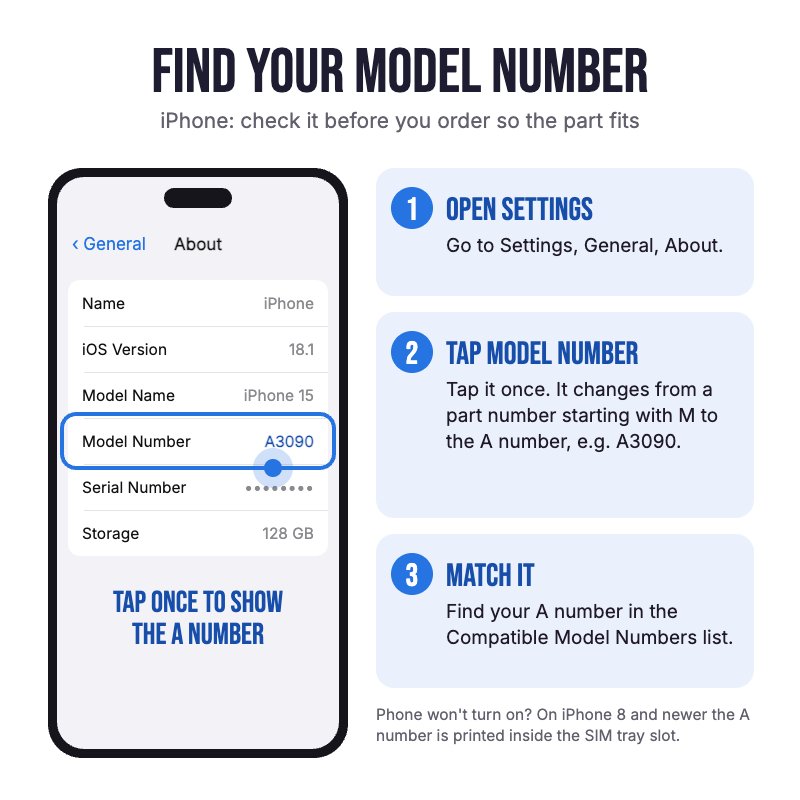
Does NOT fit iPhone 8 Plus or iPhone 7. They look alike but use different ports. Check in Settings, General, About for your model.
Please Note
The port colour only shows inside the port and can't be seen from the outside. Choose a light or dark one to suit the inside of your current port.
Please Note
This repair requires the removal of the logic board to reach the port. Watch the video in Installation Help before you start.
Specifications
- Part Number: 821-00276
- Type: Charging Port Dock Flex Cable
- Connector: Lightning
- Microphone: Dual lower microphones
- Antenna: Cellular antenna
- Colours: Black and White
- Compatible Models: iPhone 7 Plus (A1661, A1784, A1785, A1786)
- Pairing: Not needed. The charging port isn't a paired part, so no Unknown Part message.
- Warranty: 12 Months
How do I find my Model number?
 iPhone 7 Plus
Compatible Model Numbers
iPhone 7 PlusModel Number (A Number)
- A1661
- A1784
- A1785
- A1786
 iPhone 7 Plus Model NumbersHow do I find my Model number?
Model Identifier
- iPhone9,2
- iPhone9,4
EMC Number
- EMC 3092
Device Number (M Number)
- MN482
- MN492
- MN4A2
- MN4C2
- MN4D2
- MN4E2
- MN4F2
- MN4J2
- MN4K2
- MN4L2
- MN4M2
- MN4P2
- MN4Q2
- MN4U2
- MN4V2
- MN4W2
- MN4X2
- MN4Y2
- MN502
- MN522
- MN532
- MN552
- MN562
- MN572
- MN592
- MN5C2
- MN5D2
- MN5E2
- MN5F2
- MN5G2
- MN5H2
- MN5J2
- MN5K2
- MN5L2
- MN5M2
- MN5N2
- MN5P2
- MN5Q2
- MN5R2
- MN5T2
- MN5U2
- MN5V2
- MN5W2
- MN5X2
- MN5Y2
- MN602
- MN612
- MN622
- MN632
- MN642
- MN652
- MN662
- MN672
- MN682
- MN692
- MN6A2
- MN6C2
- MN6D2
- MN6E2
- MN6F2
- MN6G2
- MN6H2
- MN6J2
- MN6K2
- MN6L2
- MN6M2
- MN6N2
- MN6P2
- MN6Q2
- MNFP2
- MNFQ2
- MNFR2
- MNFT2
- MNFV2
- MNFY2
- MNQH2
- MNQJ2
- MNQK2
- MNQL2
- MNQM2
- MNQN2
- MNQP2
- MNQQ2
- MNQR2
- MNQT2
- MNQU2
- MNQV2
- MNQW2
- MNQX2
- MNQY2
- MNR02
- MNR12
- MNR22
- MNR32
- MNR42
- MNR52
- MNR62
- MNR72
- MNR82
- MNR92
- MNRA2
- MNRC2
- MNRD2
- MNRJ2
- MNRK2
- MNRL2
- MNRM2
- MPQV2
- MPQW2
- MPQY2
- MPR02
- MPR12
- MPR52
- MPR62
- MPR72
- MPR82
- MPR92
- MPRA2
- MQU52
- MQU62
- MPQX2
- MQU32
- MQU42
- MPR22
- MPRE2
- MQU82
More info Less info
Installation Help

Check out the video above or the step by step guide below for assistance with this repair
iFixit iPhone 7 Plus Lightning Connector Replacement Guide

Here are some tools you may need to help you complete the repair.
- P2 Metal Pentalobe 0.8mm Screwdriver Tool
- Y000 Metal Triwing Tri-Point 0.6mm Screwdriver Tool
- #000 1.5mm Metal Phillips Screwdriver Tool (PH000)
- Large Blue Suction Cup Opening Tool
- Mechanic AK-15 King ESD Anti-Static Stainless Steel Red Curved Tweezers
- iGadget Plastic Triangle Opening Picks (set of 5)
- 5x iGadget Plastic Flexible Opening Cards
- Nylon Antistatic Spudger Pry Tool
- Or get the P2, Y000 and #000 screwdrivers, suction cup, tweezers, opening pick, opening card and spudger together in our 8 Piece iPhone Repair Toolkit
- Metal Stand-Off 2.5mm Screwdriver Tool
- iSclack Evo (Gen 3) Suction Cup Opening Tool for phones and tablets by Dottorpod
- uFix iOpener Microwaveable Heated Bag Opening Tool
- iHold Evo Screen Holding Opening Tool for iPads and iPhones with USB-C Adapter by Dottorpod
- iGadget Plastic Alcohol 200mL Bottle with Pump Top
- iPhone 7 Plus/8 Plus LCD Screen Gasket Adhesive

Here are some helpful tips to assist you in completing a safe repair on your device. If you are unsure of something or have any questions, please feel free to contact us either by phone (0508 IGADGET) or by email
- Drain the battery below 25% before you start on this repair
- Always power down your device prior to working on it
- Always track your screws to avoid putting back in the wrong place and damaging your device. There are two 3.4mm P2 pentalobe screws at the bottom edge, then many Y000, Phillips and standoff screws of different lengths inside. You can draw a picture of your phone and tape the screws to the right places or use a screw mat
- Warm the bottom edge of the screen and lift it with a suction cup placed above the home button. Slide an opening pick in no more than 3mm deep (take extra care on the right edge, where the display cables run) and don't lift the screen more than 15 degrees. Slide the screen down to free the clips along the top edge, then open it like a book from the left side
- Make sure you always unplug the battery before attempting any component removal. On the iPhone 7 Plus the battery stays in the phone: remove the lower display cable bracket (Y000 screws) and lift the battery connector out of its socket
- On the iPhone 7 Plus the charging port sits under the logic board. The screen, Wi-Fi antenna, rear camera, logic board, barometric vent, Taptic Engine and loudspeaker all come out to reach it. Note which coaxial antenna cable goes to which socket, and don't forget to remove the SIM tray when removing the logic board
- The port is held by several Phillips screws plus a grounding spring contact at the top left. The two microphones and the flex cable are held with adhesive, so warm the area and lift them gently with a plastic pick. Move the rubber Lightning gasket from the old port across to the new one. If the spring is bent or lost, we sell the iPhone 7 & 7 Plus Charging Port Ground Spring
- The connector to the logic board can be tricky to align correctly so it fits into place. We recommend taking a pencil and tracing the original charging port so you know exactly where it gets positioned and lining the new charger port within the pencil lines
- Before closing the phone, test that it charges, connects to a computer, has mobile signal and that the microphones work (record a voice memo)
- Opening your iPhone 7 Plus breaks its factory water-resistance seal. Clean off the old adhesive with isopropyl alcohol and fit new screen adhesive when you close it up
What’s In The Box
- 1x iPhone 7 Plus Replacement Charging Port Flex Cable


