MacBook Pro 14" / 16" USB-C Port Replacement Board (2021-2023) | A2442 A2485 A2779 A2780 A2918

MacBook Pro 14" / 16" USB-C Port Replacement Board (2021-2023) | A2442 A2485 A2779 A2780 A2918

MBPRO-A2442-19 In Stock
Regular price NZ$19.99
Regular price Sale price NZ$19.99
Sale Sold out
inc GST

4 xNZ$0.00

Skip to product information

MacBook Pro 14" / 16" USB-C Port Replacement Board (2021-2023) | A2442 A2485 A2779 A2780 A2918

MacBook Pro 14" / 16" USB-C Port Replacement Board (2021-2023) | A2442 A2485 A2779 A2780 A2918

MBPRO-A2442-19 In Stock
Regular price NZ$19.99
Regular price Sale price NZ$19.99
Sale Sold out
inc GST
Or Weekly Interest Free Payments of

4 x NZ$4.99

DIY DIFFICULTY ModerateAbout 1 to 2 hours

Bottom case and logic board come out to reach it. Each board is held by two T5 screws.

  • Replacement USB-C port board (one Thunderbolt / USB-C port on its flex cable), silver
  • Fixes a USB-C charging port that's loose, only charges at an angle, won't connect to devices or has stopped working
  • Compatible with MacBook Pro 14" A2442, A2779, A2918 and 16" A2485, A2780 (2021-2023)
Regular price NZ$19.99
Regular price Sale price NZ$19.99

Dispatches next business day straight from our NZ warehouse

Frequently Bought Together

#00 Metal Phillips 2.0mm Screwdriver Tool (PH00)

#00 Metal Phillips 2.0mm Screwdriver Tool (PH00)

IG-DRIV-PH00

NZ$7.99
Choose Default:
P5 Metal Pentalobe 1.2mm Screwdriver Tool

P5 Metal Pentalobe 1.2mm Screwdriver Tool

IG-DRIV-P5

NZ$7.99
Choose Default:
S-160 Blue Anti-Static iPhone/iPad/Mobile Phone Repair Heat Resistant Work Mat (45cm x 30cm)

S-160 Blue Anti-Static iPhone/iPad/Mobile Phone Repair Heat Resistant Work Mat (45cm x 30cm)

IG-MAT-S160

NZ$22.99
Choose Default:
ESD Anti-Static Stainless Steel Curved Tweezers | ESD 15

ESD Anti-Static Stainless Steel Curved Tweezers | ESD 15

IG-TWEEZ-CUR

NZ$6.99
Choose Default:
iSesamo Metal Pry Bar Opening Tool with Mini Tool by Dottorpod

iSesamo Metal Pry Bar Opening Tool with Mini Tool by Dottorpod

DP-ISESAMO

NZ$16.99
Choose Default:
View full details

Frequently Bought Together

iPhone 6s Battery Replacement | 1715mAh | Premium Zero-Cycle

iPhone 6s Battery Replacement | 1715mAh | Premium Zero-Cycle

IPH6S-15

NZ$15.99
Choose Default:
MacBook Air 13" A1466 / A1369 Battery Replacement (A1496) 2010-2017

MacBook Air 13" A1466 / A1369 Battery Replacement (A1496) 2010-2017

MBAIR-A1466-15-A1496

NZ$69.99
Choose Default:
iPhone 7 Battery Replacement | 1960mAh | Premium Zero-Cycle

iPhone 7 Battery Replacement | 1960mAh | Premium Zero-Cycle

IPH7-15

NZ$16.99
Choose Default:
8 Piece iPhone Repair Toolkit - Suitable for 7-16 Series

8 Piece iPhone Repair Toolkit - Suitable for 7-16 Series

IG-IPH7-TOOL-8P

NZ$19.99
Choose Default:
11 Piece Universal Phone, Laptop and Tablet Repair Tool Kit - Pentalobe P2/P5, Y000, T5, #000

11 Piece Universal Phone, Laptop and Tablet Repair Tool Kit - Pentalobe P2/P5, Y000, T5, #000

IG-TOOL-SET-11P

NZ$10.00
Choose Default:

Product Details

Is a USB-C port on your MacBook Pro 14" or 16" loose, only charging at an angle, or not working at all? Each USB-C (Thunderbolt) port sits on its own small board, so a new USB-C port board is usually the repair you need.

This board fits the 14-inch and 16-inch MacBook Pro from 2021 to 2023, with M1 Pro, M1 Max, M2 Pro or M2 Max chips, and the 14-inch M3 A2918. Charging problem on the MagSafe side? We also stock the MacBook Pro 14"/16" MagSafe 3 charging port board.


Part Includes:

  • 1x USB-C port board with flex cable and connector
  • 12 Month Warranty


Please Note

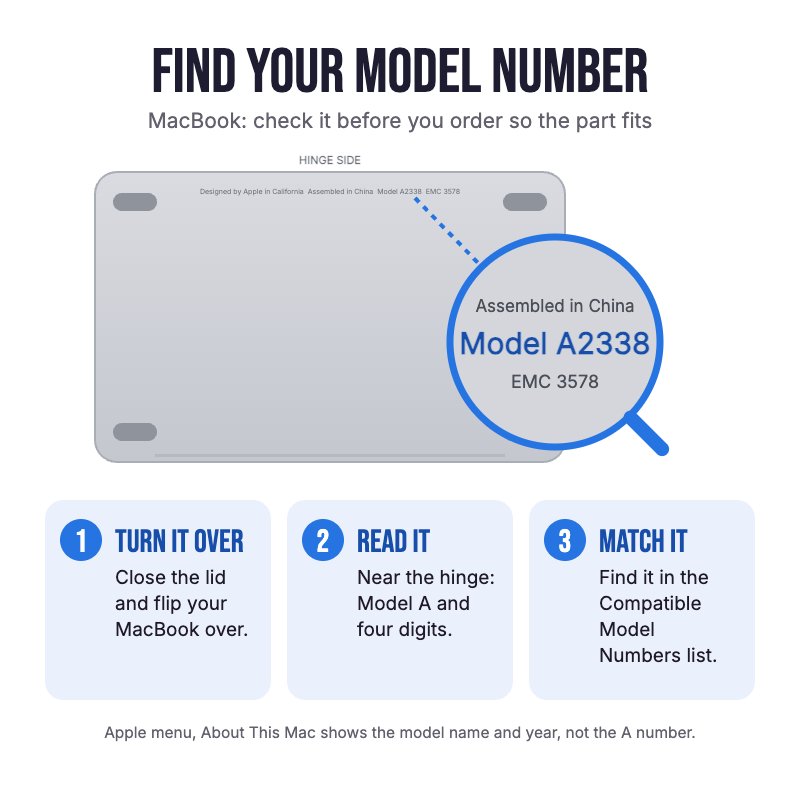
Does NOT fit the M3 Pro or M3 Max MacBook Pro (14" A2992, 16" A2991), the 2024 M4 models or the 13" MacBook Pro. Check the A-number on the bottom case for your model.

Please Note

One board carries one USB-C port. Most 14" and 16" models have three (the M3 14" A2918 has two), so check which one is faulty before you order.

Please Note

The USB-C boards sit under the logic board, so the logic board has to come out to fit it.

Specifications

  • Part Type: USB-C (Thunderbolt) port board with flex cable
  • Printed Part Number: 821-03084
  • Ports: 1x USB-C / Thunderbolt
  • Colour: Silver
  • Condition: Brand new or A-grade used genuine Apple part
  • Warranty: 12 Months
How do I find my Model number?

Compatible Model Numbers

MacBook Pro A2918 MacBook Pro 14" Late 2023
Model Number (A Number)
  • A2918
EMC Number
  • EMC 8304

Part number icon MacBook Pro 14" Late 2023 How do I find my Model number?

Model Identifier
  • Mac15,3
Device Number (M Number)
  • MR7J3
  • MR7K3
  • MTL73
  • MTL83
  • MTLC3
  • MXE03
  • MXE13
* Please note, to make searching the device number (M Number) easier, we have only listed the part numbers (First 5 characters), we have removed the region numbers as there is no difference in parts. For example, if "M Number" is "MC922LL/A". we remove the "region" portion and everything after (the "LL/A" at the end) leaving us with "MC922".
More info Less info
MacBook Pro A2779 MacBook Pro 14" Early 2023
Model Number (A Number)
  • A2779
EMC Number
  • EMC 8102

Part number icon MacBook Pro 14" Early 2023 How do I find my Model number?

Model Identifier
  • Mac14,5
  • Mac14,9
Device Number (M Number)
  • MPHE3
  • MPHF3
  • MPHG3
  • MPHH3
  • MPHJ3
  • MPHK3
* Please note, to make searching the device number (M Number) easier, we have only listed the part numbers (First 5 characters), we have removed the region numbers as there is no difference in parts. For example, if "M Number" is "MC922LL/A". we remove the "region" portion and everything after (the "LL/A" at the end) leaving us with "MC922".
More info Less info
MacBook Pro A2780 MacBook Pro 16" Early 2023
Model Number (A Number)
  • A2780
EMC Number
  • EMC 8103

Part number icon MacBook Pro 16" Early 2023 How do I find my Model number?

Model Identifier
  • Mac14,6
  • Mac14,10
Device Number (M Number)
  • MNW83
  • MNW93
  • MNWA3
  • MNWC3
  • MNWD3
  • MNWE3
  • MNWF3
  • MNWG3
  • MNWJ3
  • MNWK3
* Please note, to make searching the device number (M Number) easier, we have only listed the part numbers (First 5 characters), we have removed the region numbers as there is no difference in parts. For example, if "M Number" is "MC922LL/A". we remove the "region" portion and everything after (the "LL/A" at the end) leaving us with "MC922".
More info Less info
MacBook Pro A2442 MacBook Pro 14" Late 2021
Model Number (A Number)
  • A2442
EMC Number
  • EMC 3650

Part number icon MacBook Pro 14" Late 2021 How do I find my Model number?

Model Identifier
  • MacBookPro18,3
  • MacBookPro18,4
Device Number (M Number)
  • MKGP3
  • MKGQ3
  • MKGR3
  • MKGT3
* Please note, to make searching the device number (M Number) easier, we have only listed the part numbers (First 5 characters), we have removed the region numbers as there is no difference in parts. For example, if "M Number" is "MC922LL/A". we remove the "region" portion and everything after (the "LL/A" at the end) leaving us with "MC922".
More info Less info
MacBook Pro A2485 MacBook Pro 16" Late 2021
Model Number (A Number)
  • A2485
EMC Number
  • EMC 3651

Part number icon MacBook Pro 16" Late 2021 How do I find my Model number?

Model Identifier
  • MacBookPro18,1
  • MacBookPro18,2
Device Number (M Number)
  • MK183
  • MK193
  • MK1A3
  • MK1E3
  • MK1F3
  • MK1H3
* Please note, to make searching the device number (M Number) easier, we have only listed the part numbers (First 5 characters), we have removed the region numbers as there is no difference in parts. For example, if "M Number" is "MC922LL/A". we remove the "region" portion and everything after (the "LL/A" at the end) leaving us with "MC922".
More info Less info

Installation Help

helpful tips

Here are some helpful tips to assist you in completing a safe repair on your device. If you are unsure of something or have any questions, please feel free to contact us either by phone (0508 IGADGET) or by email

  • Run sudo nvram BootPreference=%00 in Terminal first (macOS Sequoia or later) so the MacBook doesn't switch on when you open it or plug it in. Undo it afterwards with sudo nvram -d BootPreference
  • Always power down your device prior to working on it
  • Drain the battery below 25% before you start on this repair
  • The bottom case is held by eight P5 pentalobe screws in two lengths. Track your screws on a magnetic work mat or tape them to a drawing of your laptop, as several screws look alike but are different lengths
  • Disconnect the battery before anything else: release the battery board data cable, remove the T5 screw on the battery power connector and lift it with a spudger. Slide an opening pick under it so it can't touch the socket
  • The logic board has to come out. It is held by T5 and T6 screws, with T3 screws on the cable covers. Lift all of its connectors clear before you lift the board, and refit it with the HDMI and SD card side first. On the 16", two standoffs need a 4 mm nut driver
  • Reconnect press connectors by pressing one end down and then the other, never the middle, which can bend pins. The fan cables are stuck down, so peel them up slowly with tweezers
  • Start the board screws loosely, plug an unpowered USB-C cable into the port to line the board up, then tighten them. A port that sits out of line makes the plug feel stiff or loose

What’s In The Box

  • 1x MacBook Pro 14"/16" USB-C Port Board (2021-2023)
Customer Reviews
0.0 Be the first to review this item
0% 
0% 
0% 
0% 
0%