MacBook Air M1 / Retina 13" Charging Port Replacement | USB-C Board A1932 A2179 A2337 (2018-2020)

MacBook Air M1 / Retina 13" Charging Port Replacement | USB-C Board A1932 A2179 A2337 (2018-2020)

3 reviews
MBAIR-A1932-19
Regular price NZ$12.99
Regular price Sale price NZ$12.99
Sale Sold out
Email me when back in stock
inc GST
Ships today
Skip to product information

MacBook Air M1 / Retina 13" Charging Port Replacement | USB-C Board A1932 A2179 A2337 (2018-2020)

MacBook Air M1 / Retina 13" Charging Port Replacement | USB-C Board A1932 A2179 A2337 (2018-2020)

3 reviews
MBAIR-A1932-19
Regular price NZ$12.99
Regular price Sale price NZ$12.99
Sale Sold out
inc GST
Email me when back in stock
DIY DIFFICULTY ModerateAbout 10 to 30 minutes

Bottom case comes off with screws. A small bracket covers the cable, and the board is held by two screws.

  • Replacement USB-C charging port board with both USB-C / Thunderbolt ports
  • Fixes charging ports that are loose, only charge at an angle, won't connect to devices or have stopped charging
  • Compatible with MacBook Air 13" A1932 (2018-2019), A2179 (2020) and M1 A2337 (2020)
Regular price NZ$12.99
Regular price Sale price NZ$12.99

Dispatches today straight from our NZ warehouse

Frequently Bought Together

ESD Anti-Static Stainless Steel Curved Tweezers | ESD 15

ESD Anti-Static Stainless Steel Curved Tweezers | ESD 15

IG-TWEEZ-CUR

NZ$6.99
Choose Default:
P5 Metal Pentalobe 1.2mm Screwdriver Tool

P5 Metal Pentalobe 1.2mm Screwdriver Tool

IG-DRIV-P5

NZ$7.99
Choose Default:
S-160 Blue Anti-Static iPhone/iPad/Mobile Phone Repair Heat Resistant Work Mat (45cm x 30cm)

S-160 Blue Anti-Static iPhone/iPad/Mobile Phone Repair Heat Resistant Work Mat (45cm x 30cm)

IG-MAT-S160

NZ$22.99
Choose Default:
#00 Metal Phillips 2.0mm Screwdriver Tool (PH00)

#00 Metal Phillips 2.0mm Screwdriver Tool (PH00)

IG-DRIV-PH00

NZ$7.99
Choose Default:
iPhone 6s Battery Replacement | 1715mAh | Premium Zero-Cycle

iPhone 6s Battery Replacement | 1715mAh | Premium Zero-Cycle

IPH6S-15

NZ$15.99
Choose Default:
View full details

Frequently Bought Together

iSesamo Metal Pry Bar Opening Tool with Mini Tool by Dottorpod

iSesamo Metal Pry Bar Opening Tool with Mini Tool by Dottorpod

DP-ISESAMO

NZ$16.99
Choose Default:
iPhone 6s Battery Replacement | 1715mAh | Premium Zero-Cycle

iPhone 6s Battery Replacement | 1715mAh | Premium Zero-Cycle

IPH6S-15

NZ$15.99
Choose Default:
MacBook Air 13" A1466 / A1369 Battery Replacement (A1496) 2010-2017

MacBook Air 13" A1466 / A1369 Battery Replacement (A1496) 2010-2017

MBAIR-A1466-15-A1496

NZ$69.99
Choose Default:
iPhone 7 Battery Replacement | 1960mAh | Premium Zero-Cycle

iPhone 7 Battery Replacement | 1960mAh | Premium Zero-Cycle

IPH7-15

NZ$16.99
Choose Default:
8 Piece iPhone Repair Toolkit - Suitable for 7-16 Series

8 Piece iPhone Repair Toolkit - Suitable for 7-16 Series

IG-IPH7-TOOL-8P

NZ$19.99
Choose Default:

Product Details

Are the USB-C ports on your MacBook Air loose, only charging at an angle, or not charging at all? Both ports sit together on one small USB-C board, so a new USB-C charging port board is usually the repair you need.

This board fits the 13-inch Retina MacBook Air A1932 from 2018 and 2019, the A2179 from early 2020 and the M1 A2337 from late 2020. It carries both USB-C ports.


Part Includes:

  • 1x USB-C board with two ports, flex cable and connector
  • 12 Month Warranty


Please Note

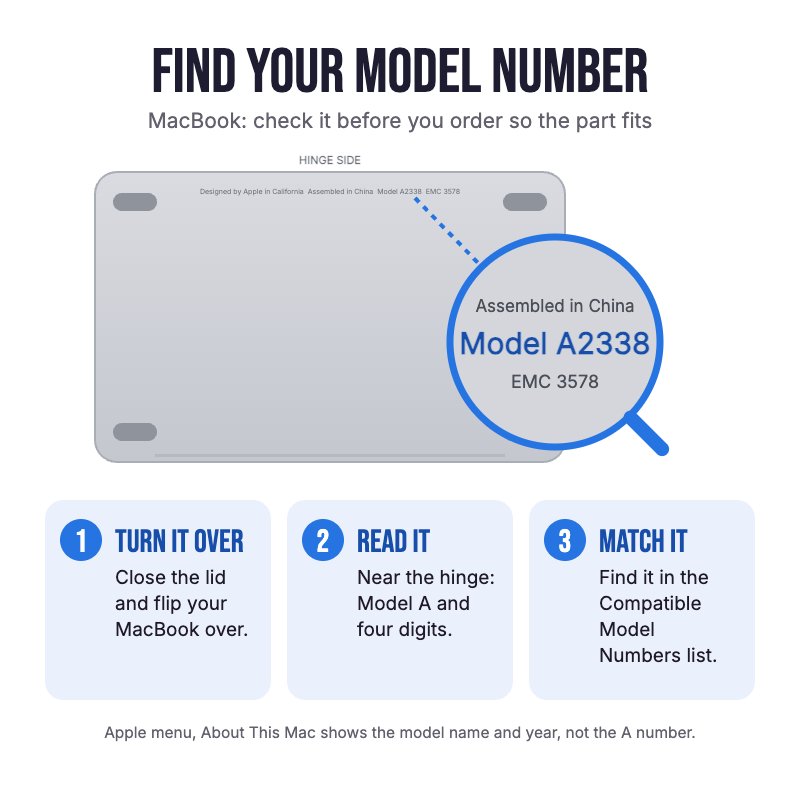
Does NOT fit the M2 A2681 or M3 A3113 MacBook Air, or the older A1466 Air. Check the A-number on the bottom case for your model.

Please Note

One board carries both USB-C ports, so one board replaces both.

Please Note

Neither the logic board nor the battery comes out. A small bracket covers the cable connector.

Specifications

  • Part Type: USB-C / Thunderbolt port board with flex cable
  • Printed Part Number: 821-01658, 820-01161
  • Ports: 2x USB-C / Thunderbolt
  • Condition: Brand new or A-grade genuine Apple part
  • Warranty: 12 Months
How do I find my Model number?

Compatible Model Numbers

MacBook Air A2337 MacBook Air 13" Late 2020
Model Number (A Number)
  • A2337
EMC Number
  • EMC 3598

Part number icon MacBook Air 13" Late 2020 How do I find my Model number?

Model Identifier
  • MacBookAir10,1
Device Number (M Number)
  • MGN63
  • MGN73
  • MGN93
  • MGNA3
  • MGND3
  • MGNE3
* Please note, to make searching the device number (M Number) easier, we have only listed the part numbers (First 5 characters), we have removed the region numbers as there is no difference in parts. For example, if "M Number" is "MC922LL/A". we remove the "region" portion and everything after (the "LL/A" at the end) leaving us with "MC922".
More info Less info
MacBook Air A2179 MacBook Air 13" Early 2020
Model Number (A Number)
  • A2179
EMC Number
  • EMC 3302

Part number icon MacBook Air 13" Early 2020 How do I find my Model number?

Model Identifier
  • MacBookAir9,1
Device Number (M Number)
  • MVH22
  • MVH42
  • MVH52
  • MWTJ2
  • MWTK2
  • MWTL2
* Please note, to make searching the device number (M Number) easier, we have only listed the part numbers (First 5 characters), we have removed the region numbers as there is no difference in parts. For example, if "M Number" is "MC922LL/A". we remove the "region" portion and everything after (the "LL/A" at the end) leaving us with "MC922".
More info Less info
MacBook Air A1932 MacBook Air 13" Mid 2019
Model Number (A Number)
  • A1932
EMC Number
  • EMC 3184

Part number icon MacBook Air 13" Mid 2019 How do I find my Model number?

Model Identifier
  • MacBookAir8,2
Device Number (M Number)
  • MVFH2
  • MVFJ2
  • MVFK2
  • MVFL2
  • MVFM2
  • MVFN2
  • MVH62
  • MVH82
* Please note, to make searching the device number (M Number) easier, we have only listed the part numbers (First 5 characters), we have removed the region numbers as there is no difference in parts. For example, if "M Number" is "MC922LL/A". we remove the "region" portion and everything after (the "LL/A" at the end) leaving us with "MC922".
More info Less info
MacBook Air A1932 MacBook Air 13" Late 2018
Model Number (A Number)
  • A1932
EMC Number
  • EMC 3184

Part number icon MacBook Air 13" Late 2018 How do I find my Model number?

Model Identifier
  • MacBookAir8,1
Device Number (M Number)
  • MRE82
  • MRE92
  • MREA2
  • MREC2
  • MREE2
  • MREF2
  • MUQT2
  • MUQU2
  • MUQV2
* Please note, to make searching the device number (M Number) easier, we have only listed the part numbers (First 5 characters), we have removed the region numbers as there is no difference in parts. For example, if "M Number" is "MC922LL/A". we remove the "region" portion and everything after (the "LL/A" at the end) leaving us with "MC922".
More info Less info

Installation Help

helpful tips

Here are some helpful tips to assist you in completing a safe repair on your device. If you are unsure of something or have any questions, please feel free to contact us either by phone (0508 IGADGET) or by email

  • A1932 and A2179 (Intel): Run sudo nvram AutoBoot=%00 in Terminal first so the MacBook doesn't switch on when you open it. Turn it back on afterwards with sudo nvram AutoBoot=%03. M1 A2337: run sudo nvram BootPreference=%00 instead (macOS Sequoia or later)
  • Always power down your device prior to working on it
  • The ten P5 bottom case screws are three lengths. Track your screws on a magnetic work mat or tape them to a drawing of your laptop, as several screws look alike but are different lengths
  • Unplug the battery first. On the A1932 and A2179 slide the connector out of its socket with a spudger. On the M1, lift the metal locking arm right up before you lift the connector
  • Remove the small bracket over the USB-C cable connector (two T3 screws, use a T4 if the T3 feels loose), then pry the connector up
  • The board is held by two 2.9 mm screws (iFixit uses a T4 on the 2019 and a T5 on the M1). Lift the board out with tweezers
  • Start the board screws loosely, plug an unpowered USB-C cable into the port to line the board up, then tighten them. A port that sits out of line makes the plug feel stiff or loose
  • After it's back together the Air may not switch on until it is plugged into a charger. Allow about two minutes

What’s In The Box

  • 1x MacBook Air 13" A1932 / A2179 / A2337 USB-C Port Board (2018-2020)
Customer Reviews
5.0 Based on 3 Reviews
100% 
0% 
0% 
0% 
0%