MacBook Air 13" A1932 / A2179 Screen Replacement Complete LCD Display Assembly (2019-2020)

MacBook Air 13" A1932 / A2179 Screen Replacement Complete LCD Display Assembly (2019-2020)

1 review
MBAIR-A2179-13-GLD-2019 In Stock
Regular price NZ$468.99
Regular price Sale price NZ$468.99
Sale Sold out
inc GST
Ships today

4 xNZ$0.00

Skip to product information

MacBook Air 13" A1932 / A2179 Screen Replacement Complete LCD Display Assembly (2019-2020)

MacBook Air 13" A1932 / A2179 Screen Replacement Complete LCD Display Assembly (2019-2020)

1 review
MBAIR-A2179-13-GLD-2019 In Stock
Regular price NZ$468.99
Regular price Sale price NZ$468.99
Sale Sold out
inc GST
Or Weekly Interest Free Payments of

4 x NZ$117.24

DIY DIFFICULTY ModerateAbout 15 to 40 minutes

Held at the hinges under the bottom case. The antenna bar comes out and the display cable unplugs first.

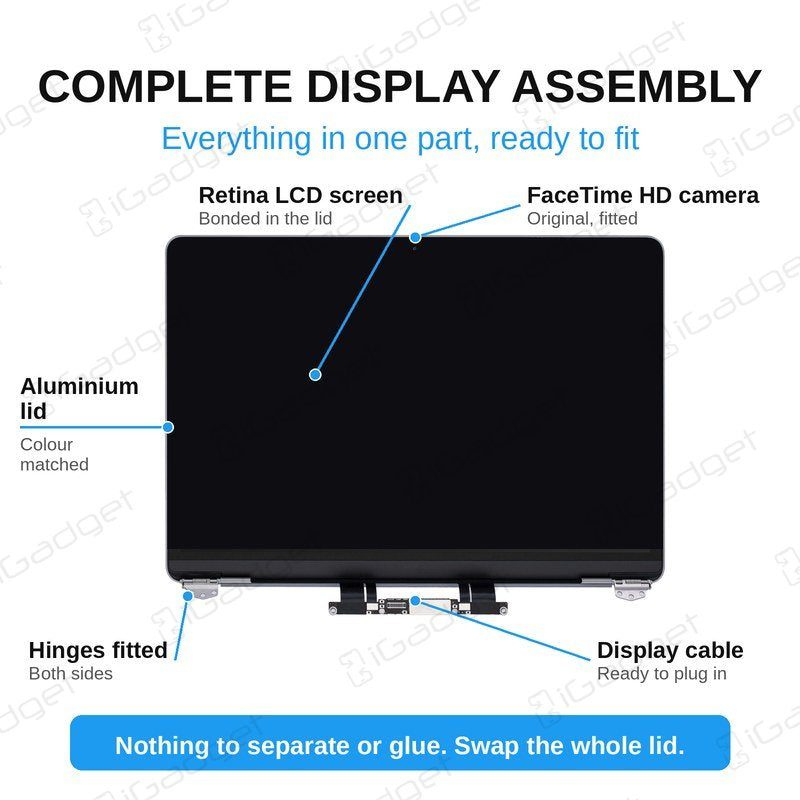
  • Complete display assembly (whole lid) for the MacBook Air 13" A1932 (2019) and A2179 (2020), with the Retina LCD screen, camera, hinges and display cable already fitted
  • Fixes a cracked, black, flickering, lined or bleeding screen, a damaged display cable or a bent lid
  • Compatible with MacBook Air 13" A1932 2019 (EMC 3184, MacBookAir8,2) and A2179 2020 (EMC 3302)
Colour:
Gold
Space Grey (Grey)
Silver
Regular price NZ$468.99
Regular price Sale price NZ$468.99

Dispatches today straight from our NZ warehouse

Frequently Bought Together

ESD Anti-Static Stainless Steel Curved Tweezers | ESD 15

ESD Anti-Static Stainless Steel Curved Tweezers | ESD 15

IG-TWEEZ-CUR

NZ$6.99
Choose Default:
#00 Metal Phillips 2.0mm Screwdriver Tool (PH00)

#00 Metal Phillips 2.0mm Screwdriver Tool (PH00)

IG-DRIV-PH00

NZ$7.99
Choose Default:
iSesamo Metal Pry Bar Opening Tool with Mini Tool by Dottorpod

iSesamo Metal Pry Bar Opening Tool with Mini Tool by Dottorpod

DP-ISESAMO

NZ$16.99
Choose Default:
P5 Metal Pentalobe 1.2mm Screwdriver Tool

P5 Metal Pentalobe 1.2mm Screwdriver Tool

IG-DRIV-P5

NZ$7.99
Choose Default:
S-160 Blue Anti-Static iPhone/iPad/Mobile Phone Repair Heat Resistant Work Mat (45cm x 30cm)

S-160 Blue Anti-Static iPhone/iPad/Mobile Phone Repair Heat Resistant Work Mat (45cm x 30cm)

IG-MAT-S160

NZ$22.99
Choose Default:
View full details

Frequently Bought Together

iPhone 6s Battery Replacement | 1715mAh | Premium Zero-Cycle

iPhone 6s Battery Replacement | 1715mAh | Premium Zero-Cycle

IPH6S-15

NZ$15.99
Choose Default:
MacBook Air 13" A1466 / A1369 Battery Replacement (A1496) 2010-2017

MacBook Air 13" A1466 / A1369 Battery Replacement (A1496) 2010-2017

MBAIR-A1466-15-A1496

NZ$69.99
Choose Default:
iPhone 7 Battery Replacement | 1960mAh | Premium Zero-Cycle

iPhone 7 Battery Replacement | 1960mAh | Premium Zero-Cycle

IPH7-15

NZ$16.99
Choose Default:
8 Piece iPhone Repair Toolkit - Suitable for 7-16 Series

8 Piece iPhone Repair Toolkit - Suitable for 7-16 Series

IG-IPH7-TOOL-8P

NZ$19.99
Choose Default:
11 Piece Universal Phone, Laptop and Tablet Repair Tool Kit - Pentalobe P2/P5, Y000, T5, #000

11 Piece Universal Phone, Laptop and Tablet Repair Tool Kit - Pentalobe P2/P5, Y000, T5, #000

IG-TOOL-SET-11P

NZ$10.00
Choose Default:

Product Details

Cracked screen, black display, lines or flickering on your MacBook Air 13" A1932 (2019) or A2179 (2020)? Replace the damaged LCD with this complete display assembly.

It is a 13.3" 2560 x 1600 Retina LCD screen, supplied as a complete lid with the camera, hinges and display cable already fitted. The display is held in with screws at the hinges, so no heat or adhesive is needed and there is no glass or panel to separate.


Part Includes:

  • 2560 x 1600 13.3" LCD Screen
  • Aluminium lid (back housing) and bezel
  • Hinges
  • Front Camera
  • Camera connection cable
  • LCD display cable
  • 12 Month Warranty


Please Note

Does NOT fit the Late 2018 A1932 (no True Tone) or the M1 A2337. Check the A-number on the bottom case for your model.

Please Note

Same part for the 2019 A1932 and the 2020 A2179. The whole lid is replaced, so pick Gold, Space Grey or Silver to match.

Please Note

Not an official Apple part. The screen supports True Tone, but Apple switches it off after a screen is replaced. Brightness works as normal.

Specifications

  • Part Type: Complete Display Assembly (Lid)
  • Colours: Gold, Space Grey or Silver
  • Screen Size: 13.3"
  • Screen Type: Retina LCD
  • Resolution: 2560 x 1600
  • Pixel Density: 227 ppi
  • LCD Panel: OEM LCD panel, assembled at the panel maker's factory
  • Lid: OEM aluminium lid with original hinges
  • Camera: Original FaceTime HD camera
  • Backlight and reflective sheets: High-brightness compatible parts
  • Springs, metal strip and rubber seal: Original
  • Adhesive: Strong 3M compatible adhesive
  • True Tone: Supported by the screen, but Apple turns it off after a screen replacement
  • Connections: LCD and front camera
  • Compatible Part Numbers: 661-12586, 661-12587, 661-12588, 661-15389, 661-15390, 661-15391
  • Warranty: 12 Months
How do I find my Model number?

Compatible Model Numbers

MacBook Air 13-inch Retina 2020 MacBook Air 13" Retina 2020
Model Number (A Number)
  • A2179
EMC Number
  • EMC 3302

Part number icon MacBook Air 13" Retina 2020 How do I find my Model number?

Model Identifier
  • MacBookAir9,1
Device Number (M Number)
  • MVH22
  • MVH42
  • MVH52
  • MWTJ2
  • MWTK2
  • MWTL2
* Please note, to make searching the device number (M Number) easier, we have only listed the part numbers (First 5 characters), we have removed the region numbers as there is no difference in parts. For example, if "M Number" is "MC922LL/A". we remove the "region" portion and everything after (the "LL/A" at the end) leaving us with "MC922".
More info Less info
MacBook Air 13-inch Retina 2019 MacBook Air 13" Retina 2019
Model Number (A Number)
  • A1932
EMC Number
  • EMC 3184

Part number icon MacBook Air 13" Retina 2019 How do I find my Model number?

Model Identifier
  • MacBookAir8,2
Device Number (M Number)
  • MVFH2
  • MVFJ2
  • MVFK2
  • MVFL2
  • MVFM2
  • MVFN2
  • MVH62
  • MVH82
* Please note, to make searching the device number (M Number) easier, we have only listed the part numbers (First 5 characters), we have removed the region numbers as there is no difference in parts. For example, if "M Number" is "MC922LL/A". we remove the "region" portion and everything after (the "LL/A" at the end) leaving us with "MC922".
More info Less info

Installation Help

installation guide

Check out the video above or the step by step guide below for assistance with this repair

iFixit MacBook Air 13" A1932 2019 Display Replacement Guide

iFixit MacBook Air 13" A2179 2020 Display Assembly Replacement Guide


helpful tips

Here are some helpful tips to assist you in completing a safe repair on your device. If you are unsure of something or have any questions, please feel free to contact us either by phone (0508 IGADGET) or by email

  • Drain the battery below 25% before you start on this repair
  • Turn off Auto Boot first so the MacBook does not power on mid-repair (iFixit guide). Enter sudo nvram AutoBoot=%00 in Terminal, and sudo nvram AutoBoot=%03 to turn it back on afterwards. Then power down
  • Always track your screws to avoid putting them back in the wrong place and damaging your device. Draw a picture of your laptop and tape the screws to the right places, or use a magnetic work mat
  • Remove the P5 screws, then pull the bottom case up off its clips with your fingers
  • Peel back the tape over the battery connector and slide the connector out parallel to the board with the spudger, not upwards. Always unplug the battery before you remove any other parts. Keep metal tools away from the battery, and never bend, crush or puncture it.
  • Remove the T3 brackets over the antenna and display cable connectors, and lift those connectors straight up with the spudger or tweezers. The antenna bar then comes out after its T5 screws
  • The six hinge screws are T8 Torx. Support the display at 90 degrees on the edge of the table while you remove and refit them, start all the hinge screws before tightening any, and check the lid sits flush
  • Route the display cable so it doesn't get pinched by the hinge, and click both antenna cables back in, or Wi-Fi and Bluetooth will be weak
  • Test the screen, camera and Wi-Fi before you refit the bottom case, and leave the protective film and stickers on until the new screen is working properly.

What’s In The Box

  • 1x A1932/A2179 MacBook Air 13" Complete Display Assembly 2019-2020 (Gold, Space Grey or Silver as selected)
Customer Reviews
5.0 Based on 1 Reviews
100% 
0% 
0% 
0% 
0%