





iPad Pro 10.5"/iPad Pro 12.9" (2nd Gen)/iPad Air 3 Home Button
iPad Pro 10.5"/iPad Pro 12.9" (2nd Gen)/iPad Air 3 Home Button
1
IPPRO12-2ND-02-BLK
 In Stock
Regular price
NZ$8.99
Regular price
Sale price
NZ$8.99
Unit price
per
inc GST
✔ In stock
Fast dispatch. Overnight courier to metro NZ.

 12 month warranty


iPad Pro 10.5"/iPad Pro 12.9" (2nd Gen)/iPad Air 3 Home Button
iPad Pro 10.5"/iPad Pro 12.9" (2nd Gen)/iPad Air 3 Home Button
1
IPPRO12-2ND-02-BLK
In Stock
Regular price
NZ$8.99
Regular price
Sale price
NZ$8.99
Unit price
per
inc GST
- Replacement Home Button
- Compatible with iPad Pro 12.9" 2nd Generation (A1670 & A1671), iPad Pro 10.5" (A1701 & A1709), iPad Air 3 (A2123, A2152, A2153 & A2154) models.
Installing a new home button will only restore ordinary home button functions, not the Touch ID features.
Things you may need for this repair

This item
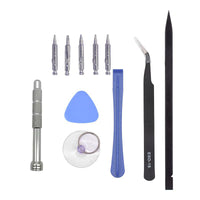
ToolsTools
Total
ⓘ Add-on savings can't be combined with discount codes.


Things you may need for this repair
This item
ToolsTools
Total
ⓘ Add-on savings can't be combined with discount codes.


Product Details
Suitable for a faulty or damaged home button of your iPad Pro 12.9" Gen 2 (A1670 & A1671), iPad Pro 10.5" (A1701 & A1709), iPad Air 3 (A2123, A2152, A2153 & A2154).
Part Includes:
- Replacement Home Button
- 12 Month Warranty
Warning
Installing a new home button will only restore ordinary home button functions, not the Touch ID features.
Please Note
This part will either be brand new or an A-Grade used Genuine Apple replacement.
Specifications
- Type: Home Button
- Colors: Black, Gold, Silver, Rose Gold
- Warranty: 12 Months
How do I find my Model number?
 iPad Pro 12.9" (2nd Gen) Wifi
 + Cellular
 iPad Pro 10.5" Wifi
 + Cellular
 iPad Air 3 Wifi
 iPad Air 3 Wifi + Cellular
Compatible Model Numbers
iPad Pro 12.9" (2nd Gen) WifiModel Number (A Number)
- A1670
 iPad Pro 12.9" 2nd Gen Wifi Model Numbers How do I find my Model number?
Model Identifier
- iPad7,1
EMC Number
- EMC 3149
Device Number (M Number)
- MQDC2
- MP6H2
- MPL02
- MQDA2
- MP6G2
- MPKY2
- MQDD2
- MP6J2
- MPL12
More info Less info
iPad Pro 12.9" (2nd Gen) Wifi + CellularModel Number (A Number)
- A1671
iPad Pro 12.9" 2nd Gen Wifi+Cellular Model Numbers How do I find my Model number?
Model Identifier
- iPad7,2
EMC Number
- EMC 3150
Device Number (M Number)
- MPA42
- MPA52
- MPA62
- MPLJ2
- MPLK2
- MPLL2
- MQED2
- MQEE2
- MQEF2
More info Less info
iPad Pro 10.5" WifiModel Number (A Number)
- A1701
iPad Pro 10.5" Wifi Model Numbers How do I find my Model number?
Model Identifier
- iPad7,3
EMC Number
- EMC 3140
Device Number (M Number)
- MQDW2
- MPF02
- MPGJ2
- MQDT2
- MPDY2
- MPGH2
- MQDX2
- MPF12
- MPGK2
- MQDY2
- MPF22
More info Less info
iPad Pro 10.5" Wifi + CellularModel Number (A Number)
- A1709
iPad Pro 10.5" Wifi+Cellular Model Numbers How do I find my Model number?
Model Identifier
- iPad7,4
EMC Number
- EMC 3141
Device Number (M Number)
- MQF02
- MPHH2
- MPMF2
- MQEY2
- MPHG2
- MPME2
- MPHJ2
- MPMG2
- MQF22
- MPHK2
- MPMH2
More info Less info
iPad Air 3 WifiModel Number (A Number)
- A2152
iPad Air 3 Wifi Model Numbers How do I find my Model number?
Model Identifier
- iPad11,3
EMC Number
- EMC 3315
Device Number (M Number)
- MUUJ2
- MUUK2
- MUUL2
- MUUQ2
- MUUR2
- MUUT2
More info Less info
iPad Air 3 Wifi + CellularModel Number (A Number)
- A2123
- A2153
- A2154
iPad Air 3 Wifi+Cellular Model Numbers How do I find my Model number?
Model Identifier
- iPad11,4
EMC Number
- EMC 3316
Device Number (M Number)
- MV152
- MV162
- MV172
- MV1D2
- MV1F2
- MV1G2
More info Less info
Installation Help

Checkout the video above for assistance in completing this repair

Here are some tools you may need to help you complete the repair.
- Phillips #000 Screwdriver
- Phillips #00 Screwdriver
- Suction Cup
- TESA Tape
- Fine Tipped Curved Tweezers
- iGadget 5 piece opening picks
- Black Spudger
- uFix iOpener Heat bag
- iHold Evo Screen Holder
- S-160 Antistatic Heat Resistant Repair Mat

Here are some helpful tips to assist you in completing a safe repair on your device. If you are unsure of something or have any questions, please feel free to contact us either by phone (0508 IGADGET) or by email
- Always track your screws to avoid putting back in the wrong place and damaging your device. You can draw a picture of your phone and tape the screws to the right places or use a screw mat
- Always power down your device prior to working on it
- Make sure you always unplug the battery before attempting any component removal
- If your iPad does not turn on or show an image after your repair, you may need to perform a force restart. To do this, press and hold the power button and home button until the apple logo appears onscreen.
What’s In The Box
- 1x iPad Pro 10.5"/iPad Pro 12.9" (2nd Gen)/iPad Air 3 Replacement Home Button
Things you may need for this repair
This item
ToolsTools
Total
ⓘ Add-on savings can't be combined with discount codes.


