





iPad Pro 11" (3rd and 4th Gen) Volume Flex Cable
iPad Pro 11" (3rd and 4th Gen) Volume Flex Cable
 In Stock
Regular price
NZ$19.99
Regular price
Sale price
NZ$19.99
Unit price
per
inc GST
✔ In stock
Fast dispatch. Overnight courier to metro NZ.

 12 month warranty


iPad Pro 11" (3rd and 4th Gen) Volume Flex Cable
iPad Pro 11" (3rd and 4th Gen) Volume Flex Cable
In Stock
Regular price
NZ$19.99
Regular price
Sale price
NZ$19.99
Unit price
per
inc GST
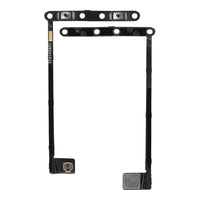
- Replacement Volume Flex Cable
- Suitable for faulty or damaged volume internal switches
- Compatible with iPad Pro 11" 3rd Gen (A2377, A2301, A2459, A2460) and 4th Gen (A2759, A2435, A2761, A2762) models
Things you may need for this repair
This item
ToolsTools
Total
ⓘ Add-on savings can't be combined with discount codes.
Goes well with this part


Charger + cable20W USB-C Fast Charging Wall Charger - NZ/AU SAA Approved Plug + 60W USB-C to USB-C Charging Cable (1M) | Foxconn Type-C Fast Charger Cable
NZ$18.98 NZ$17.08 with this part
10% off when bought with this part10% off with the part in your cart.


Things you may need for this repair
This item
ToolsTools
Total
ⓘ Add-on savings can't be combined with discount codes.
Goes well with this part
Charger + cable20W USB-C Fast Charging Wall Charger - NZ/AU SAA Approved Plug + 60W USB-C to USB-C Charging Cable (1M) | Foxconn Type-C Fast Charger Cable
NZ$18.98 NZ$17.08 with this part
10% off when bought with this part10% off with the part in your cart.


Product Details
Replace a damaged internal volume button switches in an iPad Pro 11" 3rd Gen (A2377, A2301, A2459, A2460) and 4th Gen (A2759, A2435, A2761, A2762).
Part Includes:
- Replacement Volume Flex
- 12 Month Warranty
Please Note
This part does not include the external volume button cover.
Please Note
This part will either be brand new or an A-Grade used Genuine Apple replacement.
Specifications
- Type: Volume Flex Cable
- Warranty: 12 Months
How do I find my Model number?
 iPad Pro 11"(3rd Gen)
iPad Pro 11"(4th Gen)
Compatible Model Numbers
iPad Pro 11"(3rd Gen)Model Number (A Number)
- A2301
- A2459
- A2460
- A2377
 iPad Pro 11" Wifi+Cellular Model Numbers How do I find my Model number?
Model Identifier
- iPad13,4
- iPad13,5
- iPad13,6
- iPad13,7
EMC Number
- EMC 3681
- EMC 3682
- EMC 3683
- EMC 3684
Device Number (M Number)
- MHQT3
- MHQV3
- MHQX3
- MHR03
- MHR33
- MHQR3
- MHQU3
- MHQW3
- MHQY3
- MHR23
- MHMU3
- MHMW3
- MHMY3
- MHN13
- MHN33
- MHMT3
- MHMV3
- MHMX3
- MHN03
- MHN23
- MHW63
- MHW83
- MHWA3
- MHWD3
- MHWF3
- MHW53
- MHW73
- MHW93
- MHWC3
- MHWE3
- MHWH3
- MHWK3
- MHWM3
- MHWP3
- MHWR3
- MHWG3
- MHWJ3
- MHWL3
- MHWN3
- MHWQ3
More info Less info
iPad Pro 11"(4th Gen)Model Number (A Number)
- A2759
- A2435
- A2761
- A2762
iPad Pro 11" Wifi+Cellular Model Numbers How do I find my Model number?
Model Identifier
- iPad14,3
- iPad14,4
EMC Number
- EMC 8166
- EMC 8167
- EMC 8168
Device Number (M Number)
- MNXE3
- MNXG3
- MNXJ3
- MNXL3
- MNXN3
- MNXD3
- MNXF3
- MNXH3
- MNXK3
- MNXM3
- MP563
- MP583
- MP5D3
- MP5F3
- MP5H3
- MP553
- MP573
- MP593
- MP5E3
- MP5G3
- MNYD3
- MNYF3
- MNYH3
- MNYK3
- MNYM3
- MNYC3
- MNYE3
- MNYG3
- MNYJ3
- MNYL3
- MNYP3
- MNYR3
- MNYU3
- MNYW3
- MNYY3
- MNYN3
- MNYQ3
- MNYT3
- MNYV3
- MNYX3
More info Less info
Installation Help

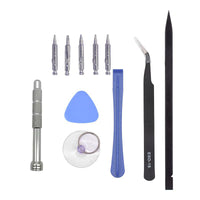
Here are some tools you may need to help you complete the repair.
- Phillips #000 Screwdriver
- Phillips #00 Screwdriver
- Suction Cup
- TESA Tape
- Fine Tipped Curved Tweezers
- iGadget 5 piece opening picks
- Black Spudger
- uFix iOpener Heat bag
- iHold Evo Screen Holder
- S-160 Antistatic Heat Resistant Repair Mat

Here are some helpful tips to assist you in completing a safe repair on your device. If you are unsure of something or have any questions, please feel free to contact us either by phone (0508 IGADGET) or by email
- Always track your screws to avoid putting back in the wrong place and damaging your device. You can draw a picture of your phone and tape the screws to the right places or use a screw mat
- Always power down your device prior to working on it
- Make sure you always unplug the battery before attempting any component removal
- If your iPad does not turn on or show an image after your repair, you may need to perform a force restart. To do this, press and hold the power button and home button until the apple logo appears onscreen.
What’s In The Box
- 1x iPad Pro 11" (Gen 3 & 4) Replacement Volume Flex Cable
Things you may need for this repair
This item
ToolsTools
Total
ⓘ Add-on savings can't be combined with discount codes.
Goes well with this part
Charger + cable20W USB-C Fast Charging Wall Charger - NZ/AU SAA Approved Plug + 60W USB-C to USB-C Charging Cable (1M) | Foxconn Type-C Fast Charger Cable
NZ$18.98 NZ$17.08 with this part
10% off when bought with this part10% off with the part in your cart.


