





MacBook Pro 15" Retina A1398 Charging Port Replacement | MagSafe 2 DC-in Board (2012-2015)
MacBook Pro 15" Retina A1398 Charging Port Replacement | MagSafe 2 DC-in Board (2012-2015)
 In Stock

 12 month warranty


MacBook Pro 15" Retina A1398 Charging Port Replacement | MagSafe 2 DC-in Board (2012-2015)
MacBook Pro 15" Retina A1398 Charging Port Replacement | MagSafe 2 DC-in Board (2012-2015)
In Stock
Bottom case, AirPort card, both fans, SSD and logic board come out. The battery is unplugged only.
- Replacement MagSafe 2 DC-in charging port board with its flex cable
- Fixes a MagSafe port that won't charge, charges on and off, or shows no light on the plug
- Compatible with MacBook Pro Retina 15" A1398 (Mid 2012, Early 2013, Late 2013, Mid 2014, Mid 2015)
Things you may need for this repair


Things you may need for this repair


Product Details
Is your MacBook Pro 15" Retina not charging, charging on and off, or is the light on the MagSafe plug not coming on? The MagSafe 2 port sits on its own small DC-in board (also called the DC jack or power board), so a new MagSafe 2 charging port board is usually the repair you need.
This board fits every 15-inch Retina MacBook Pro A1398, from Mid 2012 to Mid 2015. It is the same board whatever the year.
Part Includes:
- 1x MagSafe 2 DC-in board with flex cable and connector
- 12 Month Warranty
Please Note
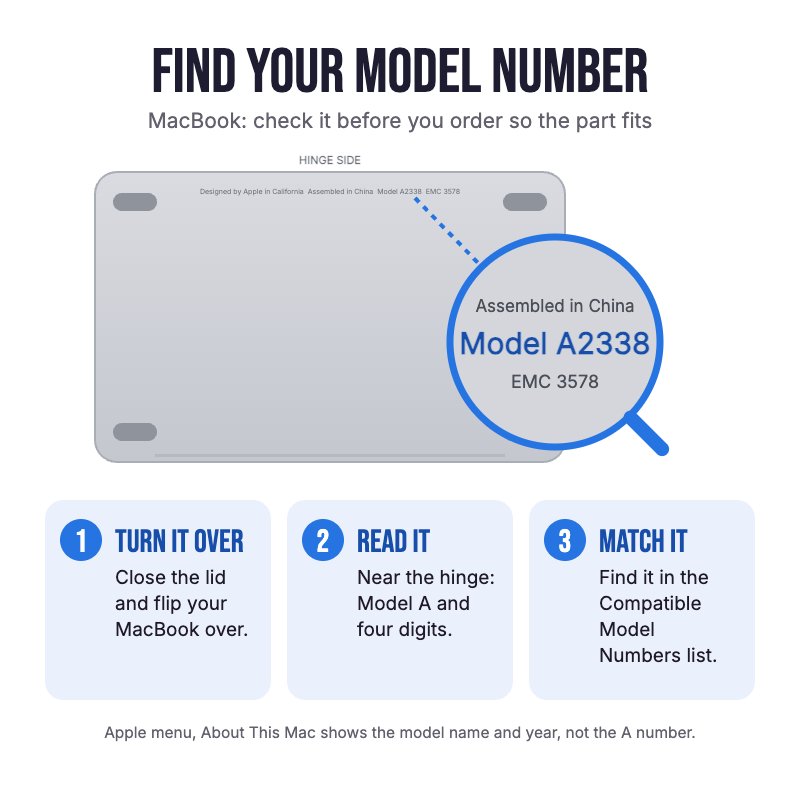
Does NOT fit the 13" Retina MacBook Pro (A1425, A1502), the non-Retina 15" A1286 or the 2016 and later 15" models. Check the A-number on the bottom case for your model.
Please Note
Takes the MagSafe 2 charger, the flatter, wider plug used from 2012 onwards.
Please Note
The DC-in board sits under the logic board, so the fans, SSD and logic board have to come out to fit it.
Specifications
- Part Type: MagSafe 2 DC-in charging port board with flex cable
- Printed Part Number: 820-3109-A
- Service Part Numbers: 923-0096 (Mid 2012, Early 2013), 923-0667 (Late 2013, Mid 2014), 923-00535 (Mid 2015)
- Connector: MagSafe 2
- Condition: Brand new or A-grade used genuine Apple part
- Warranty: 12 Months
Compatible Model Numbers
 MacBook Pro Retina 15" Mid 2015
Model Number (A Number)
- A1398
EMC Number
- EMC 2909
- EMC 2910
 MacBook Pro Retina 15" Mid 2015 How do I find my Model number?
Model Identifier
- MacBookPro11,4
- MacBookPro11,5
Device Number (M Number)
- MJLQ2
- MJLT2
- MJLU2
MacBook Pro Retina 15" Mid 2014Model Number (A Number)
- A1398
EMC Number
- EMC 2876
- EMC 2881
MacBook Pro Retina 15" Mid 2014 How do I find my Model number?
Model Identifier
- MacBookPro11,2
- MacBookPro11,3
Device Number (M Number)
- MGXA2
- MGXC2
- MGXG2
MacBook Pro Retina 15" Late 2013Model Number (A Number)
- A1398
EMC Number
- EMC 2674
- EMC 2745
MacBook Pro Retina 15" Late 2013 How do I find my Model number?
Model Identifier
- MacBookPro11,2
- MacBookPro11,3
Device Number (M Number)
- ME293
- ME294
- ME874
MacBook Pro Retina 15" Early 2013Model Number (A Number)
- A1398
EMC Number
- EMC 2673
MacBook Pro Retina 15" Early 2013 How do I find my Model number?
Model Identifier
- MacBookPro10,1
Device Number (M Number)
- ME664
- ME665
- ME698
MacBook Pro Retina 15" Mid 2012Model Number (A Number)
- A1398
EMC Number
- EMC 2512
MacBook Pro Retina 15" Mid 2012 How do I find my Model number?
Model Identifier
- MacBookPro10,1
Device Number (M Number)
- MC975
- MC976
- MD831
Installation Help

Follow the step by step guide below for assistance with this repair
iFixit MacBook Pro 15" Retina Mid 2014 MagSafe DC-in Board Replacement Guide

Here are some tools you may need to help you complete the repair.
- P5 Metal Pentalobe 1.2mm Screwdriver Tool
- T5 Torx Screwdriver | MacBook Logic Board and Battery Repairs
- Or get the P5 and T5 together in our 10 Piece MacBook Repair Toolkit
- Mechanic AK-15 King ESD Anti-Static Stainless Steel Red Curved Tweezers
- Nylon Antistatic Spudger Pry Tool
- iGadget Universal Magnetic Work Project Mat with Marker (30cm x 25cm)

Here are some helpful tips to assist you in completing a safe repair on your device. If you are unsure of something or have any questions, please feel free to contact us either by phone (0508 IGADGET) or by email
- Always power down your device prior to working on it
- Remove the 10 P5 bottom case screws. Track your screws on a magnetic work mat or tape them to a drawing of your laptop, as several screws look alike but are different lengths
- Unplug the battery before anything else. Plan on taking the logic board out, as the DC-in board sits under it
- The AirPort antenna and camera connectors are fragile. Lift the antenna plugs straight up and walk the camera plug out with a spudger, never pry it upwards
- The AirPort card, fans, SSD and logic board are all held by T5 screws. Connect each fan ribbon as you drop the fan back in, and start all its screws loosely before tightening
- If the MagSafe cable is stubborn, take out the two 2.5 mm T5 DC-in board screws first and ease the board out with tweezers
- Before lowering the logic board back in, check no cable is trapped under it
What’s In The Box
- 1x MacBook Pro 15" Retina A1398 MagSafe 2 DC-in Board (2012-2015)
Things you may need for this repair


